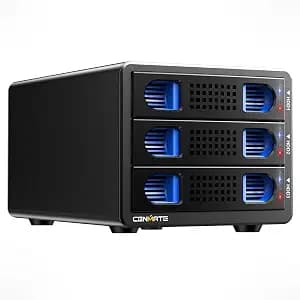
CENMATE Aluminum 3 Bay Hard Drive Enclosure with Cooling Fan for 2.5“/3.5" SATA HDD/SSD with USB A/C 3.0, Support Hot Swappable, Tool-Free HDD Enclosure, DAS(NO RAID/NAS)
Description
【Reliable External Storage System for Individuals and business】The 3.5 hard drive enclosure supports 2.5/3.5 inches HDD and SSD, max capacity up to 20TB for each hard drive, it's a ideal external hard drive enclosure for personal or enterprise using.Save space on your desktop or laptop.; 【No heat】The sata enclosure built in Aluminum-Alloy materials and 2.7 inch Fan.Maximize the security of your data. NOTE:Fan noise is around 40-50 decibels, not recommended if you are very sensitive to noise.; 【Up to 5Gbps】This 3.5 hard drive enclosure equips with GL3510+ASM1153E chips and USB 3.0 output interface.Transfer 1G files in 3-5 seconds with USB 3.0 Ports, which is 10 times faster than USB 2.0.; 【Hot Swappable Convenience】The HDD enclosure supports hot swapping, allowing users to replace hard drives without powering off the device. This feature enhances convenience and efficiency in data transfer processes.; 【Tool-Free Installation】Featuring a tool-free hard drive tray design, the external hard drive enclosure enables easy installation and removal of hard drives without requiring additional tools. Plug and play! No fuss, no muss!; 【Daisy Chain Expansion】Add a USB HOST port for external hard drive enclosure and daisy chain to expand capacity. Expansion 180TB storage through daisy chain up to 3 devices; 【Wide Compatibility, Plug and Play】Equipped with USB A/C 3.0 Cable.Compatible with Windows 7 and above, Mac 9.1 and above, Linux.; 【Quality Assurance】Cenmate provides friendly technical support.If you have any questions about the product, please don't hesitate to contact us, reply and solve your problem within 24 hours.
Compare the trade-offs
Similar products, side by side
A random selection of analyzed products from the same category. Different products are not necessarily interchangeable.

GODO 3.5 inch Dual Bay Hard Drive Enclosure,USB3.0 to 3.5" SATA HDDs External Enclosure,RAID 0/1/JBOD/PM Mode,Max 40TB RAID Hard Drive Docking Station,Aluminum

BENFEI 2.5 Inch SATA to USB Tool Free External Hard Drive Enclosure, USB Type-C/Type-A to Sata Compatible for 2.5 Inch SSD(Optimized for SSD, Support UASP)

USB 3.0 to SATA IDE Adapter Hard Drive Reader, USB + Type C to External Hard Drive Disk HDD Converter Kit for Universal 2.5" 3.5" IDE HDD, 2.5" SSD, with 12V/2A Power Adapter
One less thing to search
Before you buy: quick questions
Is the fan loud, and can I control it or replace it?
Many users note the cooling fan is effective but can be audible, especially during intensive read/write operations. It's a standard 40mm fan designed for cooling, not silence. The fan speed is automatic and not user-controllable via software. While some tech-savvy users on forums have successfully replaced it with a quieter aftermarket fan, doing so would void the warranty.
I'm confused about "DAS (NO RAID/NAS)." What can this enclosure actually do?
This is a crucial point! This is a Direct-Attached Storage (DAS) device, meaning it connects directly to your computer via USB. It does not have built-in RAID functionality to combine drives (for mirroring or striping) and it is not a Network-Attached Storage (NAS) that can be accessed by multiple devices over your network. It presents each of the three drives as separate, individual volumes to your computer—perfect for organization, backup, or media libraries.
How is the build quality? I've seen mixed comments about the plastic parts.
The main aluminum chassis is robust and well-regarded. Feedback on platforms like Reddit highlights that while the tool-free drive trays are made of plastic for easy handling, a small number of users feel they could be sturdier. The overall consensus from over 1,300 reviews is that the build is solid and reliable for its price point, with the 4.4-star average rating reflecting strong satisfaction with its durability in daily use.
Is it truly plug-and-play, and will it work with my specific drive/computer?
Yes, for the vast majority of users, setup is famously tool-free and plug-and-play. It supports both 2.5" and 3.5" SATA HDDs/SSDs. It's compatible with Windows, macOS, and Linux (typically requiring no extra drivers) and connects via USB 3.0 (Type-A or Type-C). As some YouTube tutorials mention, for very high-capacity drives (e.g., 18TB+), ensure they are pre-formatted to a compatible file system like exFAT or NTFS for Windows.
Who is this product best suited for, and who might want to look elsewhere?
This enclosure is a fantastic fit for home users, content creators, and tech enthusiasts who need simple, expanded storage for backups, archives, or projects directly on one computer. It's ideal if you value hot-swapping drives without rebooting. You might want to consider a different product if: 1) You need silent operation (look for fanless enclosures), 2) You require built-in RAID data protection, or 3) You want to share files over a home network (in which case a true NAS is what you need).
From a similar, more-reviewed product in this category: CENMATE Aluminum 4 Bay Hard Drive RAID Enclosure with Cooling Fan for 2.5/3.5" SATA HDD/SSD with USB A/C 3.0+eSATA Cable, 3.5 Hard Drive Reader Supports 80TB Capacity, 8 RAID Modes, DAS(NO NAS)
How many drives can this enclosure hold and what is the maximum total capacity?
It supports up to 4 drives (2.5/3.5" HDD or SSD) with a maximum capacity of 80TB, which is 20TB per drive.
Is the fan noisy?
The manufacturer states fan noise is around 40-50 decibels and does not recommend it if you are very sensitive to noise, though some reviewers found it quiet enough for a home theater room while others noted it is a little loud.
How do I switch between RAID modes?
Disconnect the power, use a screwdriver to toggle the paddle to the corresponding mode, press and hold the reset button, turn on the power, and hold reset for ten seconds; note that when replacing RAID you must go back to NORMAL first, and designing RAID may result in data loss.
Is it easy to set up and is it compatible with my drives?
Reviewers report it is easy to set up and plug and play, with one noting it worked immediately after moving drives from another enclosure and setting the dip switches to RAID 10, and another confirming compatibility with shucked 20TB WD Easystore drives.
Does the eSATA port support hot-swapping or a SATA-to-eSATA adapter?
No, the eSATA port does not support a computer's SATA-to-eSATA adapter and hot-swapping is not supported; the computer's eSATA port must support RAID functionality to access multiple drive bays, otherwise only one bay can be accessed.
Answers are limited to the manufacturer's listing and the reviews we analysed. Questions those sources cannot support are not answered here.
Transparent by design