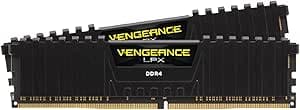
Corsair VENGEANCELPX32GB (2X 16GB) DDR4 3200(Pc4-25600) C16 1.35V Desktop Memory - Black
Description
Each Vengeance LPX module features aluminum heat spreader for faster heat dissipation and cooler operation; Available in different colors to match your motherboard, components or just your style; Optimized for Intel x299, Z390, Z370 and H370 series motherboards, Vengeance LPX offers higher frequencies, greater bandwidth and low power consumption - tested for compatibility; The Vengeance LPX are carefully designed for a low-profile design with a small footprint; XMP 2.0 support ensures interference-free and automatic overclocking
Compare the trade-offs
Similar products, side by side
A random selection of analyzed products from the same category. Different products are not necessarily interchangeable.

Kingston FURY Beast KF560C30BBEK2-32 DDR5 32GB (2x16GB) 6000MT/s CL30 DIMM Desktop Gaming Memory Kit with 2 AMD EXPO and Intel XMP Black

Crucial DDR5 RAM 128GB Kit (2x64GB) 5600MHz SODIMM Memory for Laptop/Notebook, Mini PC (Also 5200MHz / 4800MHz) CL46 - CT2K64G56C46S5

CORSAIR VENGEANCE LPX DDR4 RAM 16GB (2x8GB) 3200MHz CL16-18-18-36 1.35V Intel XMP AMD EXPO Computer Memory – Black (CMK16GX4M2B3200C16)
One less thing to search
Before you buy: quick questions
Is this RAM compatible with my AMD Ryzen or Intel motherboard, and will it run at 3200MHz right away?
This DDR4 RAM is widely compatible with both AMD and Intel platforms. However, to run at the advertised 3200MHz speed, you typically need to enable the XMP (Intel) or DOCP/EXPO (AMD) profile in your motherboard's BIOS. It's a simple one-click setting for most, but some users, particularly on older AMD boards, report needing a manual tweak. We always recommend checking your motherboard's QVL (Qualified Vendor List) for guaranteed compatibility.
I have a large CPU air cooler. Will these RAM modules fit underneath it?
The VENGEANCE LPX is designed as a "low-profile" module to maximize compatibility. The heat spreader height is approximately 34mm. This fits under most coolers, but there can be issues with massive dual-tower coolers like the Noctua NH-D15 on certain motherboards. If clearance is a major concern, checking your cooler's specifications or looking at build photos online with your specific combo is a smart move.
How reliable is this RAM, and what is Corsair's warranty policy?
Based on thousands of reviews, this RAM is praised for its long-term stability and reliability once properly set up. Corsair backs it with a limited lifetime warranty, which is a strong signal of their confidence in the product. In the rare event of a failure, you would contact Corsair support to initiate an RMA (Return Merchandise Authorization) process.
I'm mainly a gamer. Will upgrading to this 32GB kit make a noticeable difference?
If you're currently on 8GB or 16GB of slower-speed RAM (e.g., 2400MHz), yes—you'll likely see very satisfying improvements in both average FPS and overall smoothness, especially in modern, open-world games. If you're already using 16GB of 3000MHz+ RAM, the jump to 3200MHz might offer smaller, less dramatic gains in pure FPS, but the extra capacity is fantastic for heavy multitasking while gaming.
What's the real value here, and who is this RAM best suited for?
The value comes from getting proven performance and Corsair's build quality at a competitive price point, especially on sale. It's an excellent choice for first-time builders, gamers seeking a performance uplift, and anyone who wants reliable, high-capacity RAM without flashy RGB. It's less ideal for absolute beginners unwilling to touch BIOS settings or for builds with extreme space constraints where every millimeter counts.
From a similar, more-reviewed product in this category: 4K144Hz HDMI Displayport KVM Switch 4 PC 2 Monitors 8K60Hz USB 3.0 KVM Switches For 4 Computers Share 2 Monitors and 4 USB Devices, Support Copy and Extension Display
Will this KVM switch work with my two HDMI monitors?
Not directly — and this is the detail most buyers wish they'd caught first. Monitor 1 must connect via **DisplayPort** and Monitor 2 via **HDMI**; the switch isn't designed for two HDMI displays, and adapter cables aren't recommended. Before ordering, check the ports on the back of both monitors. If you're running dual HDMI, an HDMI-only KVM will serve you far better.
Can I actually get 4K at 144Hz, or is that just marketing?
You can — but only if your entire signal chain supports it. Your graphics card, both monitors, *and* every cable in the run need to handle 4K@144Hz (or 8K@60Hz). Many reviewers note that weaker GPUs or standard HDMI cables will quietly cap you at 60Hz. Think of it as a team effort: one weak link and the whole chain drops to the lowest spec.
How reliable are the USB 3.0 ports with things like external SSDs or webcams?
For keyboards, mice, printers, and USB sticks, the four USB 3.0 ports are fast and dependable. High-power devices are a different story — the manufacturer itself recommends checking with support before connecting power-hungry gear like bus-powered SSDs. A quick message to AILVLVNG customer service before you buy can save you a return.
Is switching between computers smooth, and does the remote actually work?
You have two options: a physical button on the unit or the included remote. The remote is a real convenience for multi-PC desks, though users report it works best with a clear line of sight — treat it like a TV remote, not a long-range device. Expect a brief screen re-sync when switching inputs; that's normal EDID handshaking, not a defect.
The metal build looks great, but is this overkill for a non-technical user?
The metal housing is genuinely rugged and runs cool — a common point of praise. The real hurdle is setup: routing cables for four computers and two monitors takes patience, and labeling everything beforehand is worth the ten minutes. If you're comfortable with a bit of cable management, it's a solid long-term investment; if you want true plug-and-play, a simpler single-monitor KVM may suit you better.
Answers are limited to the manufacturer's listing and the reviews we analysed. Questions those sources cannot support are not answered here.
Transparent by design