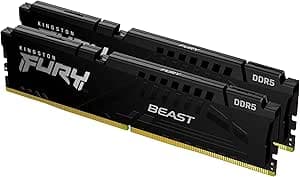
Kingston FURY Beast KF560C30BBEK2-32 DDR5 32GB (2x16GB) 6000MT/s CL30 DIMM Desktop Gaming Memory Kit with 2 AMD EXPO and Intel XMP Black
Description
Kingston FURY Beast DDR5 RAM, for next-generation gaming platforms; more performance for computers, with advanced features such as On-Die ECC for better stability and dual 32-bit subchannels to increase efficiency; On-Die ECC (ODECC) for improved stability at extreme speeds, two 32-bit subchannels for higher efficiency, and an integrated circuit for power management (PMIC) on the module that delivers power where it is needed most; Through superior advances in speed with doubling the banks from 16 to 32 as well as doubling the burst length from 8 to 16, the DDR5 RAM takes your gaming experience and all system applications to the next level of performance; Whether you push the limits when gaming with extreme settings, streaming live 4K or using large animations and 3D rendering, the Kingston FURY Beast DDR5 RAM is the upgrade you need; With Intel XMP 3.0 or AMD EXPO options, two new DDR5 overclocking specifications with customizable profiles for speeds and timings, the Kingston FURY Beast DDR5 offers all compatible overclocking solutions
Compare the trade-offs
Similar products, side by side
A random selection of analyzed products from the same category. Different products are not necessarily interchangeable.

Crucial DDR5 RAM 128GB Kit (2x64GB) 5600MHz SODIMM Memory for Laptop/Notebook, Mini PC (Also 5200MHz / 4800MHz) CL46 - CT2K64G56C46S5

Crucial DDR5 RAM 16GB 5600MHz SODIMM Memory for Laptop/Notebook, Mini PC (Also 5200MHz/4800MHz) CL46 - CT16G56C46S5

Corsair VENGEANCELPX32GB (2X 16GB) DDR4 3200(Pc4-25600) C16 1.35V Desktop Memory - Black
One less thing to search
Before you buy: quick questions
Wie kommt das Low-Profile-Design meinem Build zugute und passt es unter große CPU-Kühler?
Der Wärmeverteiler ist kompakt gestaltet, was ihn zu einer ausgezeichneten Wahl für Builds mit großen Luftkühlern wie dem Noctua NH-D15 oder der be quiet! Dark Rock Pro-Serie macht. Viele Bastler in Online-Foren wählen dieses Kit speziell, um Platzprobleme zu vermeiden, und loben seine "unkomplizierte" Kompatibilität, die keine Leistungseinbußen mit sich bringt.
Ist dieses Speicherkit mit meinem spezifischen Mainboard kompatibel und funktioniert das EXPO/XMP-Profil sofort?
Dieses Kit ist für neuere Mainboards mit AMD AM5- und Intel 600/700-Series-Chipsätzen ausgelegt. Für garantierte Leistung überprüfen Sie bitte die QVL (Qualified Vendor List) Ihres Mainboards. Während die meisten Benutzer auf kompatiblen Plattformen das 6000 MT/s CL30-Profil mit einem Klick aktivieren können, berichtet eine kleine Anzahl von der Notwendigkeit eines BIOS-Updates oder geringfügiger Spannungseinstellungen für absolute Stabilität – eine gängige Nuance bei Hochleistungs-DDR5.
Ich sehe sowohl "XMP" als auch "EXPO" aufgeführt. Für welches ist mein Mainboard qualifiziert und spielt das eine Rolle?
Dieses einzigartige Kit enthält zwei separate, vorab getestete Profile: eines für Intel (XMP 3.0) und eines für AMD (EXPO). Die QVL Ihres Mainboards kann eines von beiden auflisten. Keine Sorge – die physischen Module sind identisch. Wenn die QVL Ihres Mainboards die Intel-XMP-Version dieses Modells auflistet, können Sie trotzdem das AMD-EXPO-Profil verwenden (und umgekehrt). Die doppelte Zertifizierung bietet breite Kompatibilität.
Ich baue einen Gaming-PC mit einem großen Luftkühler. Wird dieser RAM darunter passen?
Absolut. Eines der am meisten gelobten Merkmale in Benutzerbewertungen ist sein Low-Profile-Kühlkörper-Design. Es wird speziell von Buildern gewählt, um Platzprobleme mit massiven CPU-Kühlern wie dem Noctua NH-D15 oder der be quiet! Dark Rock Pro-Serie zu vermeiden, was es zu einer ausgezeichneten Wahl für leistungsstarke, luftgekühlte Systeme macht.
Dieses Modell hat keine RGB-Beleuchtung. Gibt es bei dem schlichteren Design Leistungseinbußen?
Überhaupt nicht. Das nicht-RGB-„Beast“-Design ist eine rein ästhetische Wahl, die oft zu besserer Kühlkörperkompatibilität und einem etwas niedrigeren Preis führt. Die Leistung – 6000 MT/s bei CL30 – ist identisch mit der vieler Premium-RGB-Kits. Wie in mehreren Technik-Tests erwähnt, zahlen Sie für Geschwindigkeit und Latenz, nicht für Lichteffekte, was es zu einem Favoriten für Builds mit dem besten Preis-Leistungs-Verhältnis macht.
From a similar, more-reviewed product in this category: 4K144Hz HDMI Displayport KVM Switch 4 PC 2 Monitors 8K60Hz USB 3.0 KVM Switches For 4 Computers Share 2 Monitors and 4 USB Devices, Support Copy and Extension Display
Will this KVM switch work with my two HDMI monitors?
Not directly — and this is the detail most buyers wish they'd caught first. Monitor 1 must connect via **DisplayPort** and Monitor 2 via **HDMI**; the switch isn't designed for two HDMI displays, and adapter cables aren't recommended. Before ordering, check the ports on the back of both monitors. If you're running dual HDMI, an HDMI-only KVM will serve you far better.
Can I actually get 4K at 144Hz, or is that just marketing?
You can — but only if your entire signal chain supports it. Your graphics card, both monitors, *and* every cable in the run need to handle 4K@144Hz (or 8K@60Hz). Many reviewers note that weaker GPUs or standard HDMI cables will quietly cap you at 60Hz. Think of it as a team effort: one weak link and the whole chain drops to the lowest spec.
How reliable are the USB 3.0 ports with things like external SSDs or webcams?
For keyboards, mice, printers, and USB sticks, the four USB 3.0 ports are fast and dependable. High-power devices are a different story — the manufacturer itself recommends checking with support before connecting power-hungry gear like bus-powered SSDs. A quick message to AILVLVNG customer service before you buy can save you a return.
Is switching between computers smooth, and does the remote actually work?
You have two options: a physical button on the unit or the included remote. The remote is a real convenience for multi-PC desks, though users report it works best with a clear line of sight — treat it like a TV remote, not a long-range device. Expect a brief screen re-sync when switching inputs; that's normal EDID handshaking, not a defect.
The metal build looks great, but is this overkill for a non-technical user?
The metal housing is genuinely rugged and runs cool — a common point of praise. The real hurdle is setup: routing cables for four computers and two monitors takes patience, and labeling everything beforehand is worth the ten minutes. If you're comfortable with a bit of cable management, it's a solid long-term investment; if you want true plug-and-play, a simpler single-monitor KVM may suit you better.
Answers are limited to the manufacturer's listing and the reviews we analysed. Questions those sources cannot support are not answered here.
Transparent by design