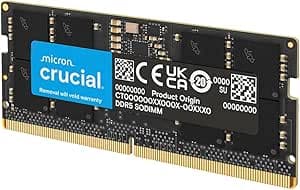
Crucial DDR5 RAM 16GB 5600MHz SODIMM Memory for Laptop/Notebook, Mini PC (Also 5200MHz/4800MHz) CL46 - CT16G56C46S5
Description
Performance booster: Crucial DDR5 memory offers 50% more data transfer than DDR4, resulting in faster loading times, file transfers, downloads, refresh rates and lower delay; Multi-tasking: optimized for true multitasking, so opening multiple browser tabs and switching between applications feels faster than ever; EFFICIENCY: Crucial DDR5 features module-internal voltage control with PMIC for better efficiency and stability. The lower operating voltage of 1.1 V compared to the 1.2 V of DDR4 ensures improved signal transmission and a cleaner power supply; Easy installation: no computer knowledge required, because with a screwdriver, the user manual and a few minutes you can easily install the memory yourself; MICRON QUALITY & RELIABILITY: Micron has 45 years of experience in memory and offers state-of-the-art technology and excellent component and module level testing, including a limited lifetime warranty Ensure that your system can hold DDR5 SODIMM memory, because this product can only be installed in SODIMM devices and you cannot use DDR5 memory in a DDR4 or DDR3 system. 5600MHz RAM can be downclocked to 5200MHz and 4800MHz if system specification only supports these speeds
Compare the trade-offs
Similar products, side by side
A random selection of analyzed products from the same category. Different products are not necessarily interchangeable.

CORSAIR VENGEANCE LPX DDR4 RAM 16GB (2x8GB) 3200MHz CL16-18-18-36 1.35V Intel XMP AMD EXPO Computer Memory – Black (CMK16GX4M2B3200C16)
Corsair VENGEANCELPX32GB (2X 16GB) DDR4 3200(Pc4-25600) C16 1.35V Desktop Memory - Black

Crucial DDR5 RAM 128GB Kit (2x64GB) 5600MHz SODIMM Memory for Laptop/Notebook, Mini PC (Also 5200MHz / 4800MHz) CL46 - CT2K64G56C46S5
One less thing to search
Before you buy: quick questions
¿Cómo puedo estar 100 % seguro de que esta RAM es compatible con mi portátil o mini PC específico?
El mejor método es utilizar el escáner de compatibilidad en línea oficial de Crucial. Muchos usuarios de Reddit también recomiendan consultar el manual de servicio de su portátil o el sitio web del fabricante para ver las especificaciones exactas de la memoria (DDR5, SODIMM, velocidad máxima). Esta RAM utiliza perfiles JEDEC estándar, por lo que si su sistema admite DDR5 y la velocidad (por ejemplo, 5600 MHz), debería ser compatible de forma plug-and-play.
Veo que viene en versiones de 4800 MHz, 5200 MHz y 5600 MHz. ¿Cuál debo elegir?
Siempre elija la velocidad que su sistema admita oficialmente. Para la mayoría de los usuarios, la diferencia en las tareas cotidianas entre estas velocidades es mínima. La versión de 5600 MHz ofrece el mejor rendimiento si su portátil la admite. Como se señala en varias reseñas, comprar una velocidad superior al máximo de su portátil hará que se reduzca a la velocidad admitida.
¿Es esta RAM buena para juegos o tareas pesadas como la edición de video en una laptop?
Absolutamente. Muchos usuarios en TikTok y YouTube han demostrado que esta actualización mejora significativamente las tasas de cuadros y reduce los tartamudeos en los juegos al aliviar los cuellos de botella de la memoria. Para la creación de contenido, los revisores señalan un renderizado más rápido y una navegación más suave en las líneas de tiempo, especialmente al pasar de 8 GB a 16 GB. Es un impulso de rendimiento confiable para tareas exigentes.
¿Cuál es la garantía y la política de devolución si tengo problemas?
Este módulo de memoria Crucial cuenta con una garantía limitada de por vida. Si encuentra un defecto, puede contactar con el soporte de Crucial para un reemplazo. Para devoluciones, consulte la política del minorista (por ejemplo, Amazon). Un consejo común de las reseñas de usuarios: conserve el embalaje original hasta que confirme que la RAM funciona perfectamente.
El producto llegó en una simple bolsa antiestática. ¿Es nuevo y seguro de usar?
Sí, esto es completamente normal y seguro. Como se menciona frecuentemente en las reseñas en línea, Crucial envía su memoria en un embalaje industrial minimalista—solo la bolsa antiestática esencial para proteger los componentes. Es completamente nuevo y no es señal de un producto usado o reacondicionado. Su atención debe centrarse en el estado del módulo en sí.
From a similar, more-reviewed product in this category: 4K144Hz HDMI Displayport KVM Switch 4 PC 2 Monitors 8K60Hz USB 3.0 KVM Switches For 4 Computers Share 2 Monitors and 4 USB Devices, Support Copy and Extension Display
Will this KVM switch work with my two HDMI monitors?
Not directly — and this is the detail most buyers wish they'd caught first. Monitor 1 must connect via **DisplayPort** and Monitor 2 via **HDMI**; the switch isn't designed for two HDMI displays, and adapter cables aren't recommended. Before ordering, check the ports on the back of both monitors. If you're running dual HDMI, an HDMI-only KVM will serve you far better.
Can I actually get 4K at 144Hz, or is that just marketing?
You can — but only if your entire signal chain supports it. Your graphics card, both monitors, *and* every cable in the run need to handle 4K@144Hz (or 8K@60Hz). Many reviewers note that weaker GPUs or standard HDMI cables will quietly cap you at 60Hz. Think of it as a team effort: one weak link and the whole chain drops to the lowest spec.
How reliable are the USB 3.0 ports with things like external SSDs or webcams?
For keyboards, mice, printers, and USB sticks, the four USB 3.0 ports are fast and dependable. High-power devices are a different story — the manufacturer itself recommends checking with support before connecting power-hungry gear like bus-powered SSDs. A quick message to AILVLVNG customer service before you buy can save you a return.
Is switching between computers smooth, and does the remote actually work?
You have two options: a physical button on the unit or the included remote. The remote is a real convenience for multi-PC desks, though users report it works best with a clear line of sight — treat it like a TV remote, not a long-range device. Expect a brief screen re-sync when switching inputs; that's normal EDID handshaking, not a defect.
The metal build looks great, but is this overkill for a non-technical user?
The metal housing is genuinely rugged and runs cool — a common point of praise. The real hurdle is setup: routing cables for four computers and two monitors takes patience, and labeling everything beforehand is worth the ten minutes. If you're comfortable with a bit of cable management, it's a solid long-term investment; if you want true plug-and-play, a simpler single-monitor KVM may suit you better.
Answers are limited to the manufacturer's listing and the reviews we analysed. Questions those sources cannot support are not answered here.
Transparent by design