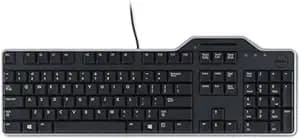
Dell Keyboard Smartcard USB
Description
This Smartcard Keyboard provides durable typing solution through spill-resistant, stylish keyboard that has an integrated Smartcard reader.
Compare the trade-offs
Similar products, side by side
A random selection of analyzed products from the same category. Different products are not necessarily interchangeable.

ProtoArc Foldable Bluetooth Keyboard, XK01 Full-Size Portable Wireless Keyboard for Travel, 105 Keys, 0.65" Keycaps, Multi-Device Sync for iPad Tablet Smartphone Laptop PC Windows iOS Android, Blue

Microsoft Surface Pro Signature Keyboard with Slim Pen 2 - Black

Inateck Foldable Mini Keyboard with Trackpad, 3-Device Bluetooth
One less thing to search
Before you buy: quick questions
Will this Dell Smartcard Keyboard work with my Mac or Linux machine, or is it strictly Windows-only?
This keyboard is built primarily for Windows environments—specifically Windows 7 through 11—where the smartcard reader installs automatically. While the physical keys (typing and basic functions) will work on Mac and Linux, the integrated card reader functionality is not officially supported. If you rely on smartcard authentication on a non-Windows system, we'd recommend checking with your IT department for alternative hardware. Many users on tech forums have noted that they keep this keyboard dedicated to their Windows workstations for this reason.
I’ve heard the keys are a bit stiff from some reviewers. Will that bother me if I type all day?
There is a break-in period. A number of users have mentioned that the keys feel slightly resistant out of the box, particularly compared to feather-light laptop keyboards. However, most report that after a week or two of regular use, the mechanism loosens up and feels comfortable for extended sessions. If you prefer a very soft, membrane-style press, this might feel a bit firm; but if you appreciate a tactile "bump" that prevents accidental keystrokes, you'll likely find it satisfying. For high-volume writers who need an exceptionally light touch, some reviewers have opted to add a silicone keycap dampener to soften the response.
Does the USB pass-through port allow me to plug in a mouse or flash drive, or is it just for charging?
The USB port on this keyboard is a functional pass-through, not just a charging port. It will carry data, so you can plug in a wired mouse, a USB headset dongle, or a flash drive. However, keep in mind that it operates at USB 2.0 speeds—fine for a mouse or keyboard, but slow if you're transferring large files. Many home-office users have mentioned this is perfect for keeping their desk organized by running their mouse cable through the keyboard rather than reaching for the tower.
Is this keyboard worth the price if I’m just using it for light office work and occasional card logins?
For light office work, this is solid, but it's specifically priced for the enterprise security feature. If you *don't* need the smartcard reader, there are cheaper Dell keyboards with the same typing feel. But if you need to authenticate with a CAC card, PIV card, or common access card for government or corporate VPNs, then this is actually a value buy—it saves you from buying a separate standalone USB smartcard reader (which costs $30–$50 by itself) and keeps your desk clutter-free. Users in healthcare and finance often mention this is the cheapest way to get a reliable integrated reader without purchasing a premium docking station.
I’ve seen some mixed comments about the looks. Is it too bulky or ugly for a modern home office?
It's fair to say the design prioritizes function over flair. The chassis is a utilitarian matte black plastic—it won't win any design awards, and several TikTok desk-setup videos have pointed out that it looks more "corporate cubicle" than "minimalist studio." However, it's compact and low-profile, so it doesn't dominate your desk space. If aesthetics are a top priority, you might consider a sleeker wireless alternative; but if you value the security features and robust build, the slightly dated look is a trade-off most users are willing to make. As one reviewer put it: "It's not pretty, but it's a workhorse."
From a similar, more-reviewed product in this category: Razer Joro Wireless Gaming Keyboard, Portable Compact 75%, Low Profile Keys
Does the Razer Joro work wirelessly with Bluetooth, and how many devices can it pair with?
The listing states Bluetooth 5.0 with pairing for up to three devices across Windows, Mac, handhelds, and mobile, with shortcuts to switch between them. Reviews are mixed on wireless reliability: one reviewer reported stable, fast Bluetooth, while others reported connection problems and missed keystrokes after the keyboard sleeps.
How does the keyboard feel to type and game on?
The listing describes ultra low-profile switches with quick, precise actuation and satisfying tactile feedback. Reviewers who liked it compared the feel to laptop scissor keys and Apple-style chiclet keys, calling it quiet with good tactile response, though one noted the spacebar is small.
Is the Razer Joro actually portable and well built?
The listing says it weighs 374 g and is 16.5 mm thin with a full function row and full-sized arrow keys. Reviewers described it as sturdy and minimalist, and one noted the static angle is a deliberate trade-off for a keyboard meant to be carried around.
What are the complaints about the RGB lighting?
The listing advertises Chroma RGB with 16.8 million colors and dynamic effects. Reviewers reported a glow around the keys rather than through the lettering, secondary symbols that are hard to see, and one said the lighting stayed on while the PC was locked.
Do I need Razer Synapse software to use all the keyboard's features?
The listing ties Snap Tap and Chroma customization to Razer Synapse 4. Reviewers noted that some functions, such as turning off Fn lock to use F1–F12 directly, require Synapse, and one complained there is no Synapse software for SteamOS.
Answers are limited to the manufacturer's listing and the reviews we analysed. Questions those sources cannot support are not answered here.
Transparent by design