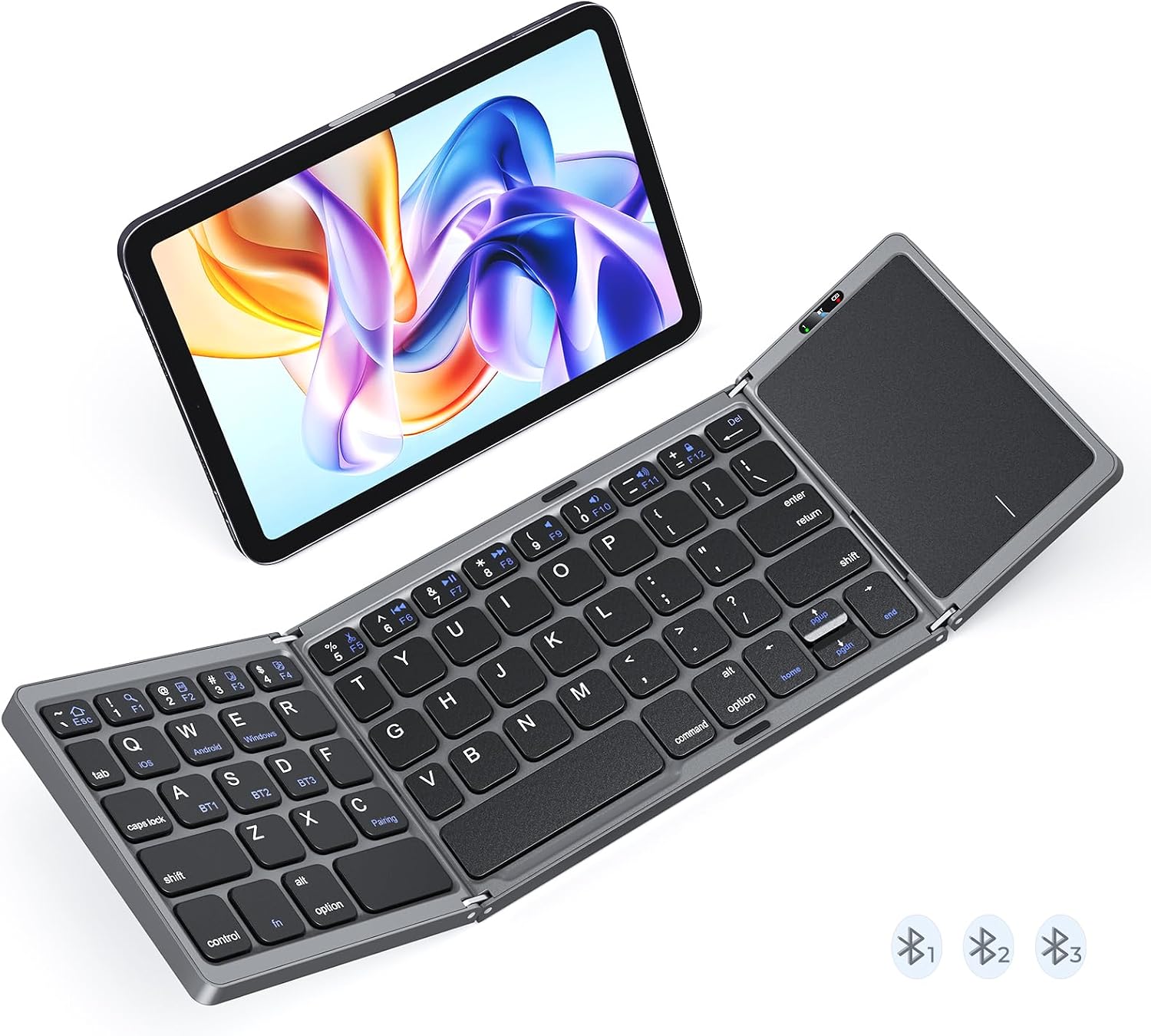
Inateck Foldable Mini Keyboard with Trackpad, 3-Device Bluetooth

Inateck Foldable Mini Keyboard with Trackpad, 3-Device Bluetooth

4 on Amazon96 ratingswww.amazon.com
Review reliability
83/ 100Grade B
Reviews are detailed, authentic, balanced across topics, and free of promotional language, with star ratings generally matching the text, though top ratings are under half and mid-range reviews about a third.
Affiliate link — commission is the same whatever the score.

The 30-second read

Before you decide

A starting point, not a buying verdict

What people like

Portable, easy Bluetooth, good value

Reviewers consistently praise the easy Bluetooth pairing and multi-device switching, the foldable portable design, and the value for money. Several also find it pleasant to type on with a responsive trackpad.

The main watch-out

Durability and key failures reported

A recurring concern is durability: multiple reviewers report keys stopping working or the keyboard falling apart after weeks to a few months of use. Some also mention connection issues between sections.

Before you choose

Check compatibility and setup needs

It has no dongle, so installing an OS may require another keyboard, and multimedia keys are default until toggled with Fn+Esc. It supports three Bluetooth links via Fn+1/2/3, and one reviewer notes it feels a bit cheap and is only tested with iPad.

From a similar, more-reviewed product in this category: Razer Joro Wireless Gaming Keyboard, Portable Compact 75%, Low Profile Keys

What people like

Sturdy, responsive, reliable connections

Reviewers praise the solid build, responsive scissor keys, and stable wired and Bluetooth connections.

The main watch-out

Sleeps quickly, misses first keystrokes

One reviewer reports the keyboard sleeps after 5-10 minutes idle, so the first keys typed are missed; battery life without lights is also a concern.

Before you choose

Check software and platform support

Synapse software needs broad input permissions, and there's no SteamOS version, limiting Fn-lock and key customization on some setups.

Your use case first

Your concerns

functionality

Mixed experiences

6 of 22 mentions describe a negative experience (27%).

quality

Mixed experiences

4 of 17 mentions describe a negative experience (24%).

value for money

Mostly positive

0 of 9 mentions describe a negative experience (0%).

magnetic attachment

Mixed experiences

2 of 7 mentions describe a negative experience (29%).

foldability

Mostly positive

0 of 6 mentions describe a negative experience (0%).

build quality

Mostly negative

6 of 11 mentions describe a negative experience (55%).

connectivity

Mixed experiences

4 of 11 mentions describe a negative experience (36%).

touchpad responsiveness

Mixed experiences

4 of 9 mentions describe a negative experience (44%).

One review can mention several topics. Percentages describe the reviews we analysed, not all buyers or the product's overall failure rate.

From a similar, more-reviewed product in this category: Razer Joro Wireless Gaming Keyboard, Portable Compact 75%, Low Profile Keys

keyboard quality

Mixed experiences

9 of 35 mentions describe a negative experience (26%).

build quality

Mixed experiences

2 of 13 mentions describe a negative experience (15%).

compact size

Mixed experiences

2 of 11 mentions describe a negative experience (18%).

portability

Mostly positive

0 of 8 mentions describe a negative experience (0%).

responsiveness

Mixed experiences

4 of 13 mentions describe a negative experience (31%).

wireless connectivity

Mixed experiences

5 of 12 mentions describe a negative experience (42%).

keyboard lighting

Mixed experiences

5 of 11 mentions describe a negative experience (45%).

value for money

Mostly negative

9 of 11 mentions describe a negative experience (82%).

Compare the trade-offs

Similar products, side by side

A random selection of analyzed products from the same category. Different products are not necessarily interchangeable.

Check the evidence

What the review excerpts say

Included does not mean verified authentic. Flagged does not mean proven fake. These are analytical classifications.

Showing 3 illustrative excerpts, not the complete review set.

Included in analysis4.0/5 stars

Almost perfect.

“I bought this keyboard for $13 with Prime Day deal so I didn't pay the normal full asking price. But for what I paid it's fantastic. I did multiple typing tests back to back to get a feel for it, and I was getting a range of 65 to 85 wpm on this thing depending on what all I had to type and whether or not I was making any major mistakes, and had an overall accuracy of about 98% or more. I hit a peak of 90wpm but only one time. Doesn't seem to have an issue with bad travel as far as I can tell nor with any intermittent dropping of signal (albeit I haven't tried to go super duper far away from my work station to use it) I believe it should work fine in a living room situation to be used with anything connected to a TV. I like the touch pad on it, I specifically chose this one because it had a more full size keyboard with a number row but had a larger pad than other's with it being about 75% of the full space it resides in whereas other products had a smaller pad that was about 50% of the space, and any pad I saw in this $20-ish price range that had a full pad that covered 100% of the right side panel had a lesser keyboard with less keys. Touch pad is also responsive and works well on both my laptop and my S24 Ultra. Battery life is hard for me to report on, but I didn't seem to have any issues with it while using it at work for 8 hours. When it goes to sleep and you press a key to wake it up, it sends the signal for that key so be mindful of that. I've taken to pressing the FN key to wake it up so I don't send any other kind of keyboard press to my system. Using the touch pad itself does not keep the keyboard awake, if you sit and use just the touch pad for things like scrolling and stuff for too long, the keyboard will go to sleep because it doesn't seem to see that as activity that keeps it awake, nor will pressing either of the two mouse click buttons wake it up either. You can use it while it's charging, but it does not support any kind of wired mode. It gets 4 stars from me for those last three things: Any key press to wake it up is sent to the system, mouse pad is not tied to activity and cannot keep it awake nor wake it up, and no wired mode. The magnets that hold the thing together when folded up have good strength as well. All in all, it's a great value if it's on sale for something like $25 or less and would be more worth the full $36 asking price if those three things I mentioned above were addressed (especially wired mode)”

Signals matched: Specific detail: quantity, process, comparison · Mentions: value for money, quality · Reads as an authentic voice

Included in analysis5.0/5 stars

It's a cool keyboard

“Just another Bluetooth keyboard, though I didn't expect this to be so pleasant to use. I've paired it with a Samsung Galaxy Tablet S9+ and I use it exclusively on flat surfaces e.g. coffee shop tables. It's lightweight without feeling flimsy, and I like that it folds up for a sense of security/protection, even though it's probably not necessary. It wakes up quickly after idling and doesn't miss any keystrokes. Touchpad is responsive and I can use simple gestures with my tablet in Dex mode. I'm not sure if I like that the touchpad buttons are at the bottom -- maybe I would prefer them to be up top. The power switch is also difficult to use, and I have to use my thumbnail to slide it. I do not care for the "AI" at all. But these snags are small enough that they don't impede my work or make me less willing to use it.”

Signals matched: Specific detail: entity, scenario, process · Mentions: connectivity, build quality, foldability, touchpad responsiveness · Reads as an authentic voice

Included in analysis5.0/5 stars

Checked all of my boxes but may not be for everyone

“I haven’t used it much yet but seems to function as it should. It feels a bit cheap but checked all the boxes for me. Full size, easily portable, track pad, no need for abfolio/special case and finally price. I was able to sync it to my iPad with no issue at all that is the only device I’ve used it with so I can’t speak on the compatibility with other devices. Although I would expect any device with Bluetooth would work fine. The materials feel very flimsy, and the magnet is pretty weak. The trackpad is perfectly functional (turn on tap to click) but that is where I would draw the line, it is not unusable but not amazing. Overall I would recommend for anyone that will only need to use it on occasion and not a daily basis.”

Signals matched: Specific detail: entity, scenario, comparison · Mentions: functionality, quality, value for money, foldability, connectivity, touchpad responsiveness · Reads as an authentic voice
One less thing to search

Before you buy: quick questions

How many devices can this keyboard connect to, and can I switch between them?
From 7 kept reviews mentioning "connectivity"From the manufacturer's listing

The listing states it uses Bluetooth 5.3 and supports quick switching between 3 devices, with a dedicated indicator light for each channel. A reviewer confirms the 3 link options (Fn+1, Fn+2, Fn+3) and says they set one to Windows and one to Linux.

Does it have a trackpad, and how well does it work?
From 4 kept reviews mentioning "touchpad responsiveness"From the manufacturer's listing

Yes, the listing describes a built-in touchpad for precise control, zooming, switching windows, and opening browsers. Reviewers describe the trackpad as decent and fairly responsive, though one noted difficulty with double taps or two-finger taps.

How portable is it, and does it fold up?
From 4 kept reviews mentioning "foldability"From the manufacturer's listing

The listing says it folds down to 18cm x 11.4cm x 1.8cm and weighs only 228g, fitting easily into a laptop bag. Reviewers call it lightweight without feeling flimsy and like that it folds up for a sense of security and protection.

How durable is this keyboard over time?
From 8 kept reviews mentioning "quality"

Reviewers report mixed long-term results: some say it feels sturdy and robust, while several report keys stopping working after about a month, 7 weeks, or a few months, and one says it fell apart with teenage use. One reviewer had a connection issue after 2 months but received a hassle-free warranty replacement from Inateck support.

What devices and operating systems is it compatible with?
From 7 kept reviews mentioning "connectivity"From the manufacturer's listing

The listing states it is compatible with Windows, iPad OS, Android, and iOS. Reviewers confirm pairing with an iPad, a Samsung Galaxy Tablet S9+, a Windows tablet, PS4, and Mac.

From a similar, more-reviewed product in this category: Razer Joro Wireless Gaming Keyboard, Portable Compact 75%, Low Profile Keys

Does the Razer Joro work wirelessly with Bluetooth, and how many devices can it pair with?
From 4 kept reviews mentioning "wireless connectivity"From the manufacturer's listing

The listing states Bluetooth 5.0 with pairing for up to three devices across Windows, Mac, handhelds, and mobile, with shortcuts to switch between them. Reviews are mixed on wireless reliability: one reviewer reported stable, fast Bluetooth, while others reported connection problems and missed keystrokes after the keyboard sleeps.

How does the keyboard feel to type and game on?
From 5 kept reviews mentioning "keyboard quality"From the manufacturer's listing

The listing describes ultra low-profile switches with quick, precise actuation and satisfying tactile feedback. Reviewers who liked it compared the feel to laptop scissor keys and Apple-style chiclet keys, calling it quiet with good tactile response, though one noted the spacebar is small.

Is the Razer Joro actually portable and well built?
From 1 kept reviews mentioning "portability"From the manufacturer's listing

The listing says it weighs 374 g and is 16.5 mm thin with a full function row and full-sized arrow keys. Reviewers described it as sturdy and minimalist, and one noted the static angle is a deliberate trade-off for a keyboard meant to be carried around.

What are the complaints about the RGB lighting?
From 5 kept reviews mentioning "keyboard lighting"From the manufacturer's listing

The listing advertises Chroma RGB with 16.8 million colors and dynamic effects. Reviewers reported a glow around the keys rather than through the lettering, secondary symbols that are hard to see, and one said the lighting stayed on while the PC was locked.

Do I need Razer Synapse software to use all the keyboard's features?
From 5 kept reviews mentioning "keyboard quality"From the manufacturer's listing

The listing ties Snap Tap and Chroma customization to Razer Synapse 4. Reviewers noted that some functions, such as turning off Fn lock to use F1–F12 directly, require Synapse, and one complained there is no Synapse software for SteamOS.

Answers are limited to the manufacturer's listing and the reviews we analysed. Questions those sources cannot support are not answered here.

Transparent by design

Understand the analysis