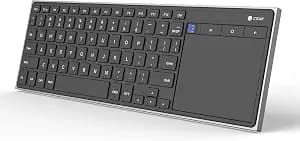
CZUR Rechargeable Bluetooth Keyboard with Touchpad, Portable Computer Keyboard with Trackpad, Wireless Ultra Slim Keyboard for PC/Laptop/Tablet/Phone, for Windows/Android/Mac/iOS
Description
Wide Compatibility: 1. Compatible devices: Desktop/Laptop/Tablet/Phone; 2. Compatible systems: for Windows/Android/Mac/iOS; Stable Wireless Connection: The CZUR TouchBoard Pro wireless keyboard connects to your device quickly and reliably—no receiver or messy cables required. The wireless range is up to 33 feet, but please note that walls or other obstacles may affect stability, so try to maintain a clear line of sight for the best performance.; Lightweight and Portable: CZUR keyboard is thin and light. With the stylish design, CZUR TouchBoard Pro keyboard is the perfect choice for office, business or WFH. The keyboard is lightweight and small in size, making it easy to carry and do your work wherever you are. Please note: the keycaps are slightly smaller than those on a standard keyboard.; Rechargeable Battery: The CZUR keyboard has a built-in rechargeable battery and comes with a free charging cable, saving you the trouble of frequently replacing the battery. The on/off switch and auto-sleep feature greatly extend battery life; Not backlit – This keyboard does not have a backlight, making it a simple and power-efficient choice for various environments. Tips: This keyboard only supports Bluetooth connection, not wired connection or wireless receiver.
Compare the trade-offs
Similar products, side by side
A random selection of analyzed products from the same category. Different products are not necessarily interchangeable.


One less thing to search
Before you buy: quick questions
Is the keyboard too small for comfortable, long typing sessions?
This depends on your needs and hand size. While its ultra-slim, portable design is a major highlight, the compact layout means keys are closer together. Many users on Reddit love it for on-the-go use, but some touch typists and those with larger hands find it cramped for extended work. If you plan to use it as your primary keyboard for hours daily, you might prefer a slightly larger portable model.
How does the built-in touchpad perform for precise tasks?
The touchpad is celebrated for its convenience—no need to carry a separate mouse! For general navigation on a tablet or phone, it works well. However, some TikTok and YouTube reviewers note it can be quite sensitive, making very precise clicks (like in detailed photo editing) a bit challenging. It's perfect for browsing and presentations, but hardcore gamers or designers may want a dedicated mouse for fine control.
What's the real-world battery life, and is the rechargeable feature a pro or con?
Based on aggregated user feedback, most people get several weeks of typical use (a few hours per day) on a single charge. A common social media insight is that while convenient, the built-in battery doesn't necessarily last dramatically longer than some standard battery-operated keyboards. The "pro" is not buying batteries; just be aware it's not a charge-once-a-year device.
Is it truly compatible with all my devices (Windows, Mac, iOS, Android)?
Yes, it is widely compatible. It uses standard Bluetooth protocols and includes easy-switch functionality between up to three paired devices. Users confirm successful connections with iPhones, iPads, Android tablets, and both Windows and macOS laptops. The keyboard has dedicated key mappings for different operating systems.
How durable is it for travel, and what if I have issues with connectivity or build quality?
The keyboard is lightweight and designed for portability, but some reviews mention it can feel less robust than heavier models. For protection in a backpack, using a simple sleeve is recommended. Regarding issues: while most connections are stable, a small percentage of users report occasional Bluetooth dropouts. We recommend checking the manufacturer's warranty and your retailer's return policy upon purchase, so you're covered if you encounter any hardware or persistent pairing problems.
From a similar, more-reviewed product in this category: Razer Joro Wireless Gaming Keyboard, Portable Compact 75%, Low Profile Keys
Does the Razer Joro work wirelessly with Bluetooth, and how many devices can it pair with?
The listing states Bluetooth 5.0 with pairing for up to three devices across Windows, Mac, handhelds, and mobile, with shortcuts to switch between them. Reviews are mixed on wireless reliability: one reviewer reported stable, fast Bluetooth, while others reported connection problems and missed keystrokes after the keyboard sleeps.
How does the keyboard feel to type and game on?
The listing describes ultra low-profile switches with quick, precise actuation and satisfying tactile feedback. Reviewers who liked it compared the feel to laptop scissor keys and Apple-style chiclet keys, calling it quiet with good tactile response, though one noted the spacebar is small.
Is the Razer Joro actually portable and well built?
The listing says it weighs 374 g and is 16.5 mm thin with a full function row and full-sized arrow keys. Reviewers described it as sturdy and minimalist, and one noted the static angle is a deliberate trade-off for a keyboard meant to be carried around.
What are the complaints about the RGB lighting?
The listing advertises Chroma RGB with 16.8 million colors and dynamic effects. Reviewers reported a glow around the keys rather than through the lettering, secondary symbols that are hard to see, and one said the lighting stayed on while the PC was locked.
Do I need Razer Synapse software to use all the keyboard's features?
The listing ties Snap Tap and Chroma customization to Razer Synapse 4. Reviewers noted that some functions, such as turning off Fn lock to use F1–F12 directly, require Synapse, and one complained there is no Synapse software for SteamOS.
Answers are limited to the manufacturer's listing and the reviews we analysed. Questions those sources cannot support are not answered here.
Transparent by design