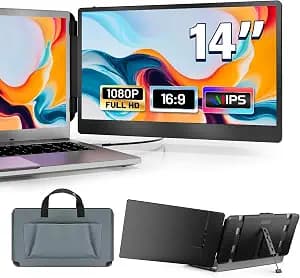
domyfan 14" Laptop Monitor Extender, FHD 1080P IPS Dual Laptop Screen Extender, HDMI/USB-A/Type-C Plug and Play for Windows, Mac, Chrome, Android, Xbox, Switch, PS5, Work with 13.3”-17” Laptops
Description
📟Excellent Display Parameters-- 14-inch HD display, 1000:1 contrast, IPS 1080P resolution, rich colors, better viewing experience, The laptop monitor extender can independently adjust the brightness, Stereo speaker, contrast and other parameters. Flexibly adjust the screen rotation Angle 180 degrees, adjust the best viewing Angle at any time, whenever and wherever you can greatly enjoy the visual and audio dual experience.; 💻Increase Your Productivity by 200%-- The laptop screen extender supports three modes: Extended Mode, Duplicated Mode, and Second Screen Mode, Perfect for conference presentations, multitasking, The perfect multi-screen simultaneous and multi-screen standalone display solution for laptop users, perfect for gamer, programmers, financial and investment professionals, designers, and anyone who needs a more efficient workflow.; 🎯Wide Range of Applications-- The bracket for monitor extension for laptop is easy to use, clamp the bracket on the top of the computer screen, easy to install and fixed without falling. Suitable for 13.3"-17" laptops. The weighs an ultra-light 2.33lbs, Complimentary handbag easy to carry, fold or unfold, this travel monitor for laptop is a great choice for office meetings, home work and business travel, entertainment games.; ⚡Plug and Play Without Driver-- Only 1 cable are needed for plug and play function. Make sure your laptop has a full-featured C port or an HDMI port and a USB-A port. If the screen displays "No Signal" after connecting the USB-C cable, it means that your laptop's C port only supports power supply, then you need to connect the HDMI cable to the display extension to provide it with video signals.; 🎁High Compatibility-- Compatible with Mac, PC, Windows, Android, PS5, Xbox, Switch and most other operating systems, if your connection fails, please contact us directly, our after-sales team will give you a satisfactory solution. Package includes :1* Portable monitor, 1* User Manual, 1*Carry Bag, 1* USB-C to USB-C cable, 1* HDMI to TYPE-C cable, 1*USB-A to USB-C cable.
Compare the trade-offs
Similar products, side by side
A random selection of analyzed products from the same category. Different products are not necessarily interchangeable.

ASUS ProArt Display 27” 1440P Professional Monitor (PA278CGV) - IPS, QHD (2560 x 1440), 144Hz, 95% DCI-P3, ΔE < 2, Calman Verified, USB-C PD 90W, FreeSync Premium, DisplayHDR 400, Height Adjustable

LG 34G600A-B 34-inch Ultragear WQHD (3440 x 1440) Curved Gaming Monitor 160Hz, AMD FreeSync Premium, HDR10, Built-in Speaker, Reader Mode, HDMI 2.1, DisplayPort, Tilt/Height/Swivel Stand, Black

ViewSonic VG1655 15.6 Inch 1080p Portable Monitor, IPS Display with Eye Care for Comfortable Mobile Workspaces and Second Screen Productivity, Built-in Stand, 60W USB-C, and mini HDMI Inputs
One less thing to search
Before you buy: quick questions
特に厚いベゼルがある場合、このモニターは私の特定のノートパソコンモデルに物理的に取り付けられますか?
クランプは、ほとんどの13.3インチから17インチのノートパソコンに適合するように設計されています。ユーザーフィードバックに基づくと、Dell、MacBook、Lenovoの人気モデルでうまく機能します。異常に厚い下部ベゼルやテーパー形状のデザインのノートパソコンの場合は、利用可能なクランプスペース(画面下の薄い部分)を測定し、モニターの最小グリップ深さ15mmと比較することをお勧めします。ゲーミングノートパソコンを使用する多くのRedditユーザーが良好なフィット感を確認しています。
MacBookのような最新のノートパソコンで、本当に1本のケーブルで「プラグアンドプレイ」設定が可能ですか?
USB-C経由のDisplayPort Alt Modeをサポートするデバイス(最新のMacBook、Windowsノートパソコン、Androidスマートフォンのほとんどなど)の場合、1本のUSB-Cケーブルで映像と電源の両方を扱えます。ただし、一部のYouTubeレビュアーが指摘しているように、特定のデバイスでは映像用に付属のHDMIケーブル、電源用にUSB-Aケーブルが必要になる場合があります。パッケージには両方のシナリオに対応する必要なケーブルがすべて含まれています。
明るい環境での画面品質と使用感はどうですか?
ユーザーは一貫して、FHD 1080P IPSパネルの鮮やかな色と広い視野角を称賛しており、仕事やメディア視聴に優れていると評価しています。ソーシャルメディアでよく指摘されるのは、画面が光沢仕上げであるため、直射日光や窓際ではまぶしさを生じることがある点です。屋外や明るいオフィスで頻繁に使用する場合は、マット画面保護フィルムがユーザーに人気の追加アクセサリーです。
頻繁に旅行する人にとって実際の耐久性はどのようなもので、壊れた場合はどうなりますか?
このモニターは携帯性を考慮して作られており、保護ケースが付属しています。ほとんどの旅行者はバックパックの中で十分に耐えると報告しています。折りたたみヒンジは通常使用に耐える頑丈な作りですが、ごく一部のユーザーからは、非常に長期間の過酷な使用には注意して扱うようアドバイスされています。12ヶ月の保証が付いています。サポートチームは迅速に対応します。問題がございましたら、注文プラットフォームから直接お問い合わせください。
この製品が向いていないのはどのような方ですか?
このモニターはポータブルな*セカンダリー*スクリーンとして最適です。以下のような方には最適ではないかもしれません:1) 完全なコードレス使用のためにタッチスクリーンや内蔵バッテリーが必要な方、2) HDMIまたはUSB-Cポートのない古いノートパソコンをお持ちの方(仕様を確認してください!)、3) 競技用ゲーミングに超高速リフレッシュレートのプライマリーモニターをお探しの方。これらのニーズには、専用タブレットやハイエンドのポータブルモニターがより良い選択肢となる場合があります。
From a similar, more-reviewed product in this category: KOORUI 24 Inch Gaming Monitor, 180Hz 1080P VA Display with 3000:1 Contrast
Does this monitor really run at 180Hz, and what do I need to enable it?
Yes — it's a native 180Hz panel, but you'll need to switch it on manually. Connect via the included HDMI cable (or a DisplayPort-capable setup), then set 180Hz in your GPU's display settings; it defaults to a lower refresh rate out of the box. Many Reddit and YouTube users note that enabling Adaptive Sync/FreeSync alongside it gives the smoothest experience, and it works with both AMD and NVIDIA cards.
How does the VA panel perform for gaming and everyday work?
The 3000:1 contrast gives noticeably deeper blacks than typical IPS budget monitors, which shines in dark game scenes and movies. For fast-paced competitive shooters, some TikTok and Reddit users mention mild ghosting/smearing in dark transitions — it's great for casual gaming, students, and office work, but color-critical creators or hardcore FPS players may prefer an IPS panel.
The stand looks basic — can I adjust the height or mount it?
Correct, the included stand only tilts (-5° to 20°) and doesn't offer height, swivel, or pivot adjustment, and a few users find the base slightly wobbly. The good news: it's VESA 100×100mm compatible, so a monitor arm or desk mount solves ergonomics entirely — a popular fix among dual-monitor and dorm-room setups.
What if I receive a unit with a dead pixel or backlight bleed?
Budget monitors can vary unit to unit, and some buyers report stuck pixels or corner bleed — but KOORUI backs it with a 3-year manufacturer warranty. If your unit arrives defective, contact the seller for a replacement or refund promptly; most users who did so report a smooth resolution, so inspect the screen within the return window.
Is it good value, and who is it best suited for?
At around $120, it's widely praised as one of the best budget 180Hz options — ideal for students, casual gamers, home-office users, and compact or dual-monitor setups. Just set expectations: no built-in speakers, a single HDMI plus VGA, and basic ergonomics. If you need height adjustment, color accuracy, or built-in audio, consider spending more on an IPS alternative.
Answers are limited to the manufacturer's listing and the reviews we analysed. Questions those sources cannot support are not answered here.
Transparent by design