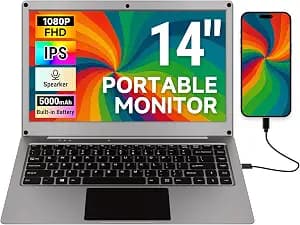
ELECROW Portable Monitor with Keyboard, 14 Inch Lapdock Display with Built-in Battery & RPi5 Adapter, 1080P FHD IPS USB C Computer Monitors Compatible with Raspberry Pi, PC, Phone, Mac, Game Console
Description
Portable All-in-One Display: The CrowView Note with RPi5 Adapter (Without RPi5) is a fully integrated portable monitor featuring a screen, keyboard, touchpad, and speakers in a laptop-style design. Ideal for mobile work, entertainment, and on-the-go productivity, you can enjoy efficient work and ultimate entertainment experience on the road, in a cafe, or at home; Wide Compatibility: The display monitors feature USB-A, Mini HDMI, and Type-C ports, making it compatible with a wide range of devices, including phones, laptops, PC, Mac, Raspberry Pi, Jetson Nano, PS4/5, Xbox, and Nintendo Switch. It serves as a seamless external display, ensuring smooth integration with various devices and operating systems; Built-in Battery with Power Sharing: The portable monitor with keyboard is built with a 5000mAh battery. It not only provides power supply for the monitor but also can reversely charge your mobile phone and Raspberry Pi via type-c port, enhancing flexibility and convenience and making it a reliable travel companion; High-Resolution Display with Vivid Colors: The 14-inch Full HD (1920x1080) portable display screen boasts 100% sRGB color gamut and 300cd/m² brightness, delivering accurate and vibrant colors. Whether for work, design, or entertainment, it provides crisp visuals and a comfortable viewing experience—even in bright environments; Smart Controls & Display Customization: With built-in function keys and an intuitive On-Screen Display (OSD) menu, users can easily adjust brightness, volume, contrast, and switch input sources. Multiple display modes, including Standard, Gaming, and Reading, allow for a personalized visual experience tailored to different needs
Compare the trade-offs
Similar products, side by side
A random selection of analyzed products from the same category. Different products are not necessarily interchangeable.


One less thing to search
Before you buy: quick questions
Can I use my own USB-C charger with the Lapdock, or am I stuck with the included one?
The Lapdock must be charged using the included proprietary barrel-plug charger. While this is a common point of feedback from users who prefer a universal USB-C ecosystem, the included charger ensures reliable power delivery. We recommend keeping the provided charger in your travel bag or workstation.
How is the trackpad and keyboard quality for daily use?
The keyboard is functional for typing emails, documents, and light coding, though some users note it has a softer travel than a mechanical keyboard. The trackpad is basic—it gets the job done for cursor movement, but many Reddit and YouTube reviewers recommend using an external mouse for precision tasks or prolonged use for a better experience.
Is this truly "plug-and-play" with devices like the Steam Deck, Samsung phones, and Raspberry Pi?
For the vast majority of devices, yes! It's praised for its simplicity. For Samsung Dex and most phones/PCs/Macs, it typically works instantly. For the Steam Deck, you may need to enable the appropriate external display setting. For Raspberry Pi 5, use the included adapter. We always recommend checking your specific device's video-out capabilities via its USB-C port.
Who is this product best suited for, and who might want to look elsewhere?
This Lapdock is a fantastic value for Raspberry Pi enthusiasts, students creating a compact setup, or professionals using phone desktop modes (like Dex). It's perfect if you want an all-in-one portable screen and input device. If your top priority is a premium laptop-like trackpad, keyboard feel, or you need a standalone computer, you might consider a high-end lapdock or a traditional lightweight laptop.
What's the real-world battery life, and can it charge my connected phone or Raspberry Pi?
In real-world testing, users report between 5 to 8 hours of use depending on screen brightness and the connected device. A key benefit is that the Lapdock's built-in battery can *power your connected device* (like a Raspberry Pi or phone), acting as a portable power bank and eliminating the need for extra cords and plugs during mobile sessions.
From a similar, more-reviewed product in this category: KOORUI 24 Inch Gaming Monitor, 180Hz 1080P VA Display with 3000:1 Contrast
Does this monitor really run at 180Hz, and what do I need to enable it?
Yes — it's a native 180Hz panel, but you'll need to switch it on manually. Connect via the included HDMI cable (or a DisplayPort-capable setup), then set 180Hz in your GPU's display settings; it defaults to a lower refresh rate out of the box. Many Reddit and YouTube users note that enabling Adaptive Sync/FreeSync alongside it gives the smoothest experience, and it works with both AMD and NVIDIA cards.
How does the VA panel perform for gaming and everyday work?
The 3000:1 contrast gives noticeably deeper blacks than typical IPS budget monitors, which shines in dark game scenes and movies. For fast-paced competitive shooters, some TikTok and Reddit users mention mild ghosting/smearing in dark transitions — it's great for casual gaming, students, and office work, but color-critical creators or hardcore FPS players may prefer an IPS panel.
The stand looks basic — can I adjust the height or mount it?
Correct, the included stand only tilts (-5° to 20°) and doesn't offer height, swivel, or pivot adjustment, and a few users find the base slightly wobbly. The good news: it's VESA 100×100mm compatible, so a monitor arm or desk mount solves ergonomics entirely — a popular fix among dual-monitor and dorm-room setups.
What if I receive a unit with a dead pixel or backlight bleed?
Budget monitors can vary unit to unit, and some buyers report stuck pixels or corner bleed — but KOORUI backs it with a 3-year manufacturer warranty. If your unit arrives defective, contact the seller for a replacement or refund promptly; most users who did so report a smooth resolution, so inspect the screen within the return window.
Is it good value, and who is it best suited for?
At around $120, it's widely praised as one of the best budget 180Hz options — ideal for students, casual gamers, home-office users, and compact or dual-monitor setups. Just set expectations: no built-in speakers, a single HDMI plus VGA, and basic ergonomics. If you need height adjustment, color accuracy, or built-in audio, consider spending more on an IPS alternative.
Answers are limited to the manufacturer's listing and the reviews we analysed. Questions those sources cannot support are not answered here.
Transparent by design