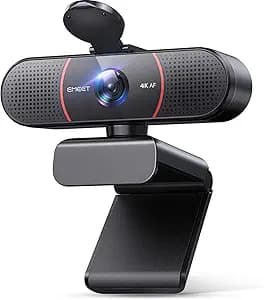
EMEET C960 4K Webcam for PC, 4K UHD CMOS Sensor, PDAF Auto Focus, Dual Omnidirectional Mics, Auto Light Correction, 73° FOV, Plug&Play Webcam w/Privacy Cover, Works w/Zoom/Teams/Skype/Google Meet
Description
Unmatched Clarity with True 4K Resolution - Experience ultra-clear video conferencing with a genuine EMEET SmartCam C960 4K CMOS sensor. No false upscaling, only pure 4K quality. Ideal for remote business meetings where every detail matters. The 4K webcam for laptop provides ultra-clear visuals that make you feel like you're in the same room with your colleagues, students, or audience. Note: Video resolution defaults to 1080P; Switch to 4K via built-in camera software or APPs like PotPlayer/OBS.; PDAF Focus & Auto Light Correction - Equipped with PDAF automatic focusing technology, the EMEET webcam for pc 4K ensures clear and stable focusing in various scenarios like business conferences and educational lectures. Say goodbye to blurry interruptions. Online meetings can be conducted in both over-exposed and low-light settings with auto light adjustment. The 73° FOV focus on you rather than your background, no longer need to painstakingly choose or blur your conference background.; Dual Omnidirectional Mics - The built-in dual microphones capture voices clearly for crisp, natural audio. Perfect for conference calls and remote teaching, where clear communication is paramount. The webcam with microphone enables you to savor crisp audio quality, fostering an immersive meeting experience that enhances your productivity. Be sure to designate the EMEET SmartCam C960 4K USB webcam as your default microphone device for optimal performance.; USB Plug and Play & Privacy Assured - The simplicity of plug-and-play technology meets high performance in the C960 4K webcam. The default USB-A interface ensures that you're up and running in no time no matter your level of tech expertise. The webcam comes with a privacy cover for your security. With the flexible mounting options, you can have a computer camera that adapts to your needs without compromising on your privacy. No Driver/Wi-Fi/Bluetooth/Cloud Storage is used to assure privacy.; Compatibility and Versatility - Works effortlessly across multiple platforms such as Windows (Win7,10,11), macOS (10.14 and above), Android TV V7.0 and above, and Linux. Ideal for use with popular communication software from Zoom to Teams to Skype. Personalize your video settings with EMEET's proprietary EMEETLINK software. With adjustable 360° horizontal axis, 15° vertical adjustments, and a 1/4-inch tripod thread, this webcam can be securely mounted on various screen types and tripods.
Compare the trade-offs
Similar products, side by side
A random selection of analyzed products from the same category. Different products are not necessarily interchangeable.

SVPRO USB Camera 1080P 120fps High Speed Camera for Golf Swing Simulator,12MP 4K Webcam with 3X Manual Zoom Lens USB Plug and Play for Computer Laptop Compatible with Windows Linux MacOS Android

SVPRO 1080P 120fps High Speed USB Camera,12 Megapixels 4K Glof Swing Webcam Manual Focus with 3X Optical Zoom,Industrial Lightburn Cam UVC Plug and Play for Computer Laptop Raspberry Pi

Insta360 Link 2C - 4K Webcam for PC/Mac, 1/2" Sensor, Auto Framing, HDR, AI Noise-Canceling Mic, Gesture Control for Streaming, Video Calls, Gaming, Works with Zoom, Teams, Black
One less thing to search
Before you buy: quick questions
क्या यह वास्तव में एक "प्लग एंड प्ले" वेबकैम है, या क्या मुझे विशेष ड्राइवर इंस्टॉल करने की आवश्यकता होगी?
Windows 10/11 और macOS पर अधिकांश उपयोगकर्ताओं के लिए, Zoom, Google Meet और Skype जैसे प्लेटफार्मों पर मुख्य कार्यों के लिए यह वास्तव में प्लग एंड प्ले है। हालांकि, कुछ Reddit उपयोगकर्ताओं ने बताया है कि Microsoft Teams जैसे कुछ ऐप्स में पूर्ण 4K रिज़ॉल्यूशन तक पहुंचने के लिए, आपको ऐप की वीडियो सेटिंग्स में रिज़ॉल्यूशन को मैन्युअल रूप से चुनने या उन्नत नियंत्रण के लिए EMEET की वेबसाइट से वैकल्पिक ड्राइवर इंस्टॉल करने की आवश्यकता हो सकती है।
माइक्रोफोन कीबोर्ड क्लिक जैसे बैकग्राउंड शोर को कैसे संभालता है?
दो ओम्नीडायरेक्शनल माइक शांत कमरे में स्पष्ट आवाज उठाने के लिए उत्कृष्ट हैं। हालांकि, कई YouTube समीक्षाओं में उल्लेख किया गया है, यदि आपके पास तेज आवाज वाली मैकेनिकल कीबोर्ड या महत्वपूर्ण परिवेशी शोर (जैसे पंखा) है, तो माइक उसे उठा सकते हैं। शोरगुल वाले वातावरण के लिए, कई जानकार उपयोगकर्ता सर्वोत्तम अनुभव के लिए एक समर्पित USB माइक्रोफोन का उपयोग करने या अपने कॉन्फ्रेंसिंग सॉफ़्टवेयर की पृष्ठभूमि शोर दमन सुविधा को सक्षम करने की सलाह देते हैं।
दृष्टि क्षेत्र 73° बताया गया है। क्या यह दो लोगों या मेरे डेस्क सेटअप को दिखाने के लिए पर्याप्त चौड़ा है?
73° का दृष्टि क्षेत्र निश्चित है और यह एक व्यक्ति के मानक, सिर और कंधों के शॉट के लिए डिज़ाइन किया गया है। यह वीडियो कॉल में खुद को स्पष्ट रूप से फ्रेम करने के लिए एकदम सही है। यदि आपको नियमित रूप से फ्रेम में दो लोगों को समेटना है या अपने कमरे या व्हाइटबोर्ड का एक बड़ा हिस्सा दिखाना है, तो यह बहुत संकीर्ण लग सकता है। उस स्थिति में, आप 90° या उससे अधिक चौड़े FOV वाले वेबकैम पर विचार कर सकते हैं, जैसे कि Logitech C930e।
कम रोशनी की स्थितियों में वास्तविक दुनिया का प्रदर्शन कैसा है?
ऑटो लाइट करेक्शन डेस्क लैंप या खिड़की की रोशनी वाले सामान्य होम ऑफिस सेटिंग्स के लिए अच्छी तरह काम करता है। समीक्षाएं इन स्थितियों में इसके प्रदर्शन की लगातार प्रशंसा करती हैं। हालांकि, बहुत हल्के कमरों में या तेज बैकलाइट (आपके पीछे चमकदार खिड़की जैसी) के साथ, छवि दानेदार हो सकती है या आपका चेहरा अंधेरा हो सकता है, क्योंकि यह इस मूल्य बिंदु पर अधिकांश वेबकैम की एक सीमा है। लगातार खराब रोशनी के लिए, बड़े सेंसर वाला वेबकैम या बिल्ट-इन रिंग लाइट (रैज़र कियो जैसा) बेहतर मेल होगा।
बिल्ड कितनी टिकाऊ है, खासकर प्राइवेसी कवर?
मुख्य वेबकैम बॉडी टिकाऊ प्लास्टिक से मजबूती से बनी है। शामिल स्लाइडिंग प्राइवेसी कवर अपना काम अच्छी तरह करता है, लेकिन यह पतले प्लास्टिक से बना है। TikTok और Amazon समीक्षाओं से एक आम फीडबैक यह है कि इसे हल्के हाथों से इस्तेमाल करें, क्योंकि जबरदस्ती करने पर यह नाजुक लग सकता है। यह हल्के दैनिक उपयोग के लिए डिज़ाइन किया गया है ताकि उपयोग में न होने पर लेंस को ढक सके। दीर्घकालिक टिकाऊपन के लिए, बस इसे सावधानी से स्लाइड करें।
From a similar, more-reviewed product in this category: Webcam with Privacy Cover
Does this webcam work with both PC and Mac?
One reviewer reported it is easy plug and play on both PC and Mac. The listing also states it is compatible with laptop, personal computer, tablet, and smartphone.
How is the video quality in low light?
Reviewers describe the image as clear and sharp even in low light, crediting the automatic light correction. The listing confirms the webcam includes Auto Light Correction as a special feature.
Does the built-in microphone pick up sound clearly?
Reviewers say the built-in microphone works well and picks up sound clearly, with one noting the noise cancellation keeps their voice clear without picking up much background noise. The listing lists Noise Cancellation as a special feature.
Does it have a privacy cover?
The listing lists Privacy Shield as a special feature, and the product title is "Webcam with Privacy Cover."
Is the webcam bulky?
One reviewer described it as a bit on the bulky side, though they felt the quality made up for it.
Answers are limited to the manufacturer's listing and the reviews we analysed. Questions those sources cannot support are not answered here.
Transparent by design