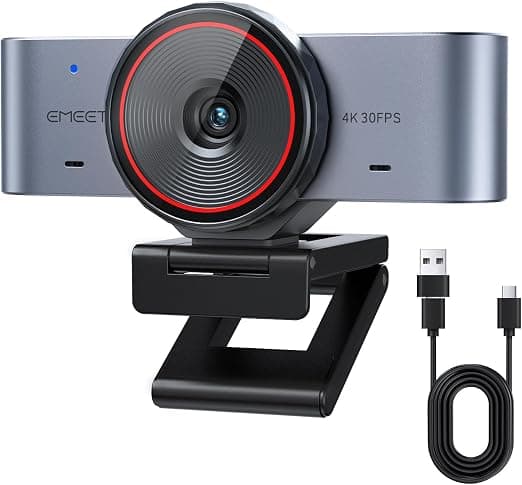
EMEET C960 Ultra 4K Webcam for Mac & PC, 1/1.5" Large Sensor, Metal Body
Description
True 4K Ultra HD Resolution with Large 1/1.5" Sensor:Experience crystal-clear video with this 4K webcam featuring a large 1/1.5" image sensor that captures stunning detail even in low light. It delivers true webcam 4k quality at 3840×2160@30FPS and supports 1080P@60FPS for smooth motion, making it ideal for professional video calls, content creation, and live streaming; Designed Specifically for Mac with Premium Metal Body:As a dedicated webcam for mac, this camera complements Apple’s minimalist aesthetic with a sleek metal housing that matches MacBook, iMac, and Mac mini. While Mac built-in cameras max out at 1080P, this webcam for pc 4k also delivers true 4K resolution for Mac users who demand higher quality for creative work and professional conferencing.; Fast Auto Focus & Built-In Privacy Cover :Equipped with rapid auto focus from 10cm to infinity, this webcam for pc locks onto subjects in as fast as 0.2 seconds, ensuring you always stay sharp. The integrated privacy cover provides physical lens protection—simply rotate to open or close—giving you complete peace of mind during video calls.; Smart Software Features with EMEET STUDIO:Unlock advanced functionality with EMEET STUDIO software, including Whiteboard Mode for automatic document correction and Desktop Mode for overhead shooting. This web cam also supports image adjustment, multi-camera switching, virtual camera, and firmware updates, enhancing your workflow for teaching, product demos, and remote collaboration.; Wide Compatibility & Easy Setup: Enjoy hassle-free connectivity with USB plug-and-play across Windows, macOS, and major platforms. This webcam works seamlessly with Zoom, Teams, Skype, Google Meet, and more. A standard 1/4" tripod mount allows for horizontal or vertical positioning, making it a versatile choice for home offices, studios, and hybrid work setups.
Compare the trade-offs
Similar products, side by side
A random selection of analyzed products from the same category. Different products are not necessarily interchangeable.


One less thing to search
Before you buy: quick questions
I have a thick or curved monitor. Will the metal clip hold the webcam securely without scratching the screen?
The clip is designed with a solid metal core and a rubberized grip pad to protect your screen. However, if you have an ultra-thick bezel (over 2.5 cm) or a heavily curved monitor, the clip might not sit perfectly flush. For those setups, we recommend using the included tripod mount screw, which offers a more stable and adjustable position on your desk.
Does the 4K resolution work on Zoom and Teams, or is it capped at 1080p?
You can absolutely stream in 4K on platforms that support it, like Microsoft Teams (with the right settings) and YouTube Live. However, many apps like Zoom and Google Meet cap video quality at 1080p for bandwidth reasons. The good news is that because the EMEET C960 Ultra has a large sensor, the 1080p output is "downscaled" from 4K, which makes it look significantly sharper and cleaner than a native 1080p webcam.
I’ve seen TikTok reviews mention the autofocus "hunts" in low light. Is this a dealbreaker for evening calls?
It’s a fair observation. In very dim settings, the autofocus can take a second or two to lock on, which is common for most webcams. However, the large 1/1.5" sensor is actually a huge advantage here—it captures much more light than standard sensors, so you won't need to rely on autofocus as much. For best results, we suggest using a simple desk lamp or ring light; the camera will lock focus instantly and produce a vibrant image without the "grainy" look typical of other webcams.
Is this webcam suitable for group meetings, or is it better for solo use?
This camera is optimized for solo professionals and streamers. The 65° field of view is perfect for a head-and-shoulders shot, keeping you centered and looking sharp. If you need to fit three or more people around a conference table, you would need to mount the camera far away, which reduces the image quality. For group settings, you might be better served by a dedicated wide-angle conference cam, but for individual use, this provides the most flattering and professional image.
The metal body looks premium, but does it interfere with Wi-Fi or Bluetooth if I mount it on my monitor?
No, this is a common misconception with metal electronics. The metal chassis is purely structural and does not contain antennas that would cause interference. The webcam connects via a wired USB cable, so it won't disrupt your wireless signals. Many users in our community have confirmed that their Bluetooth headphones and Wi-Fi connections remain stable with the camera mounted directly above their screens.
From a similar, more-reviewed product in this category: Nylavee Computer Speakers for Desktop PC, Bluetooth & AUX PC Soundbar
How do I connect the Nylavee computer speakers to my device?
They support two connection methods: Bluetooth 5.0 and a 3.5mm AUX wired connection, and are compatible with laptop, desktop PC, phone, tablet, Xbox, and PS5. Reviewers report setup was quick and easy, with one using the direct AUX input and another connecting via Bluetooth to a laptop.
Do these speakers fit under a monitor?
The compact, slim design allows it to fit neatly under a desktop monitor, as noted by multiple reviewers, including one who needed it to fit beneath a 24" monitor with limited desk space.
How is the sound quality?
The listing describes two double-layer neodymium magnet speaker units and two independent bass diaphragms for rich high pitch and powerful bass. Reviewers describe clear sound with decent bass and treble, and one notes that even at higher volumes the sound remains clean without noticeable distortion.
How do I control the volume and other functions?
All functions of the soundbar can be operated by the side knob, and reviewers confirm the sound wheel on the side makes it easy to control the volume manually, with a pause and play button also mentioned.
Does it need a battery or separate power source?
There is no built-in battery; you plug the USB into any power source and it turns on automatically. One reviewer used a USB power adapter plugged into a dedicated outlet with the AUX connection.
Answers are limited to the manufacturer's listing and the reviews we analysed. Questions those sources cannot support are not answered here.
Transparent by design