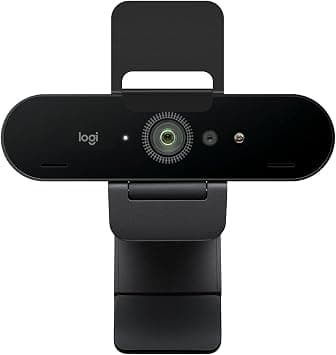
Logitech Brio 4K webcam, Video Calling, Noise-Cancelling mic
Description
Spectacular video quality: superb resolution, frame rate, color, and detail, featuring autofocus and 5x digital zoom; this Ultra HD webcam supports up to 4K at 30 fps; Look great in any light: RightLight 3 automatically adjusts exposure and contrast to compensate for glare and backlighting; Adjustable field of view: Choose from three dFOV presets to perfectly frame your video; frame an ideal head and shoulders view with 65° diagonal, and more of the room with 78° or 90° diagonal; Sound excellent anywhere: With dual omnidirectional microphones and noise-canceling tech, this webcam with microphone captures clear audio from up to 1.2 meter away while reducing background noise; Make it your own: The Logi Options+ app (3) simplifies personal device control with zoom in/out, color presets, color adjustments, set manual focus, and easy firmware updates
Compare the trade-offs
Similar products, side by side
A random selection of analyzed products from the same category. Different products are not necessarily interchangeable.

4K Webcam for PC with 2 Microphone, 1080P@60FPS, PDAF Autofocus in 1 Second, 12 Megapixels, Clear Stereo Sound, Auto Light Correction, USB Web Camera for PC Windows MacOS Teams Streaming

EMEET C960 Ultra 4K Webcam for Mac & PC, 1/1.5" Large Sensor, Metal Body
One less thing to search
Before you buy: quick questions
I have a Mac with an M2 chip. Will the Brio work without installing extra software, and does the 4K actually work on Zoom?
Yes, the Brio is fully compatible with Apple Silicon Macs. It is UVC (USB Video Class) compliant, meaning it works plug-and-play with Zoom, Teams, and FaceTime without drivers. However, to access the 4K resolution and HDR settings specifically, you will need to install Logitech Capture or G Hub. A quick note: Zoom only transmits 4K if you have a Pro business account and sufficient bandwidth; otherwise, the camera will downscale to 1080p, which still looks exceptionally sharp.
I’ve seen TikTok reviews saying the low-light quality is bad. Is it really that bad, or is it just user error?
It is a mix of both. The Brio’s sensor is excellent in "good" lighting, but it is not a low-light specialist like the Razer Kiyo Pro. If you are sitting with a window behind you or only a desk lamp, the image will get grainy. However, many users fix this by enabling the "Low-Light Compensation" toggle in Logitech Capture or simply adding a small ring light. If you cannot control your lighting, this might not be the best webcam for you; but if you have a standard home office lamp, you will be fine.
Does the noise-cancelling microphone pick up my mechanical keyboard or my dog barking in the background?
The dual omnidirectional mics do a solid job of suppressing ambient hum and air conditioner noise, but they are not magic. They will reduce the volume of keyboard clacks, but if you are typing aggressively, the thuds will still bleed through. For barking dogs or loud conversations in the next room, the mic will still pick those up. For professional calls where you need absolute silence, we recommend using a dedicated headset mic, but for casual meetings, the Brio’s mic is significantly better than your laptop’s built-in array.
The clip looks a bit flimsy in the unboxing videos. Will it hold up on a heavy monitor or a laptop screen?
The clip is sturdy enough for standard monitors up to about 0.5 inches thick, but it is a tight fit on thicker bezels. We recommend mounting it on the center of the monitor where the plastic is strongest. If you are using a laptop, the clip will fit, but the weight of the camera might tilt the screen backward slightly. Many users on Reddit suggest using the universal mounting screw on the bottom to attach it to a tripod or a monitor arm for a more stable setup, which also solves the "drooping" issue mentioned in some reviews.
Is the 4K worth the price if I only use it for business calls, or should I just buy the cheaper Logitech C920?
If you are strictly using this for standard business calls (Teams, Meet, Webex), the 4K is overkill because most platforms cap out at 1080p. The main advantage of the Brio over the C920 is the superior sensor dynamic range and HDR—meaning your face won't be blown out if you have a bright window behind you. If you are a consultant or executive who cares about looking sharp in mixed lighting, the Brio is worth it. If you are in a well-lit room and just need a reliable camera, the C920 will save you money and deliver 90% of the same experience.
From a similar, more-reviewed product in this category: Nylavee Computer Speakers for Desktop PC, Bluetooth & AUX PC Soundbar
How do I connect the Nylavee computer speakers to my device?
They support two connection methods: Bluetooth 5.0 and a 3.5mm AUX wired connection, and are compatible with laptop, desktop PC, phone, tablet, Xbox, and PS5. Reviewers report setup was quick and easy, with one using the direct AUX input and another connecting via Bluetooth to a laptop.
Do these speakers fit under a monitor?
The compact, slim design allows it to fit neatly under a desktop monitor, as noted by multiple reviewers, including one who needed it to fit beneath a 24" monitor with limited desk space.
How is the sound quality?
The listing describes two double-layer neodymium magnet speaker units and two independent bass diaphragms for rich high pitch and powerful bass. Reviewers describe clear sound with decent bass and treble, and one notes that even at higher volumes the sound remains clean without noticeable distortion.
How do I control the volume and other functions?
All functions of the soundbar can be operated by the side knob, and reviewers confirm the sound wheel on the side makes it easy to control the volume manually, with a pause and play button also mentioned.
Does it need a battery or separate power source?
There is no built-in battery; you plug the USB into any power source and it turns on automatically. One reviewer used a USB power adapter plugged into a dedicated outlet with the AUX connection.
Answers are limited to the manufacturer's listing and the reviews we analysed. Questions those sources cannot support are not answered here.
Transparent by design