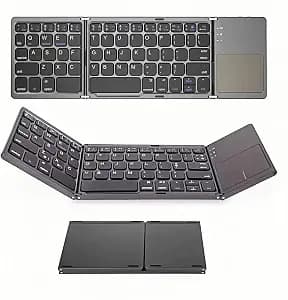
Guiheng Foldable Bluetooth Keyboard with Touchpad, Portable Wireless Keyboard Rechargeable Full Size Ultra Slim Pocket Folding Key Board for Android Windows iOS Tablet & Laptop-Grey
Description
Multi-touch Trackpad Bluetooth Foldable Keyboard:thin design of the portable folding keyboard allows you to fold it up and put it in your pocket or bag without taking up too much space,Stable bluetooth connection with max working distance of 10 meters. You can use it anywhere when you need to finish some type work on your phone or tablet,Near-standard size design provides accurate, fast typing, just like the desktop keyboard you are used to. Quiet keys allow you to focus on your work. Perfect gift for travel and business trips!; Connect up to 3 Devices:Maintain a stable connection and provide fast response to the device within 10 m. Simply turn on the keyboard and automatically connect to the last connected device,multi device Bluetooth keyboard supports 3 devices to connect at the same time, seamless switching without delay (Bluetooth 5.1 x 3). Compatible with Windows, Mac OS, iOS or Android. You can type, switch, and keep typing on your iPad, phone, tablet, or laptop!; Rechargeable Durable Battery:The portable keyboard has built-in rechargeable lithium battery, it has auto-sleep mode to save power,Built-in rechargeable battery can last for 48 hours after 2-3 hours of charging. One full charge last enough for your short business trip or vacation!; Quiet Typing:The folding keyboard has scissor switches low-profile keys design, offers efficiently typing with comfort and quiet,Exquisite and Lightweight Portable Keyboard,palm-sized keyboard can be folded up and carried around. Provide you with maximum convenience with minimal weight and size. It must be the best choice for editors.; Stable Connection & Wide Compatibility:works seamlessly with all iOS/ Android / Windows system bluetooth-enabled phone tablet and laptop,supports seamless connectivity to all your Bluetooth devices (iOS, Android and Windows). Maintain a stable connection and provide fast response to the device within 10 meters. Simply turn on the keyboard and automatically connect to the last connected device, simple appearance make it a perfect match for your tablet, phone and laptop. The Great gift for travel and business trips!
Compare the trade-offs
Similar products, side by side
A random selection of analyzed products from the same category. Different products are not necessarily interchangeable.

Dell KB813 Black USB English Keyboard with Smart Card Reader-3WPNC

MOFII Wired Full Size USB Keyboard, Colorful Retro Round Typewriter Keyboard with Foldable Stands for Windows PC Laptop (Pale Pink)

Ultra-Slim Bluetooth Keyboard with Touchpad, Wireless RGB Backlit, Portable Rechargeable Keyboard for iPad, Tablet, Laptop, Windows, Android, macOS Devices
One less thing to search
Before you buy: quick questions
How stable is the keyboard when it's unfolded and in use?
The keyboard is designed to be ultra-portable, which means the hinge allows it to fold completely flat. When open, it sits securely on a table, but as some Reddit users have noted, the hinge doesn't have a firm "lock" position. This can result in a very slight flex or wobble during very forceful typing. For most everyday typing tasks, it remains perfectly stable.
Is the touchpad practical for real work, or should I plan to use a mouse?
This is a common point of feedback. The touchpad is functional for basic navigation and gestures, but many users, especially on TikTok and YouTube, find it quite sensitive for precise cursor control. If your work involves detailed editing, spreadsheets, or design, we recommend using a separate Bluetooth mouse for the best experience. For browsing, document scrolling, and simple taps, it gets the job done.
I type all day for work. Is the typing experience comfortable for long sessions?
The Guiheng keyboard offers a surprisingly good typing feel for its size, with more tactile feedback than most ultra-slim keyboards. However, the keys are necessarily smaller and shallower than a standard keyboard. If you're a touch-typist coming from a mechanical or full-travel keyboard, there will be an adjustment period. It's ideal for mobile productivity, emails, and moderate writing, but heavy-duty, 8-hour-a-day typists might prefer a non-folding, full-size portable keyboard for primary use.
What's the real-world battery life, and how do I know when to charge it?
With the backlight off and moderate daily use (a few hours per day), you can expect several days to a week on a single charge. Continuous use with the backlight on will drain it faster, typically in 1-2 days. A small LED indicates battery status during charging. Note that some reviewers mention the battery indicator isn't highly precise, so we recommend charging it overnight once the low-battery warning appears for consistent performance.
Who is this keyboard really best suited for?
It's a fantastic fit for students, travelers, and anyone who uses a tablet or phone as a secondary device and needs a truly pocketable typing solution. Its biggest fans are people who value portability above all else and understand the trade-offs. If your top priority is a rock-solid, non-flexing base or a precision touchpad for detailed work, you might be happier with a slightly larger, non-folding Bluetooth keyboard.
From a similar, more-reviewed product in this category: Razer Joro Wireless Gaming Keyboard, Portable Compact 75%, Low Profile Keys
Does the Razer Joro work wirelessly with Bluetooth, and how many devices can it pair with?
The listing states Bluetooth 5.0 with pairing for up to three devices across Windows, Mac, handhelds, and mobile, with shortcuts to switch between them. Reviews are mixed on wireless reliability: one reviewer reported stable, fast Bluetooth, while others reported connection problems and missed keystrokes after the keyboard sleeps.
How does the keyboard feel to type and game on?
The listing describes ultra low-profile switches with quick, precise actuation and satisfying tactile feedback. Reviewers who liked it compared the feel to laptop scissor keys and Apple-style chiclet keys, calling it quiet with good tactile response, though one noted the spacebar is small.
Is the Razer Joro actually portable and well built?
The listing says it weighs 374 g and is 16.5 mm thin with a full function row and full-sized arrow keys. Reviewers described it as sturdy and minimalist, and one noted the static angle is a deliberate trade-off for a keyboard meant to be carried around.
What are the complaints about the RGB lighting?
The listing advertises Chroma RGB with 16.8 million colors and dynamic effects. Reviewers reported a glow around the keys rather than through the lettering, secondary symbols that are hard to see, and one said the lighting stayed on while the PC was locked.
Do I need Razer Synapse software to use all the keyboard's features?
The listing ties Snap Tap and Chroma customization to Razer Synapse 4. Reviewers noted that some functions, such as turning off Fn lock to use F1–F12 directly, require Synapse, and one complained there is no Synapse software for SteamOS.
Answers are limited to the manufacturer's listing and the reviews we analysed. Questions those sources cannot support are not answered here.
Transparent by design