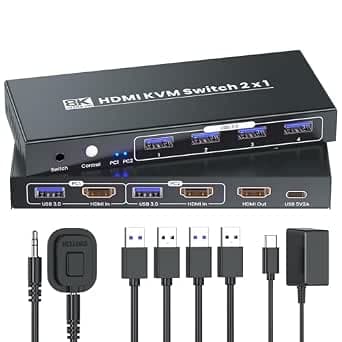
HDMI KVM Switch 1 Monitor 2 Computers, 8K60Hz 4K120Hz USB 3.0 2 Port HDMI KVM Switch for 2 PC Management Via 1 Set of Keyboard Mouse and 1 Monitor
Description
【8K60Hz 4K120Hz Resolution Support】Experience unparalleled clarity and detail with full 8K resolution support. This 2 port HDMI KVM switch ensures that your monitor displays crisp, vibrant visuals, making it ideal for tasks such as video editing, graphic design, and high - definition gaming. Note: to ensure 8K resolution, your computer, monitor, and HDMI cables must all support 8K resolutions.; 【USB 3.0 Connectivity】Equipped with USB 3.0 support, this KVM switch 1 monitor 2 computers offers fast data transfer speeds. Share files and peripherals between 2 computers without any lag or delay. The USB ports are designed for easy access and compatibility with a wide range of devices.; 【Dual Switching Modes】Easily toggle between your two computers using either the front-panel buttons on the KVM switches or an included external controller. The dual switching modes provide flexibility and convenience, allowing you to switch between systems quickly and effortlessly. Note that this KVM switch does not support hotkey switching.; 【High Compatibility】Designed with high - compatibility in mind, this dual port KVM switch works seamlessly with a wide range of computers and monitors. It supports various operating systems and hardware configurations, ensuring hassle - free setup and operation.; 【Compact Design】This KVM switch 2 computers features a compact and sleek design, making it easy to fit into any workspace without taking up too much space. The durable construction ensures long - lasting performance and reliability, even in demanding environments.
Compare the trade-offs
Similar products, side by side
A random selection of analyzed products from the same category. Different products are not necessarily interchangeable.

MLEEDA HDMI KVM Switch 1 Monitors 2 Computers 4K@60Hz,USB KVM Switches for 2 Desktops or Laptops Sharing Single Monitor and Keyboard Mouse Printer,Plug and Play,2 USB Cables Included

UGREEN HDMI KVM Switch 2 Monitors 2 Computers Support 4K@60Hz, 4 Port USB3.0 KVM Switches for 2 Computers Share Keyboard/Mouse/Hard Drives and 2 Monitor, KVM with 2 USB Cables and 4 HDMI Cable

HDMI KVM Switch 2 PC 1 Monitor Support 4K@60Hz USB 3.0 KVM Switches for 2 computers Share 1 Monitor and 4 USB 3.0 devices such as Keyboard Mouse Printer. Power Adapter and Wired Controller Included
One less thing to search
Before you buy: quick questions
¿Este conmutador KVM admite juegos con alta tasa de refresco, como 4K a 120 Hz o 1440p a 144 Hz?
Es es técnicamente capaz, pero su experiencia depende en gran medida de sus tarjetas gráficas, monitores y cables específicos. Muchos usuarios informan un funcionamiento perfecto a 4K60Hz, mientras que lograr un 4K120Hz estable puede requerir cables HDMI 2.1 certificados premium y hardware compatible. Para los juegos competitivos donde cada fotograma cuenta, algunos usuarios de Reddit sugieren investigar KVMs dedicados a juegos para un rendimiento garantizado.
¿La configuración es realmente plug-and-play o es complicada?
La mayoría de los usuarios encuentra sencillo el cambio básico de video y USB. Sin embargo, para usar todos los puertos USB 3.0 a máxima velocidad, es posible que necesite instalar un controlador pequeño en cada computadora conectada, un paso que algunos consideran que falta en el manual. Un consejo común de los foros en línea es conectar todo *antes* de encender las PC para una configuración más fluida.
¿Cuál es el problema con los cables y la alimentación?
¡Prepárate para la gestión de cables! El conmutador requiere un adaptador de corriente externo (incluido) y dos cables específicos USB-B a USB-A para conectarse a tus computadoras. Los revisores suelen mencionar que los cables incluidos son funcionales pero cortos; para un escritorio ordenado, es posible que desees comprar por separado cables HDMI y USB más largos y de mayor calidad.
He leído algunas reseñas sobre unidades que fallan. ¿Cómo son la garantía y el soporte?
Entendemos que la fiabilidad es una prioridad. Este producto suele incluir una garantía limitada del fabricante. Recomendamos encarecidamente registrar su compra y guardar el recibo. Aunque muchos usuarios tienen una experiencia impecable, si encuentra algún problema, contactar directamente con el servicio de atención posventa del vendedor es la vía más rápida para obtener una solución o un reemplazo.
¿Para quién es más adecuado este conmutador KVM y quién podría buscar otras opciones?
Este conmutador ofrece una excelente relación calidad-precio para usuarios que necesitan gestionar dos ordenadores (como un PC de trabajo y personal) con un solo teclado, ratón y monitor a 4K60Hz. Es ideal para trabajadores híbridos, streamers y productividad general. Si su principal necesidad es un paso de señal impecable para juegos con alta tasa de refresco o requiere una configuración mínima absoluta sin instalación de controladores, quizás desee considerar un conmutador KVM especializado de gama alta.
From a similar, more-reviewed product in this category: Verbatim Blu-Ray DVD-Drive 43888 - External - Black
Does this drive work with 4K Ultra HD Blu-ray discs?
Yes. Reviewers report backing up and ripping dozens of 4K UHD Blu-rays with it, and the manufacturer states it supports 4K Ultra HD and BDXL up to 100 GB.
Is it compatible with Windows and macOS?
The manufacturer lists Windows and macOS as supported operating systems, and reviewers describe using it successfully on a Windows 10 laptop, Windows 11 PC, and MacBook.
Do I need extra software to play Blu-ray movies?
Yes. Reviewers note the drive does not play Blu-ray movies straight out of the box and that you must obtain separate playback software, since Windows 11 has no built-in Blu-ray or 4K playback.
How does it connect to a computer?
It uses a USB 3.2 Gen 1 interface and comes with a USB-C to USB-A cable plus a USB-A to USB-C adapter, so it can run off a single USB-C cable.
Is the drive noisy or slow?
Reviewers describe it as relatively quiet in operation but louder when a disc is inserted, and note it is slower than a desktop drive, which they say is expected for slim drives.
Answers are limited to the manufacturer's listing and the reviews we analysed. Questions those sources cannot support are not answered here.
Transparent by design