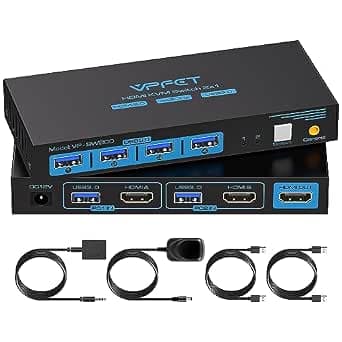
HDMI KVM Switch 2 PC 1 Monitor Support 4K@60Hz USB 3.0 KVM Switches for 2 computers Share 1 Monitor and 4 USB 3.0 devices such as Keyboard Mouse Printer. Power Adapter and Wired Controller Included
Description
【HDMI KVM Switch 2 Port】This KVM Switch 1 monitors 2 computers supports sharing a set of mouse keyboard printers and quickly switch between them with the push of a button, improving office efficiency and gaming experience.; 【4K KVM Switcher HDMI】The KVM switch HDMI supports resolutions up to 4K@60Hz, allowing images to be displayed more beautifully and realistically, and colours will be more vivid and dynamic. If you want to achieve the highest effect, please ensure that both your input device, HDMI cable and output device support 4K@60Hz.; 【USB 3.0 KVM Switcher】The KVM Switch usb comes with 4 USB 3.0 ports with transfer rates up to 5Gbps for connecting peripherals such as mice, keyboards, printers, webcams, and USB sticks with backward compatibility with USB 2.0, 1.1, and 1.0.Note: It doesn't support USB devices with more than 10W power; 【Easy Handling】Two push-button switching options make it easy to switch sources. The desktop cable controller hides the KVM switch for a cleaner, more efficient desktop. LED indicator shows which port is active when the KVM switch is connected to which source. Note: Keyboard shortcuts (hotkeys) are not supported for switching.; 【Stable Work】The KVM switch is equipped with a 12V external power adapter, which does not need to obtain current from the USB port of the computer host (the current provided by the host is small, and it cannot support USB devices such as hard disks and cameras). With the external power design, USB devices can obtain a stable working environment through the switch.; 【After-sales service】If you have any questions during use, please contact us. We have a professional technical team to help you solve your difficulties. Within 12 months, we will replace the switch at no charge.; 【Product Use Prerequisites】: 1. Please make sure that both of your computers or laptops should have 1 HDMI output port and 1 USB A output port; 2. Please make sure that your monitor has an HDMI input port; 3. The KVM switch needs to use an HDMI cable with a length of no more than 6 feet in order to ensure that video signals can be transmitted; 4. The use of DP to HDMI cables is not recommended, USB C to USB A cable, mouse and keyboard with macro function will be incompatible.
Compare the trade-offs
Similar products, side by side
A random selection of analyzed products from the same category. Different products are not necessarily interchangeable.

HDMI KVM Switch 1 Monitor 2 Computers, 8K60Hz 4K120Hz USB 3.0 2 Port HDMI KVM Switch for 2 PC Management Via 1 Set of Keyboard Mouse and 1 Monitor

UGREEN HDMI KVM Switch 2 Monitors 2 Computers Support 4K@60Hz, 4 Port USB3.0 KVM Switches for 2 Computers Share Keyboard/Mouse/Hard Drives and 2 Monitor, KVM with 2 USB Cables and 4 HDMI Cable

MLEEDA HDMI KVM Switch 1 Monitors 2 Computers 4K@60Hz,USB KVM Switches for 2 Desktops or Laptops Sharing Single Monitor and Keyboard Mouse Printer,Plug and Play,2 USB Cables Included
One less thing to search
Before you buy: quick questions
Does the 4K@60Hz support work reliably, or are there handshake issues like some users report?
For the vast majority of users, the 4K@60Hz support is stable and excellent. A small number of reviewers with specific monitor/GPU combinations reported occasional display handshake issues when switching. This is often resolved by ensuring your monitor's EDID settings are correct or using a quick power cycle of the monitor. The product reliably delivers the promised resolution for standard setups.
Can I use the USB 3.0 ports for data transfer with devices like external hard drives or webcams?
The USB ports are primarily designed and optimized for Human Interface Devices (HID) like keyboards, mice, and printers. While some users connect webcams successfully, using it for high-speed data transfer (e.g., with an external SSD) is not recommended, as speeds may be limited. For best results, connect data-intensive devices directly to your computer.
How is the build quality? I've seen comments about the power adapter and button sensitivity.
The core KVM unit itself receives consistent praise for its solid performance. Feedback on accessories is mixed: the included power adapter and cables function correctly for most, but some tech enthusiasts prefer using their own for peace of mind. The wired switch button is convenient, but its sensitivity means it's best placed where it won't be accidentally bumped.
Who is this KVM switch NOT ideal for?
This 2-port switch is perfect for most users with two computers and one monitor. However, you might want to consider a different solution if: you have 3 or more computers, need USB-C connectivity, require ultra-high refresh rates (e.g., 144Hz+) for gaming, or demand enterprise-level, 24/7 reliability. For these needs, dedicated multi-port KVMs or software-based solutions may be better.
What's included in the box, and what if I receive a unit that doesn't work?
The box includes the KVM switch unit, a wired controller, a power adapter, and one HDMI cable. It's a complete out-of-the-box solution. While the overwhelming majority of units work flawlessly out of the box, as with any electronics, there is a small chance of a DOA (Dead On Arrival) unit. The seller has a generally responsive customer service process for replacements under warranty, as noted in several resolved negative reviews. We recommend testing the unit soon after purchase.
From a similar, more-reviewed product in this category: Verbatim Blu-Ray DVD-Drive 43888 - External - Black
Does this drive work with 4K Ultra HD Blu-ray discs?
Yes. Reviewers report backing up and ripping dozens of 4K UHD Blu-rays with it, and the manufacturer states it supports 4K Ultra HD and BDXL up to 100 GB.
Is it compatible with Windows and macOS?
The manufacturer lists Windows and macOS as supported operating systems, and reviewers describe using it successfully on a Windows 10 laptop, Windows 11 PC, and MacBook.
Do I need extra software to play Blu-ray movies?
Yes. Reviewers note the drive does not play Blu-ray movies straight out of the box and that you must obtain separate playback software, since Windows 11 has no built-in Blu-ray or 4K playback.
How does it connect to a computer?
It uses a USB 3.2 Gen 1 interface and comes with a USB-C to USB-A cable plus a USB-A to USB-C adapter, so it can run off a single USB-C cable.
Is the drive noisy or slow?
Reviewers describe it as relatively quiet in operation but louder when a disc is inserted, and note it is slower than a desktop drive, which they say is expected for slim drives.
Answers are limited to the manufacturer's listing and the reviews we analysed. Questions those sources cannot support are not answered here.
Transparent by design