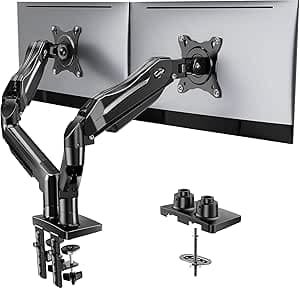
HUANUO FlowLift™ Dual Monitor Stand, Fully Adjustable Gaming Monitor Desk Mount for 13–32″ Computer Screens, Full Motion VESA 75x75/100x100 with C-Clamp & Grommet Base, Each Arm Holds 4.4 to 19.8 lbs
Description
Compatible with Wide Screens - To ensure compatibility with the dual monitor mount, your each monitor must meet three conditions at the same time: First, computer screens size range: 13 to 32 inches. Second, screen weight range: 4.4 to 19.8 lbs. Third, the back of the monitor screen must have VESA mounting holes with a pitch of 75x75mm or 100x100mm.; Regarding the compatibility with desks - Your desk must meet three conditions at the same time: First, desk material: Only wooden desks are recommended, plastic or glass desks cannot be used. Second, desk thickness range: 0.59" - 3.54". Third, the bottom of the desk should not have any cross beams or panels, as this will interfere with installation. We recommend carefully checking that your desk and monitors meets all above conditions before purchasing.; Dual C-Clamp Hold - Worried your dual monitors might wobble or slip? Our upgraded base uses a larger platform plus a dual C-clamp structure to lock the dual monitor arm firmly to your desk. Each arm safely keeps your screens steady while you type, click and game—no shaking, no sliding, just a clean and secure setup you can trust every day. It also provides Grommet Mounting installation choice, both options ensure stable and secure fixation for your 0.59" - 3.54" desk.; Full-Motion Adjustment For Comfortable View - Pull the screen closer when you’re deep in a spreadsheet, push it back to watch videos, or rotate to portrait for coding — moving everything smoothly with just one hand. The monitor stand offers +85°/-50° tilt, ±90° swivel and 360° rotation. Raise your monitor up to 16.2″ to support a healthy sitting posture. Whether you’re working from home, gaming through the night, or switching between video calls and documents, getting the screens to your natural line of sight helps relieve neck, shoulder and back strain so you can stay focused longer with less fatigue.; Keep Your Desk Organized: By lifting both screens off the desktop, this dual monitor stand opens up valuable space for your keyboard, notebook, docking station or a simple, clutter-free work area. Built-in cable management guides wires along the arms, keeping cords out of sight and out of the way. Enjoy a tidy, modern workstation that looks as good as it feels to use.
Compare the trade-offs
Similar products, side by side
A random selection of analyzed products from the same category. Different products are not necessarily interchangeable.

Amazon Basics Adjustable Single Computer Monitor Desk Mount Arm, Holds up to 32" and Ultrawide Monitors, Black

Pixio PS1S Wave Purple Single Monitor Arm Stand Desk Mount - Fits up to 32 inches Monitors and up to 19.8lbs. VESA Compatibility and Integrated Cable Management

MOUNT PRO Laptop Arm Desk Mount for Max 22lbs 17" Laptop & Max 32" Monitor
One less thing to search
Before you buy: quick questions
I have two 27-inch monitors. Will this stand be stable, or will they wobble when I type?
For two standard 27-inch monitors, this stand provides good stability for most users. Based on social feedback, some users with heavier gaming keyboards or who type very vigorously may notice a slight screen movement. Ensuring each monitor is well within the 4.4-19.8 lbs weight limit and taking time to properly tighten all tension knobs during installation minimizes this. If absolute zero wobble is your top priority, you may want to consider a premium-priced alternative.
How difficult is the assembly really? I've seen mixed comments online.
Assembly is manageable but can be a two-person job for some. The most common feedback is that attaching the arms to the base and adjusting the gas spring tension requires a bit of patience and strength. We recommend watching a setup video on YouTube (many creators have tutorials) before you begin. Having a second pair of hands to hold the arms steady while you tighten the bolts is very helpful.
Are the included screws long enough for all monitors?
The included VESA plate screws are standard M4 lengths. However, a frequent note from Reddit and Amazon reviewers is that monitors with recessed mounting points or thicker back panels may require longer screws, which are inexpensive and available at any hardware store. We recommend checking your monitor's manual for VESA screw depth requirements before installation.
I have a nice wooden desk. Will the C-clamp damage it?
The C-clamp includes a protective rubber pad to distribute pressure. For most desks, this is sufficient. However, users on platforms like TikTok with softer woods or veneer surfaces (like some IKEA desks) have reported indentations over time. If you are concerned, we strongly recommend using the grommet mount option (requires a hole in your desk) as it distributes weight more evenly and eliminates clamp pressure entirely.
This is much cheaper than brands like Ergotron. What's the main trade-off?
The primary trade-off is in materials and precision engineering. The HUANUO FlowLift offers excellent value and most of the same range of motion as premium brands. The difference often noted by tech reviewers is that premium arms may offer slightly smoother, finer adjustments and marginally better stability at the very top of the weight capacity. For the vast majority of users with monitors under 30 inches, the HUANUO provides fantastic functionality at a fraction of the cost.
From a similar, more-reviewed product in this category: FORGING MOUNT Heavy Duty Single Monitor Arm Stand Fits 17-42" Computer Screen, Adjustable Gas Spring Desk Mount Holds up to 33lbs, Full Motion with Clamp/Grommet Base, VESA Mount 75x75/100x100
Will this arm really hold a 40" or 43" monitor without sagging?
Yes — reviewers regularly mount 40" and 43" displays and report a secure, stable hold. Just keep your monitor (plus the VESA plate) under the 33 lb limit, and expect to spend a few minutes tightening the gas spring tension the first time. Once dialed in, it stays put.
How difficult is the tension adjustment? I've seen complaints about it.
It's the most common gripe, and honestly it's fair — the arm ships at minimum tension, so heavier screens need many turns of the included Allen key before they hold position. It's not hard, just tedious. Do it *before* mounting the monitor if you can, and you'll save yourself some frustration.
Will the clamp fit my desk? What if it doesn't?
The C-clamp works on most desks up to about 2" thick with a flat underside, while the grommet base is the better choice for thicker tops or desks with a metal frame or lip underneath. If you have a glass desk or an unusually beveled edge, measure first — and check the return policy before drilling anything.
Is installation really as easy as people say?
For most users, yes — 15 to 30 minutes solo with the included hardware and instructions. You'll need a Phillips screwdriver and the supplied Allen key. The only step that trips people up is tension tuning, and having a second person help lift larger monitors onto the plate makes it much smoother.
Is it worth it compared to cheaper arms or premium brands like Ergotron?
If you want heavy-duty capacity, both clamp and grommet mounting, and smooth gas-spring motion without paying Ergotron prices, this is a strong value pick — many TikTok and YouTube reviewers call it a "budget HX." If you need tool-free tension adjustment or plan to mount something over 35 lbs, step up to a premium arm instead.
Answers are limited to the manufacturer's listing and the reviews we analysed. Questions those sources cannot support are not answered here.
Transparent by design