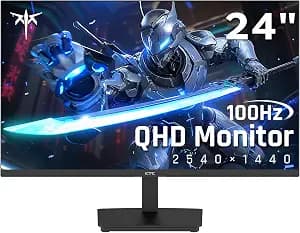
KTC 24 Inch QHD 2560x1440 IPS Computer Monitor, 100Hz Zero-Frame 2K Gaming Office Monitor, Adaptive Sync, HDR10, VESA, Tilt Adjustable, Low Blue Light, DisplayPort, HDMI, H24T27
Description
【Easily Switch Between Work and Entertainment】KTC 24 inch monitor has 100Hz refresh rate, FreeSync/G-Sync compatible, which eliminates tearing and ghosting in fast-paced actions, bringing smooth office and gaming experience.; 【Excellent Visual Experience】QHD 1440p IPS display features a three-sided borderless design for crisp, vivid images. HDR10 brings richer details of bright and dark images, and 99% sRGB and 8-bit display colors make images more realistic and engaging.; 【Flexible Connectivity】KTC Gaming PC monitor is equipped with HDMI2.0+DP1.4+USB2.0 ports and 100x100mm VESA wall-mounting mode, which can achieve seamless screen sharing, image/video editing, movie watching and gaming.; 【Eye Protection and Ergonomic Design】Low blue light mode protects your eyes, and flicker-free technology further minimizes eye fatigue. The tilt can be adjusted from -5°to 15°to find the ideal viewing angle.; 【Reliable Service】KTC provide quality products and services.Enjoy our 30-day 100% money back service policy on Amazon.Our dedicated after-sales team values your experience and will assist you with any questions.
Compare the trade-offs
Similar products, side by side
A random selection of analyzed products from the same category. Different products are not necessarily interchangeable.

UPERFECT OLED Portable Monitor 16", 3K 2880x1800 | 120Hz | 0.1ms Portable Gaming Monitor, 500 Nits |100% DCI-P3 | 100000:1 Contrast | Ultra-Slim Design for Laptop Mini PC Phone Game Consoles Ucolor O2

ROADOM 7" Touchscreen Monitor, 1024x600 IPS Raspberry Pi Screen, HDMI

ASUS ROG Swift 32” 4K OLED Gaming Monitor (PG32UCDM) - UHD (3840 x 2160), QD-OLED, 240Hz, 0.03ms, G-SYNC Compatible, Custom Heatsink, Graphene Film, 99% DCI-P3, True 10-bit, 90W USB-C
One less thing to search
Before you buy: quick questions
Is the stand as wobbly and cheap as some reviews say? Should I plan to buy a separate mount?
Many users on Reddit and YouTube note the included stand is functional but basic—it offers tilt adjustment but no height, swivel, or pivot. It can feel less stable than premium stands. If a rock-solid, ergonomic setup is important to you, we recommend budgeting for a compatible VESA mount (this monitor supports standard 100x100mm patterns), which many buyers happily do.
How good is the HDR10 feature really? I’ve seen mixed comments online.
It's important to set realistic expectations. While the monitor accepts an HDR signal, its peak brightness and lack of local dimming limit the true HDR experience. Most social media reviewers treat it as a nice bonus for compatible games/videos but advise buying this monitor for its excellent SDR (Standard Dynamic Range) performance, vibrant IPS colors, and 100Hz smoothness, not for flagship HDR.
I’m considering this for my Xbox Series S or a laptop with integrated graphics. Is 1440p a good fit?
Absolutely! The 2560x1440 resolution is a sweet spot for the Series S and modern laptops. The monitor's Adaptive Sync helps prevent screen tearing during gaming. For productivity, the sharp QHD display gives you much more workspace than 1080p. It's a popular choice for this exact hybrid use-case of casual gaming and study/work.
KTC isn't as well-known as Dell or LG. How is the quality control and warranty support?
Based on overall customer reviews, the vast majority of units arrive perfectly. KTC offers a standard manufacturer's warranty (check your seller's page for specific duration). The high 4.6-star average from over 500 reviews indicates reliable performance for most. As with any monitor, we recommend checking your unit upon arrival for any dead pixels or abnormal backlight bleed.
This seems like great value, but who would be better off with a different monitor?
This monitor is a fantastic all-rounder for budget-aware users. However, if your top priority is a fully adjustable, premium-feeling stand out of the box, you may want to look at brands like Dell. Similarly, if you are a competitive esports player seeking 240Hz+, this isn't designed for that. But for students, hybrid home office/gamers, and anyone wanting a sharp 1440p upgrade, it's consistently praised as an excellent choice.
From a similar, more-reviewed product in this category: KOORUI 24 Inch Gaming Monitor, 180Hz 1080P VA Display with 3000:1 Contrast
Does this monitor really run at 180Hz, and what do I need to enable it?
Yes — it's a native 180Hz panel, but you'll need to switch it on manually. Connect via the included HDMI cable (or a DisplayPort-capable setup), then set 180Hz in your GPU's display settings; it defaults to a lower refresh rate out of the box. Many Reddit and YouTube users note that enabling Adaptive Sync/FreeSync alongside it gives the smoothest experience, and it works with both AMD and NVIDIA cards.
How does the VA panel perform for gaming and everyday work?
The 3000:1 contrast gives noticeably deeper blacks than typical IPS budget monitors, which shines in dark game scenes and movies. For fast-paced competitive shooters, some TikTok and Reddit users mention mild ghosting/smearing in dark transitions — it's great for casual gaming, students, and office work, but color-critical creators or hardcore FPS players may prefer an IPS panel.
The stand looks basic — can I adjust the height or mount it?
Correct, the included stand only tilts (-5° to 20°) and doesn't offer height, swivel, or pivot adjustment, and a few users find the base slightly wobbly. The good news: it's VESA 100×100mm compatible, so a monitor arm or desk mount solves ergonomics entirely — a popular fix among dual-monitor and dorm-room setups.
What if I receive a unit with a dead pixel or backlight bleed?
Budget monitors can vary unit to unit, and some buyers report stuck pixels or corner bleed — but KOORUI backs it with a 3-year manufacturer warranty. If your unit arrives defective, contact the seller for a replacement or refund promptly; most users who did so report a smooth resolution, so inspect the screen within the return window.
Is it good value, and who is it best suited for?
At around $120, it's widely praised as one of the best budget 180Hz options — ideal for students, casual gamers, home-office users, and compact or dual-monitor setups. Just set expectations: no built-in speakers, a single HDMI plus VGA, and basic ergonomics. If you need height adjustment, color accuracy, or built-in audio, consider spending more on an IPS alternative.
Answers are limited to the manufacturer's listing and the reviews we analysed. Questions those sources cannot support are not answered here.
Transparent by design