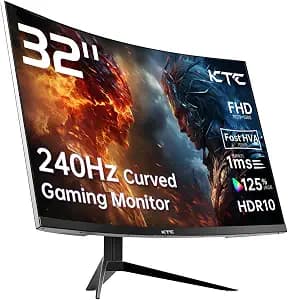
KTC 32 inch 240Hz Curved Gaming Monitor 1500R 1080P 125% sRGB 1ms, Freesync/G-sync HDR10,HDMI/DP/USB Ports VESA,Tilt Adjustable,Xbox PS5 Switch,Black
Description
240Hz Refresh Rate:Stay above the pack with monitor 240hz , giving you an edge in performance as frames transition instantly; 1ms Ultra-Fast Response Time:Enjoy instant color changes with a 1ms response time, eliminating ghosting. This gaming monitor 32 inch ensures smooth, responsive gameplay for competitive gaming; Vivid Visuals for Enhanced Viewing:The KTC 32" curved gaming monitor Boasting a FHD(1920x1080P)resolution and THE 240hz monitor displays 125% SRGB color gamut and 16.7 million display colors. It also features a remarkable contrast ratio of 3500:1, providing exceptionally clear and distinct images; Multiple Ports and Flexible Connectivity:Robust connectivity options include HDMI 2.0 x2, DisplayPort 1.4 x1 and USB 2.0 x1 for maximum convenience, making the pc monitor compatible with a wide range of devices, including PCs, laptops, TV boxes, and game consoles; Eye-Care & Ergonomic Design & VESA:Protect your eyes with the curved monitor 32 inch 's Anti-Bluelight feature, reducing harmful blue light exposure. Anti-glare and anti-flicker technology further minimize eye strain. Easy-to-install VESA mount (screw hole: 4 holes with M4 x 8 mm) supports quick installation and removal. Adjust the pc monitor tilt from 5° forward to 15° backward to find your ideal viewing angle
Compare the trade-offs
Similar products, side by side
A random selection of analyzed products from the same category. Different products are not necessarily interchangeable.

ASUS ROG Strix 27” 1440P OLED Gaming Monitor (XG27AQDMG) - QHD, Glossy OLED, 240Hz, 0.03ms, Custom Heatsink, Anti-flicker,Uniform Brightness, G-SYNC Compatible, 99% DCI-P3, DisplayWidget, 3yr warranty

ASUS VA27DQSB 27” Monitor, 1080P Full HD, 75Hz, IPS, Adaptive-Sync, Eye Care, HDMI DisplayPort VGA USB Hub, Frameless, Ergonomic Design, VESA Wall Mountable,Black

8.8 Inch Mini Touchscreen Stretched Bar Monitor 1920 * 480, Metal Shell IPS Portable Touch Display, HDMI, USB-C, Small Screen for Raspberry Pi Laptop Aida64 GPU CPU RAM Monitoring PC Case
One less thing to search
Before you buy: quick questions
Is 1080p resolution on a 32-inch screen too pixelated for everyday use or work?
This is the most common consideration. For fast-paced gaming, the 240Hz refresh rate is the star, and the pixel density is generally not an issue. However, if you plan to do a lot of text-based work, coding, or detailed photo editing, you may find text and icons less sharp than on a smaller 1080p or a 1440p monitor. Many users love it for gaming but use a second monitor for productivity tasks.
How limited is the stand, and will I need to buy a separate mount?
The included stand only offers tilt adjustment (forward/backward). It does not have height, swivel, or pivot functions. If your desk setup requires you to raise the monitor or adjust its angle significantly, you will likely need a third-party VESA mount (it's compatible with standard 100x100mm brackets). This is a frequent point mentioned in setup videos and reviews.
Does the G-Sync compatibility work well with NVIDIA graphics cards?
Yes. While it's officially a FreeSync monitor, its Adaptive-Sync works reliably with compatible NVIDIA GeForce GTX 10-series and newer cards under the "G-Sync Compatible" mode. Users on forums like Reddit report a smooth, tear-free experience once enabled through the NVIDIA Control Panel. Just ensure you're using a DisplayPort cable for the best results.
What's the real story with HDR on this monitor?
The monitor accepts an HDR10 signal, which can make supported games look more vibrant. However, as noted in many detailed reviews, it lacks the high peak brightness and local dimming zones found in premium HDR displays. Think of it as a nice bonus feature that can enhance color range, but don't expect the dramatic "HDR effect" you see on high-end TVs. Most users are very happy with its standard SDR performance.
Is this monitor a good fit for the Xbox Series X/S or PlayStation 5?
It's an excellent match for console gaming, especially for titles that prioritize high frame rates. You can enjoy 120Hz gameplay (the current max for these consoles) with smooth Adaptive-Sync over HDMI. The large, curved screen is immersive for single-player games. Note: The console will not output 240Hz, as they are capped at 120Hz, but the monitor will handle it perfectly. Also, remember you'll need external speakers or a headset, as it has none built-in.
From a similar, more-reviewed product in this category: KOORUI 24 Inch Gaming Monitor, 180Hz 1080P VA Display with 3000:1 Contrast
Does this monitor really run at 180Hz, and what do I need to enable it?
Yes — it's a native 180Hz panel, but you'll need to switch it on manually. Connect via the included HDMI cable (or a DisplayPort-capable setup), then set 180Hz in your GPU's display settings; it defaults to a lower refresh rate out of the box. Many Reddit and YouTube users note that enabling Adaptive Sync/FreeSync alongside it gives the smoothest experience, and it works with both AMD and NVIDIA cards.
How does the VA panel perform for gaming and everyday work?
The 3000:1 contrast gives noticeably deeper blacks than typical IPS budget monitors, which shines in dark game scenes and movies. For fast-paced competitive shooters, some TikTok and Reddit users mention mild ghosting/smearing in dark transitions — it's great for casual gaming, students, and office work, but color-critical creators or hardcore FPS players may prefer an IPS panel.
The stand looks basic — can I adjust the height or mount it?
Correct, the included stand only tilts (-5° to 20°) and doesn't offer height, swivel, or pivot adjustment, and a few users find the base slightly wobbly. The good news: it's VESA 100×100mm compatible, so a monitor arm or desk mount solves ergonomics entirely — a popular fix among dual-monitor and dorm-room setups.
What if I receive a unit with a dead pixel or backlight bleed?
Budget monitors can vary unit to unit, and some buyers report stuck pixels or corner bleed — but KOORUI backs it with a 3-year manufacturer warranty. If your unit arrives defective, contact the seller for a replacement or refund promptly; most users who did so report a smooth resolution, so inspect the screen within the return window.
Is it good value, and who is it best suited for?
At around $120, it's widely praised as one of the best budget 180Hz options — ideal for students, casual gamers, home-office users, and compact or dual-monitor setups. Just set expectations: no built-in speakers, a single HDMI plus VGA, and basic ergonomics. If you need height adjustment, color accuracy, or built-in audio, consider spending more on an IPS alternative.
Answers are limited to the manufacturer's listing and the reviews we analysed. Questions those sources cannot support are not answered here.
Transparent by design