What people like
Easy, reliable switching between two computers
Reviewers share one keyboard, mouse and USB devices between a laptop and desktop; switching is quick and the wired remote keeps the main unit out of the way.
The 30-second read
What people like
Reviewers share one keyboard, mouse and USB devices between a laptop and desktop; switching is quick and the wired remote keeps the main unit out of the way.
The main watch-out
One reviewer says it didn't work with HDMI monitors, another notes older analog monitors needed upgrading, and a few seconds of switching delay was mentioned.
Before you choose
The provided computer cables are only around 2 ft, so a reviewer with a PC off to the side had to buy a longer cable.
From a similar, more-reviewed product in this category: Unitek HDMI KVM Switch 1 Monitor 2 Computers with Power Adapter
What people like
Reviewers appreciate how easily this KVM lets two computers share one monitor, keyboard, and mouse, with several praising its compact design, solid build quality, and included cables.
The main watch-out
Multiple reviewers report that switching between computers is inconvenient because there is no working hotkey or dedicated switch, forcing them to reach the unit or use software.
Before you choose
Before buying, confirm the port layout and peripheral support fit your setup, note that switching is not hotkey-based, and consider that some find the price high unless on sale.
Description
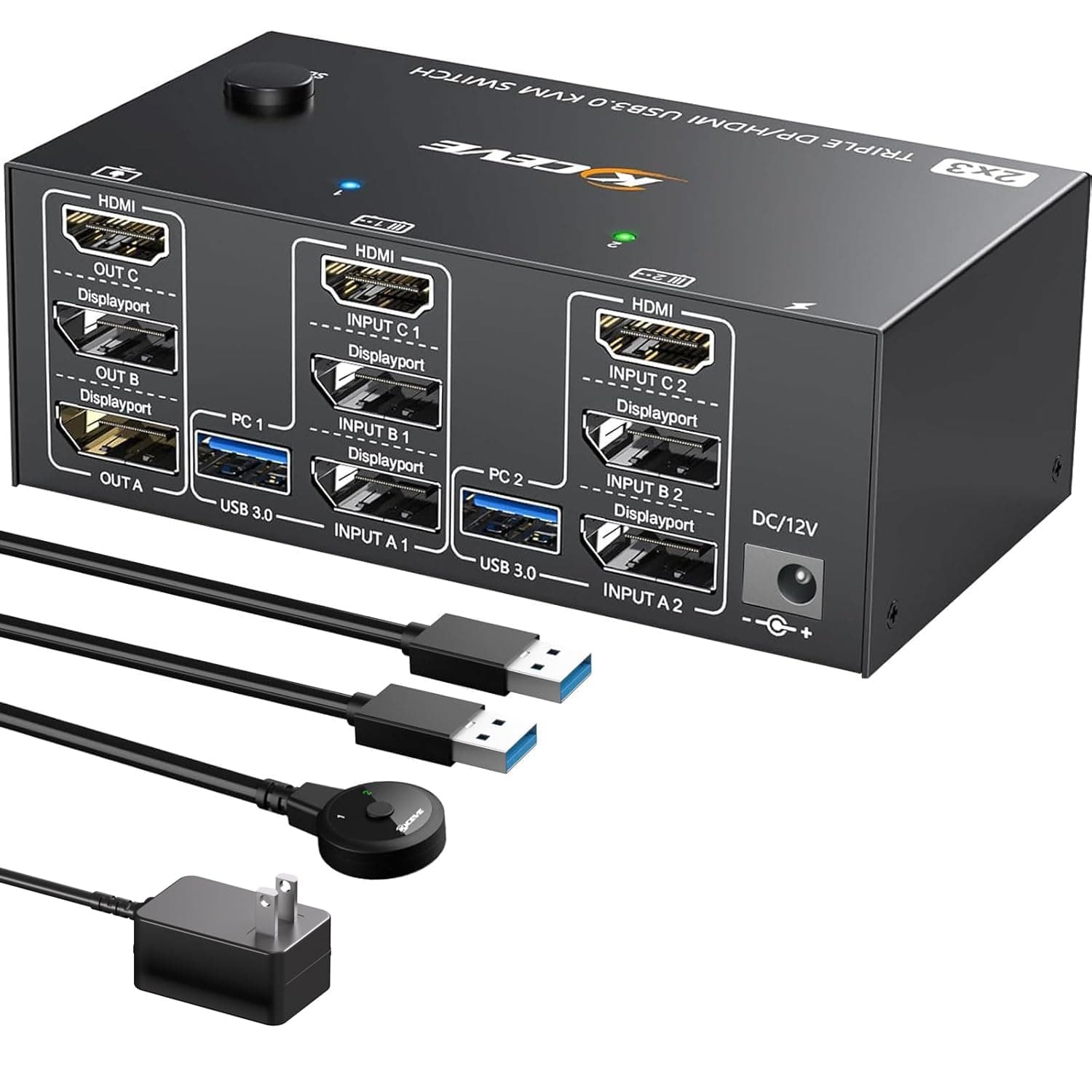
Product description 3 Monitors KVM Switch -- 2 Computers Share 3 Monitors and 4 USB Devices The video showcases the product in use. The video guides you through product setup. The video compares multiple products. The video shows the product being unpacked. Video Player is loading. Click to play video Play Mute Current Time 0:00 / Duration 1:05 Loaded : 4.62% 0:00 Stream Type LIVE Seek to live, currently behind live LIVE Remaining Time - 1:05 1x Playback Rate Chapters Chapters Descriptions descriptions off , selected Captions Captions off , selected Audio Track default , selected Fullscreen This is a modal window. KVM switch 3 monitors 2 computers Supports mirror mode and extended mode output Mirror mode: 3 monitors output the same screen How to set the mirror mode Windows OS: Press the shortcut key "WIN+P" and then select "mirror" below; Mac OS: Select [Apple Icon] [System Preferences], click [Display] [Arrange], and then check [Mirror Display]; Extended mode: 3 monitors output different screens How to set the extended mode Windows OS: Press the shortcut key "WIN+P" and then select "Extension" below; Mac OS: When [Mirror Display] is unchecked, "Extended Mode" can be achieved. Connection steps: Step 1. Connect 2*DP cables+1*HDMI+1*USB-A cable between PC 1 and KVM (INPUT A1, INPUT B1,INPUT C1,USB 3.0). Step 2. Connect 2*DP cables+1*HDMI+1*USB-A cable between PC 2 and KVM (INPUT A2, INPUT B2,INPUT C2,USB 3.0). Step 3. Connect 2*DP+1*HDMI cables between the KVM (OUT A, OUT B,OUT C) and your 3 monitors. Step 4. Connect the DC12V power adapter. Step 5. Insert your USB devices(keyboard mouse and U disk) into the USB port on the KVM. The video showcases the product in use. The video guides you through product setup. The video compares multiple products. The video shows the product being unpacked. Video Player is loading. Click to play video Play Mute Current Time 0:00 / Duration 0:32 Loaded : 9.38% 0:00 Stream Type LIVE Seek to live, currently behind live LIVE Remaining Time - 0:32 1x Playback Rate Chapters Chapters Descriptions descriptions off , selected Captions Captions off , selected Audio Track default , selected Fullscreen This is a modal window. displayport KVM switch 3 monitors 2 computers Previous page Next page 1 8K Ultra HD 2 5 Gbps transfer 3 Excellent compatibility Previous page Next page Advantages: 2 computers share 4 peripheral USB devices (keyboard mouse,printer, USB drive, etc) and 3 monitors. KVM triple monitors support extended and mirror display. Support wired or wireless keyboard and mouse. Cross support most major OS including Windows, Linux, Mac OS. Switching modes: Button switch and wired remote (1.5m),switch between 2 computers just need 2-4 seconds, fast and convenient. 1*HDMI+2* Displayport KVM Switch : 𝐇𝐃𝐌𝐈 support resolution up to 8K@60Hz/4K@60Hz; 𝐃𝐢𝐬𝐩𝐥𝐚𝐲 𝐩𝐨𝐫𝐭 support resolution up to 8K@30Hz/4K@144Hz. NOTE: Macbook Air and Macbook pro13 with M1 and M2 chips do not support expanded 3-screen output. Before purchasing this 3 monitor KVM switch, please make sure that connecting your computer directly to 3 monitors can work normally,Otherwise, the KVM will not be available. Not supporting EDID emulation. Attention Input Tip: 2*DP+1*HDMI+1*USB (for PC 1,PC 2). Desktop: The graphics card is required to have at least 2*DP+1*HDMI ports;Laptop: It is required to be able to expand at least 2*DP+1*HDMI ports (for use with a USB C docking station) Output Tip: 2*DP+1*HDMI+4*USB 3.0 (for 3 monitor and peripheral USB devices).It is recommended to use 2*DP monitor + 1 HDMI monitor, supporting DP to HDMI cable or converter. Resolution HDMI: up to 8K@60Hz;Displayport:up to 8K@30Hz,The final resolution also depends on your computer, monitor and the version and length of DP and HDMI cables About Power Supply: KVM switch can be powered by USB cables connected to the 2 computers. Using the equipped DC12V power adapter can effectively solve the problem of insufficient power supply caused by connecting high-power USB devices. Important Note The use of 3 monitors KVM switch will be affected by cables. If the cable version is lower or the cable is too long, the monitor will not work. It is recommended to use HDMI2.0 and DP1.4 version cables to connect the KVM, and the length of a single cable should not exceed 1.5m. Package Content: 1x Triple Monitor KVM Switch, 2x USB 3.0 Cable, 1x Power Adapter, 1x Wired Remote, 1x User's Manual.1 year warr-anty, including replacement with new products
Compare the trade-offs
A random selection of analyzed products from the same category. Different products are not necessarily interchangeable.

KCEVE KVM Switch 2 Computer 1 Monitor Displayport 4K@240Hz 8K@60Hz, USB 3.0 KVM Switch Displayport 2.1 for 2 PC Share 4 USB3.0 Devices Keyboard Mouse, with USB 3.0 Cable,Wired Remote and Power Supply

Unitek HDMI KVM Switch 1 Monitor 2 Computers with Power Adapter
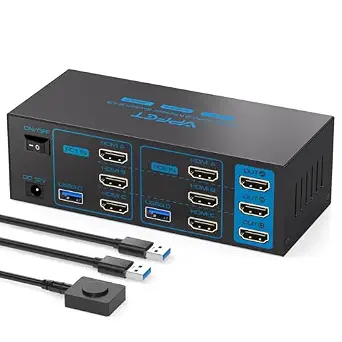
USB3.0 KVM Switch 2 Ports with 4 USB Ports for 2 Computers Sharing Triple Monitor
Check the evidence
Included does not mean verified authentic. Flagged does not mean proven fake. These are analytical classifications.
Showing 3 illustrative excerpts, not the complete review set.
I wish I could recommend it..
“I'm a vine verified reviewer but I am not just here to sweet talk other people's products in exchange for anything- I only choose that which I am quite knowledgeable about, and I only give my truest of takes- so strap in. Installation is about as easy as however you already had your computer cable managed. If you're a clean boy like I am., it'll be easy. If you are a chaos gremlin with your wiring... maybe take this as an opportunity to clean up! I installed mine using the USB cables provide provided and the highest quality HDMI cables that I have in stock. On paper, this sounds like a lovely proposition- decent price for such an accessory, a KVM is not usually the cheapest of accessory given it's slightly edge bound to use case. It supports 4K 120hz. Excellent price point for this claim. It even boasts the opportunity for three high-speed USB devices shared between device devices. It's a holy Grail of connectivity. Technically, this thing looks like a dream. I'm able to switch between my MacBook Pro and my high-powered graphic design workstation (pc) on my LG C3 4k OLED. I have a high-end set of LG keyboard and mouse that require proprietary dongle and cables- and they work flawlessly between both computer computers. I am able to display HDR, and even game at refresh rates (120FPS)... But not without constant graphical artifacting and glitching.. Talking about those scary, white banding artifacts. I'm talking flashes of static.. I'm talking those trippy rainbow artifacts when your bandwidth is screwy between HDMI devices.. My MacBook, even though attached to stable power, throws an error, saying that one of the USB ports is drawing too much voltage when this is connected as well. Odd, considering I am using a powered dock, and this KVM is touting its own power supply. It's hard to recommend a detective device when using it makes you fear for your technologies health, so I can't recommend this one too highly.”
Signals matched: Specific detail: process, comparison · Reads as an authentic voice
It works but. ...
“If only one of the cables for the two computers were longer. This is great for a two laptop setup that sit on the desk because the cables are are provided are only about 2 ft and maybe not even that. So I can connect one of the sides to my laptop which I put on the desk. But I need a longer cable to get from this device down to my PC on the side of my desk. So I need to buy a longer USB C to USB C cable to be able to connect my PC to this switch. I want to be able to share the mouse and keyboard dongles on this so I don't have to unplug them from my PC to use them in my laptop. Update: I got a 6 ft USB cable. Connected it to my PC to this switch. I have a USB hub that has my keyboard and mouse on it and a second mouse. I have this connected to the switch and I am now able to switch back and forth. This is an awesome product. I should include at least one longer cable in my opinion.”
Signals matched: Specific detail: quantity, entity, scenario · Reads as an authentic voice
Good USB Switch, But There Is a Better Option at the Same Price
“This works well for sharing USB devices between two computers. It is easy to set up, switching is quick, and I particularly like the wired remote since the main unit can be kept out of the way. The 10Gbps USB support is also a nice feature, especially for external drives. However, for the same $12.99 price, I found another MLEEDA switch that I think is a better value. It is a KVM switch, so in addition to sharing the keyboard, mouse, printer, and other USB devices, it also allows the two computers to share an HDMI monitor. The Amazon link is: https://www.amazon.com/dp/B0H871JPH7?ref=ppx_yo2ov_dt_b_fed_asin_title. There is nothing wrong with this USB switch, and it does exactly what it claims. I just think the KVM version offers significantly more functionality for the same money. I will add the Amazon link to that model below for comparison.”
Signals matched: Specific detail: quantity, entity, comparison, scenario · Reads as an authentic voice
Transparent by design