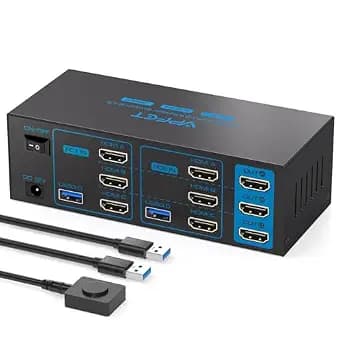
USB3.0 KVM Switch 2 Ports with 4 USB Ports for 2 Computers Sharing Triple Monitor
Description
【KVM Switch 3 Monitors 2 Computers】This KVM Switches allow two computers to share 3 HDMI monitors and 4 USB 3.0 ports, such as mouse, keyboard, printer, etc. And connect three displays in extend or duplicate display SW230-Deep Blue "Windows+P" to select "Copy" Mode or "Extend" Mode. Please note: Make sure your computer supports triple displays; when using KVM, each computer needs to be connected with 3 HDMI cables to KVM in order to output 3 video signals properly, if only 1 HDMI cable is connected, it can only transmit video to 1 monitor.; 【Ultra HD 4K@60Hz】This HDMI KVM Switch 2 port supports resolutions and refresh rates up to 4K@60Hz. Immerse yourself in the world of crystal-clear images and videos that will leave you in awe. Additionally, it is fully compatible with backward resolutions. Note: If you want to achieve 4K 60Hz, make sure the source, monitor, and HDMI cable all support 4K@60Hz.; 【USB 3.0 KVM Switch】3 monitor KVM for 2 Computers with 4 USB 3.0 ports. The transmission speed of each port is up to 5Gbps, and the data transmission performance is much higher than that of USB 2.0. USB 3.0 is backward compatible with USB 2.0 1.1 etc. Note: Each computer must be connected to the KVM switch via a single USB 3.0 cable to ensure that the 4 USB 3.0 ports on the KVM switch's front panel are properly recognised.; 【2 Ways to Switch】The triple monitor KVM switch supports 2 switching mode: 1. Press the selection button on the switcher to switch the signal source; 2. Use the desktop controller button to switch the signal source (included in the package). The LED light shows the active device, solving the problem of frequent plugging and unplugging. It supports various systems such as Windows/Vista/XP and Mac OS, Linux and Unix. NOTE: Keyboard shortcuts (hotkeys) toggles are not supported.; 【Stable work】This KVM Switch 3 Monitors 2 Computers is equipped with a 12V DC power supply to support high power USB devices such as hard drives, webcams etc. It avoids situations where the power supply is insufficient to make it unusable and ensures stable transmission between devices without frequent disconnection. Note: A DC 12V power adapter must be connected to the KVM switch for proper operation.
Compare the trade-offs
Similar products, side by side
A random selection of analyzed products from the same category. Different products are not necessarily interchangeable.

KVM/USB Mode KVM Switch 2 Monitors 2 Computers with Audio, ANXQQ 8K@30Hz 4K@144Hz USB 3.0 Dual Monitor KVM Switch Displayport, Share 4 USB Devices with Wired Control and Power Adapter

HDMI Displayport KVM Switch 3 Monitor 4 Computer 8K@60Hz/4K@144Hz KVM Switches with 4 USB 3.0 Port,Wired Remote,Power Adapter and 4 USB3.0 Cables Included

BENFEI USB 3.0 Switch, USB Switch 2 Computers Share 4 USB for PC, Mouse, Keyboard, Printer, Scanner, USB KVM Switch Selector Compatible with Windows, Mac, Linux
One less thing to search
Before you buy: quick questions
Is the switching between computers truly instant, or is there a delay?
Most users report a brief 5-10 second delay for monitors to re-detect and display when switching. This is normal for many hardware KVM switches at this price point. It's seamless for keyboard and mouse input, but if you need instantaneous, frame-perfect monitor switching (e.g., for professional live streaming), you may want to consider a higher-end model.
Can I connect and power all my USB devices through the built-in hub?
The 4 USB ports are best suited for low-to-medium power peripherals like keyboards, mice, webcams, or flash drives. A common tip from users is to avoid connecting power-hungry devices like external hard drives or multiple high-end webcams simultaneously, as they may disconnect or behave unreliably due to limited power distribution.
I have a triple monitor setup with 4K monitors. Will this switch support it?
Yes, this switch is specifically designed for triple monitor setups. However, ensure your monitors and cables support the same resolution and refresh rate (e.g., 4K @ 60Hz). Some users with older or very high-refresh-rate monitors have experienced detection issues, so checking your specific monitor model's compatibility in community forums is a good idea.
How does the build quality feel? The price seems low.
Feedback on build quality is mixed. Many users say it feels lightweight and plasticky but gets the job done for a stationary desk setup. It's not built for heavy industrial use. The consensus is that it offers great value for core functionality but you should manage expectations regarding premium materials.
Who is this KVM switch best suited for?
It's an excellent, cost-effective solution for home office users, hybrid workers, or gamers who want to cleanly share two computers across three monitors without a complex setup. It's less ideal for users who require instantaneous switching, need to drive many high-power USB devices from the hub, or are in a rugged environment where a more metal/industrial build is necessary.
From a similar, more-reviewed product in this category: Unitek HDMI KVM Switch 1 Monitor 2 Computers with Power Adapter
Can I switch between computers with a keyboard shortcut, or do I have to press a button?
This model uses a physical button on the unit — there's no hotkey switching. That's the most common complaint in reviews, so if keyboard shortcuts are a must-have for your workflow, you'll want to look at a hotkey-capable KVM instead. If you're fine reaching for a button (or placing the switch within arm's reach), it works reliably.
Do I need to use the included power adapter, or can it run without it?
Use the adapter. While some users have tried bus-powering it, the most stable experience — especially with wireless peripherals — comes from plugging in the included DC adapter. Several reviewers noted mouse dropouts when running unpowered, so treat the adapter as required, not optional.
Will it work with my Mac and Windows PC together, and does it handle 4K?
Yes, mixed Mac/Windows setups are one of its most common use cases, and it's plug-and-play for both. For resolution, check your monitor's specs against the switch's rated maximum before buying — some users with high-refresh or 4K@60Hz displays ran into EDID handshake issues (blank screen after sleep), which is the second-most-cited complaint. Standard 1080p and 4K@30Hz setups report smooth sailing.
Are the cables included, and are they long enough for a desktop tower?
Yes — HDMI and USB cables are in the box, which reviewers consistently call a nice bonus. That said, they're on the short side (roughly 3 ft), so they're ideal for laptop docks or monitors sitting close to both computers. If your tower lives under the desk, plan on buying longer cables.
Who is this KVM best suited for — and who should skip it?
It's a great fit for remote workers, students, or anyone sharing one monitor, keyboard, and mouse between two computers on a budget, especially if you value compact size, included cables, and simple setup. Skip it if you need hotkey switching, dual-monitor output, DisplayPort, or rock-solid EDID behavior with a fussy high-refresh display — in those cases, a TESmart or Cable Matters alternative will save you the return shipping.
Answers are limited to the manufacturer's listing and the reviews we analysed. Questions those sources cannot support are not answered here.
Transparent by design