What people like
Easy sharing, compact, well-built
Reviewers appreciate how easily this KVM lets two computers share one monitor, keyboard, and mouse, with several praising its compact design, solid build quality, and included cables.
The 30-second read
From a similar, more-reviewed product in this category: Unitek HDMI KVM Switch 1 Monitor 2 Computers with Power Adapter
What people like
Reviewers appreciate how easily this KVM lets two computers share one monitor, keyboard, and mouse, with several praising its compact design, solid build quality, and included cables.
The main watch-out
Multiple reviewers report that switching between computers is inconvenient because there is no working hotkey or dedicated switch, forcing them to reach the unit or use software.
Before you choose
Before buying, confirm the port layout and peripheral support fit your setup, note that switching is not hotkey-based, and consider that some find the price high unless on sale.
Description
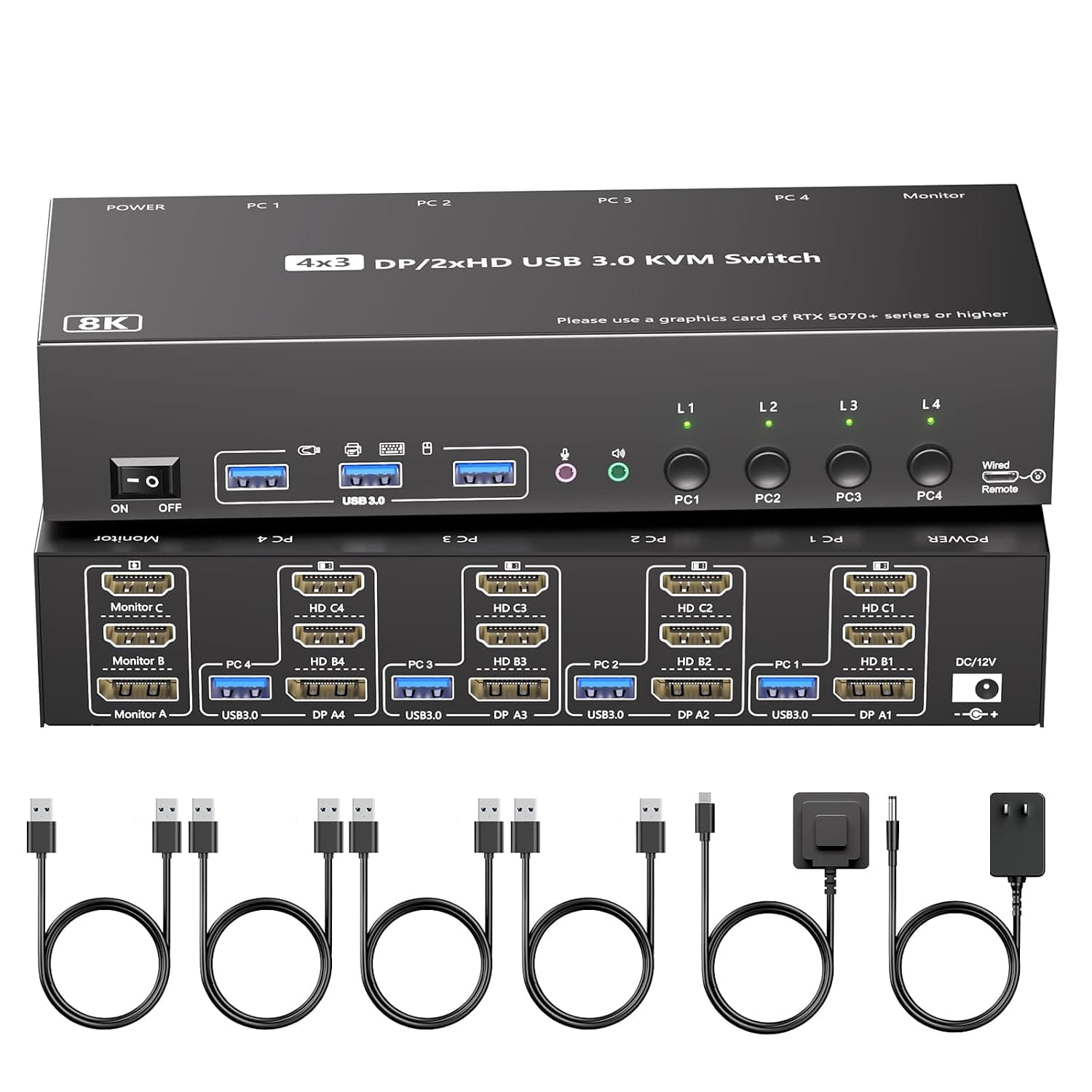
Product description 2 HDMI + Displayport triple monitor KVM switch, for 4 computers to share 3 monitors and 4 USB 3.0 devices. To make 3 monitors working, each computer will need 2 HDMI cable + 1 DP cables + 1 USB cable connection. Please buy good HDMI and DP cable yourself, if HDMI cable and DP cable is not good enough, the screen will flicker or unstable. This kvm switch supports extended mode (three screens display different contents), and duplicate mode (the three screens display the same contents) Note: Please connect the 12V DC power adapter to provide sufficient power. Using a shorter 8K HDMI + DP cable can make the KVM switch more stable.
Compare the trade-offs
A random selection of analyzed products from the same category. Different products are not necessarily interchangeable.

UGREEN 8K@60Hz HDMI Displayport KVM Switch 3 Monitors 2 Computers, Aluminum

HDMI Displayport KVM Switch 3 Monitor 4 Computer 8K@60Hz/4K@144Hz KVM Switches with 4 USB 3.0 Port,Wired Remote,Power Adapter and 4 USB3.0 Cables Included

UGREEN USB 3.0 Switch 2 Computers Sharing USB C & A Devices, 4 Port USB Switcher Sharing Keyboard and Mouse, Printer/Scanner USB Switch Hub for Two Computers with 2 USB3.0 Cables and Controller
One less thing to search
From a similar, more-reviewed product in this category: Unitek HDMI KVM Switch 1 Monitor 2 Computers with Power Adapter
This model uses a physical button on the unit — there's no hotkey switching. That's the most common complaint in reviews, so if keyboard shortcuts are a must-have for your workflow, you'll want to look at a hotkey-capable KVM instead. If you're fine reaching for a button (or placing the switch within arm's reach), it works reliably.
Use the adapter. While some users have tried bus-powering it, the most stable experience — especially with wireless peripherals — comes from plugging in the included DC adapter. Several reviewers noted mouse dropouts when running unpowered, so treat the adapter as required, not optional.
Yes, mixed Mac/Windows setups are one of its most common use cases, and it's plug-and-play for both. For resolution, check your monitor's specs against the switch's rated maximum before buying — some users with high-refresh or 4K@60Hz displays ran into EDID handshake issues (blank screen after sleep), which is the second-most-cited complaint. Standard 1080p and 4K@30Hz setups report smooth sailing.
Yes — HDMI and USB cables are in the box, which reviewers consistently call a nice bonus. That said, they're on the short side (roughly 3 ft), so they're ideal for laptop docks or monitors sitting close to both computers. If your tower lives under the desk, plan on buying longer cables.
It's a great fit for remote workers, students, or anyone sharing one monitor, keyboard, and mouse between two computers on a budget, especially if you value compact size, included cables, and simple setup. Skip it if you need hotkey switching, dual-monitor output, DisplayPort, or rock-solid EDID behavior with a fussy high-refresh display — in those cases, a TESmart or Cable Matters alternative will save you the return shipping.
Transparent by design