What people like
Kickstand and thin design praised
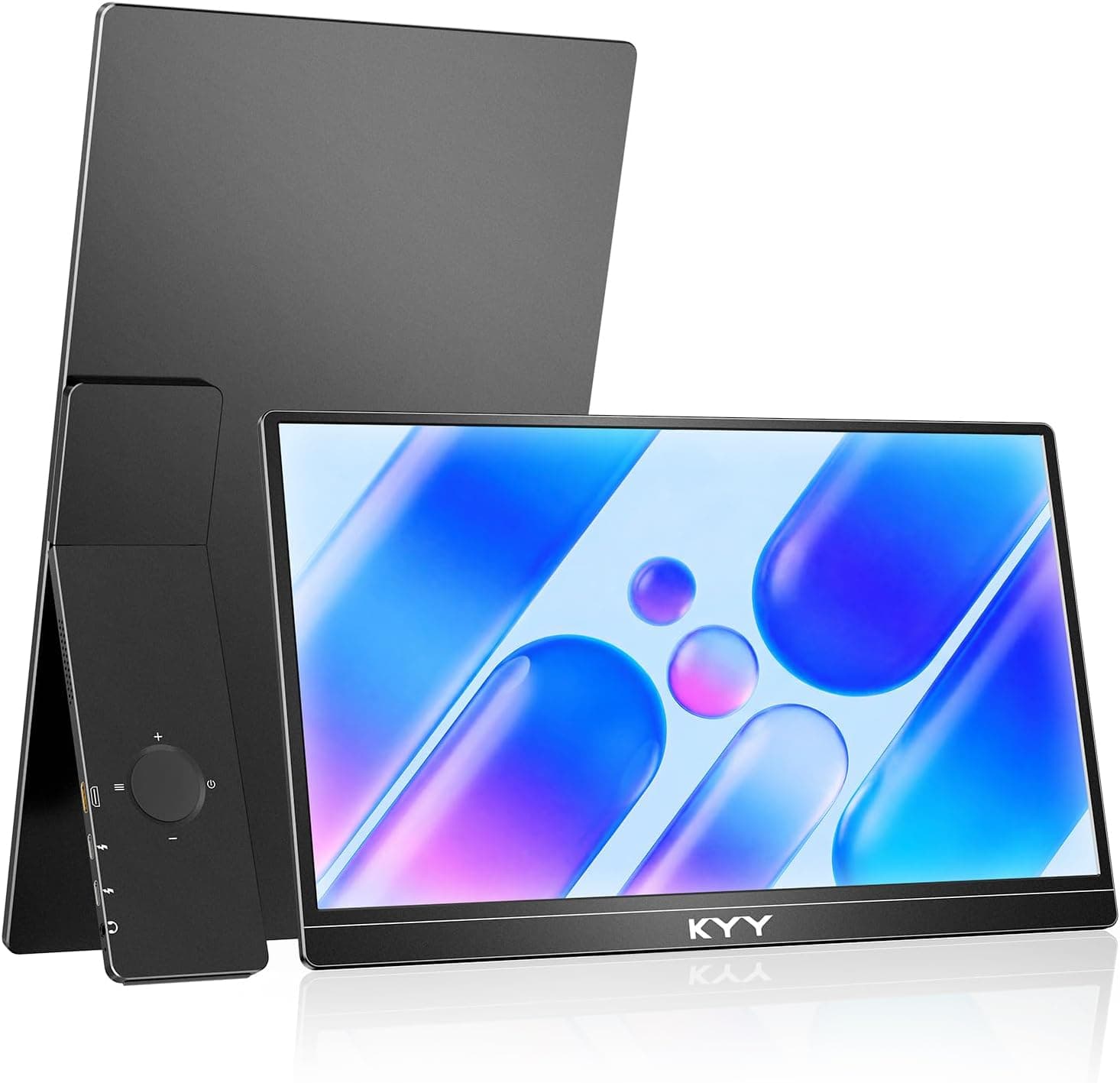
Reviewers consistently highlight the 180° rotating kickstand and slim, portable build as major improvements. Many also note the monitor feels sturdy and well-made.
The 30-second read
What people like
Reviewers consistently highlight the 180° rotating kickstand and slim, portable build as major improvements. Many also note the monitor feels sturdy and well-made.
The main watch-out
One reviewer notes that the thin profile makes the monitor feel a bit delicate and would have liked a protective case included.
Before you choose
While most found setup simple, one reviewer needed extra effort to configure it for a specific purpose, so check compatibility with your intended device and workflow.
From a similar, more-reviewed product in this category: KOORUI 24 Inch Gaming Monitor, 180Hz 1080P VA Display with 3000:1 Contrast
What people like
Several reviewers describe the monitor as a strong budget purchase, citing impressive specs for the money and satisfaction with gaming use.
The main watch-out
Several reviewers report the monitor failing or coming apart after months to a couple of years, including a dead screen and a failing power cord.
Before you choose
Two reviewers note that setup benefits from adjusting settings in your GPU software, including color, brightness, and VRR.
Your use case first
2 of 9 mentions describe a negative experience (22%).
0 of 7 mentions describe a negative experience (0%).
0 of 7 mentions describe a negative experience (0%).
0 of 5 mentions describe a negative experience (0%).
1 of 5 mentions describe a negative experience (20%).
1 of 5 mentions describe a negative experience (20%).
1 of 5 mentions describe a negative experience (20%).
0 of 5 mentions describe a negative experience (0%).
One review can mention several topics. Percentages describe the reviews we analysed, not all buyers or the product's overall failure rate.
Compare the trade-offs
A random selection of analyzed products from the same category. Different products are not necessarily interchangeable.

CRUA 34 Inch Curved Gaming Monitor, 21:9 WQHD 3440x1440 165Hz/144Hz 1500R Ultrawide Computer Monitor Support Freesync, PIP/PBP, 120% sRGB, HDMI 2.0 & DP 1.4, Wall Mountable/Tilt Adjustable-Black

KOORUI 27 Inch Curved Gaming Monitor 180Hz FHD 1080P, 1500R VA Display

ASUS TUF Gaming Series 5 24.5” 1080P Monitor (VG259QM5A) – Full HD, Fast-IPS, 240Hz, 0.3ms, G-SYNC Compatible, FreeSync Premium, 99% sRGB, DisplayWidget, Gaming AI, 3 yr Warranty
Check the evidence
Included does not mean verified authentic. Flagged does not mean proven fake. These are analytical classifications.
Showing 3 illustrative excerpts, not the complete review set.
Great monitor. Solid update to previous models
“The latest KYY portable monitor (K1302R) is a nice update to the previous (K3) model I've been using. Pics for some comparison, sorry they aren't great. Here's my little review: This new model seems smaller, due to the bezel, but it is a standard 15.6" size. The biggest update is the "kickstand" used for both propping up the display and all of the controls. Instead of using the magnetic case the K3 model has, the kickstand allows you to set this K1302R up horizontally and vertically. The kickstand has a solid feel and will rotate with enough pressure. I loved having the controls on the kickstand/back of the monitor as opposed to the sides like other models. For those wanting to use it vertically, this is ideal because other models like the K3 needed power/HDMI cables on one side, making it appear less professional having a cord or two sticking up from the top when vertical. From my testing, it functions exactly like the previous model. Connecting HDMI will automatically transfer the screen to the monitor, in the case of using it with a Steam Deck. With a laptop it will mirror the image, depending on your settings, so you can change them to extend the screen as well. Pros and Cons: For Pros, this model is a little smaller due to bezels. It looks perfectly professional if using it on your desk with a laptop or next to your other monitors. The kickstand controls work perfectly fine for settings and volume, and it is nice to hide some cables behind it if you want your desk to look clean. Gamers will like the portability, especially if being used with a Nintendo Switch or Steam Deck; but it also works great for PlayStation and Xbox consoles. Speakers are built into the kickstand and sound fine, just don't expect the best quality when watching a movie or playing a game. The monitor comes with the cables you would want for all the connectivity to your devices. Build quality is also really nice. The monitor feels solid and secure, the screen is nice and colorful, and it is thin (aluminum?) without feeling too fragile. Now for the Cons: This monitor might not be as portable as you would like it to be. There is no case to cover the screen. The kickstand doesn't allow the monitor to lay flat. It is more difficult to transport and be portable if you want to keep it safe from damage. The previous model even came with a screen protector you could apply, as well as the aforementioned magnetic case. Definitely use caution if this monitor will travel with you often and not just sit on a desk. Also, for a 1080P monitor, the pricing isn't the most competitive when there are other options for less, but of course this is brand new. Overall, I've liked what KYY has done for this update. As I stated with my review of the K3 model, it does what you would want it to do as a portable monitor, albeit with some improvements as well as disadvantages. Hopefully my review helps you determine if this monitor is what you're looking for!”
Signals matched: Specific detail: entity, comparison, quantity · Mentions: kickstand, thin · Reads as an authentic voice
KYY 1302R Review (What you should know)
“Packaging: This portable monitor comes in a nice well designed box with a USB-C/USB-C cable, HDMI-mini-HDMI cable, and a standard USB to USB-C cable. Everything was included in a neatly designed box with additional leaflets and assorted cables so I can start using the portable monitor right away without buying additional cables. Seems pretty high quality. 5/5 Physical features: The monitor comes in sleek metallic design with thin bevels and is surprisingly light to hold. But it seems very sturdy despite that. I had to fidget the back a little bit to get the stand up but once I figured how it worked, it was easy. The stand rotates all around, so it can serve as a vertical portable monitor if needed. It's thick and holds its weight. The stand features 2 ports that are Type C and support power and video delivery so if you have the right cable and supporting device, you won't need the HDMI cable. A lot of newer devices have this function so you'll have to check if yours has it. It also has a audio jack, but I probably won't use it since I primarily rely on bluetooth devices. 5/5 Set up: I just connected both the HDMI to my HDMI adapter since I use two devices, and connected the USB-C to the power and it turned on right away. Literally only took 1 minute to set up. 5/5 Color accuracy: The colors are great and the resolution is pretty good. For the price and system. I think it's great as a portable monitor, if you want to use it casually like I do. But if you're looking into hardcore image editing and adobe use, this wouldn't be something you'd want. But for day-to-day portability and use, it's affordable, high-quality, and sturdy and I can see it lasting for a long time without issues. 4.5/5 Brightness: It's pretty bright, even in a well-lit room. So if you're outside at a cafe, or even outdoors under a shady tree, it will work fine. 4.5/5 Speakers: The speakers sound a little tinny, but that's expected for a portable monitor. Again, they do provide a headphone jack if you want to listen with your headphones. But for such a device, it's not going to be the highlight of the product. 3.5/5 Portability: This is where it shines. It's tough, light, has an integrated stand, and a single cable to plug and play makes it effortless for you to setup your portable monitor wherever you go. This is 10/10. Overall, if you want a nice easy to use and affordable portable monitor, this is it. By the feel, it's quality, the image resolution and colors are nice, and it's surprisingly light for it's strong build. It's literally plug to play and the setup is super easy (even easier to use one cable if you have devices and the cable that supports it).”
Signals matched: Specific detail: entity, process · Mentions: setup, sturdiness · Reads as an authentic voice
Great value monitor: Vibrant Picture, Sleek Design, and Easy Cable Management
“I got this monitor last week and have been using it pretty extensively, and overall it's a strong value pick. The monitor is sleek, thin, and genuinely attractive, but that slim profile also makes it feel a bit delicate. I'd have liked to see a protective case included (like my older model KYY), though I understand the shape probably makes a case tricky to design without sacrificing style or function. The adjustable leg on the back operates as the stand, the input/control panel, and the speaker housing. It's a clever design that lets you stand the monitor up in either orientation and keeps all your cables (included: 2x USB-C, Mini-HDMI, headphone jack) organized and out of the way. Cable routing to a laptop or phone feels clean and intentional. The one exception is the headphone jack placement, which feels a little awkward back there and probably would be better suited on the side. The back also houses the power button, control wheel, and buttons for brightness/contrast. Convenient, but it does mean a lot of critical components are concentrated in one spot. if the stand mechanism ever fails or gets damaged, it could take several functions down with it as a single point of failure. Picture quality is vibrant with a nice wide brightness range and very impressive HDR mode. Speakers are about what you'd expect from a monitor, fine for casual use, but not something I'd rely on for primary audio (true of most monitors, not just this one). The monitor's screen size pairs really well with a 13-16" laptop, giving a natural, balanced two-monitor desktop setup. I also tested it with an Android phone and it worked seamlessly with zero extra setup. There may be a slight learning curve in interacting with the menu controls: since they're on the back, you end up shifting between front and back of the monitor to plug in cables or adjust settings, which takes some getting used to. A nice bonus and a must have for me is the ability to support both video and power over a single USB-C cable (if your laptop supports it) which cuts down on cord clutter and frees up an outlet. For the price, this is a solid monitor with great picture quality and thoughtful (if imperfect) design choices. Although I would've loved a thin leather case or protective sleeve, I can't really argue at this price point. I have an older 15.6" KYY monitor that i bought in 2021 that's still going strong, so I'm optimistic this one will hold up well for the next 5 years too.”
Signals matched: Specific detail: process, entity, comparison · Mentions: cable management, thin, sturdiness · Reads as an authentic voice
One less thing to search
Yes. Reviews report the box includes a USB-C to USB-C cable, an HDMI to mini-HDMI cable, and a USB to USB-C cable, so no extra cables are needed to begin using it.
The listing states it measures just 0.2 inches thin and weighs 1.65 lbs, and reviewers describe it as sleek, thin, and easy to carry in a backpack or laptop bag.
Yes. The listing describes a built-in stand with 65° forward/backward tilt and 180° left-right rotation for switching between landscape and portrait modes, and reviewers confirm they use it in portrait mode by swiveling the stand.
The listing says it is crafted from a single piece of aluminum alloy with an anodized, scratch-resistant finish, while one reviewer notes the slim profile makes it feel a bit delicate and that a protective case was not included.
The listing states it uses a four-way push-button knob (up/down/left/right) for direct access to core functions, allowing real-time brightness and volume adjustments without navigating OSD menus.
From a similar, more-reviewed product in this category: KOORUI 24 Inch Gaming Monitor, 180Hz 1080P VA Display with 3000:1 Contrast
Yes — it's a native 180Hz panel, but you'll need to switch it on manually. Connect via the included HDMI cable (or a DisplayPort-capable setup), then set 180Hz in your GPU's display settings; it defaults to a lower refresh rate out of the box. Many Reddit and YouTube users note that enabling Adaptive Sync/FreeSync alongside it gives the smoothest experience, and it works with both AMD and NVIDIA cards.
The 3000:1 contrast gives noticeably deeper blacks than typical IPS budget monitors, which shines in dark game scenes and movies. For fast-paced competitive shooters, some TikTok and Reddit users mention mild ghosting/smearing in dark transitions — it's great for casual gaming, students, and office work, but color-critical creators or hardcore FPS players may prefer an IPS panel.
Correct, the included stand only tilts (-5° to 20°) and doesn't offer height, swivel, or pivot adjustment, and a few users find the base slightly wobbly. The good news: it's VESA 100×100mm compatible, so a monitor arm or desk mount solves ergonomics entirely — a popular fix among dual-monitor and dorm-room setups.
Budget monitors can vary unit to unit, and some buyers report stuck pixels or corner bleed — but KOORUI backs it with a 3-year manufacturer warranty. If your unit arrives defective, contact the seller for a replacement or refund promptly; most users who did so report a smooth resolution, so inspect the screen within the return window.
At around $120, it's widely praised as one of the best budget 180Hz options — ideal for students, casual gamers, home-office users, and compact or dual-monitor setups. Just set expectations: no built-in speakers, a single HDMI plus VGA, and basic ergonomics. If you need height adjustment, color accuracy, or built-in audio, consider spending more on an IPS alternative.
Answers are limited to the manufacturer's listing and the reviews we analysed. Questions those sources cannot support are not answered here.
Transparent by design