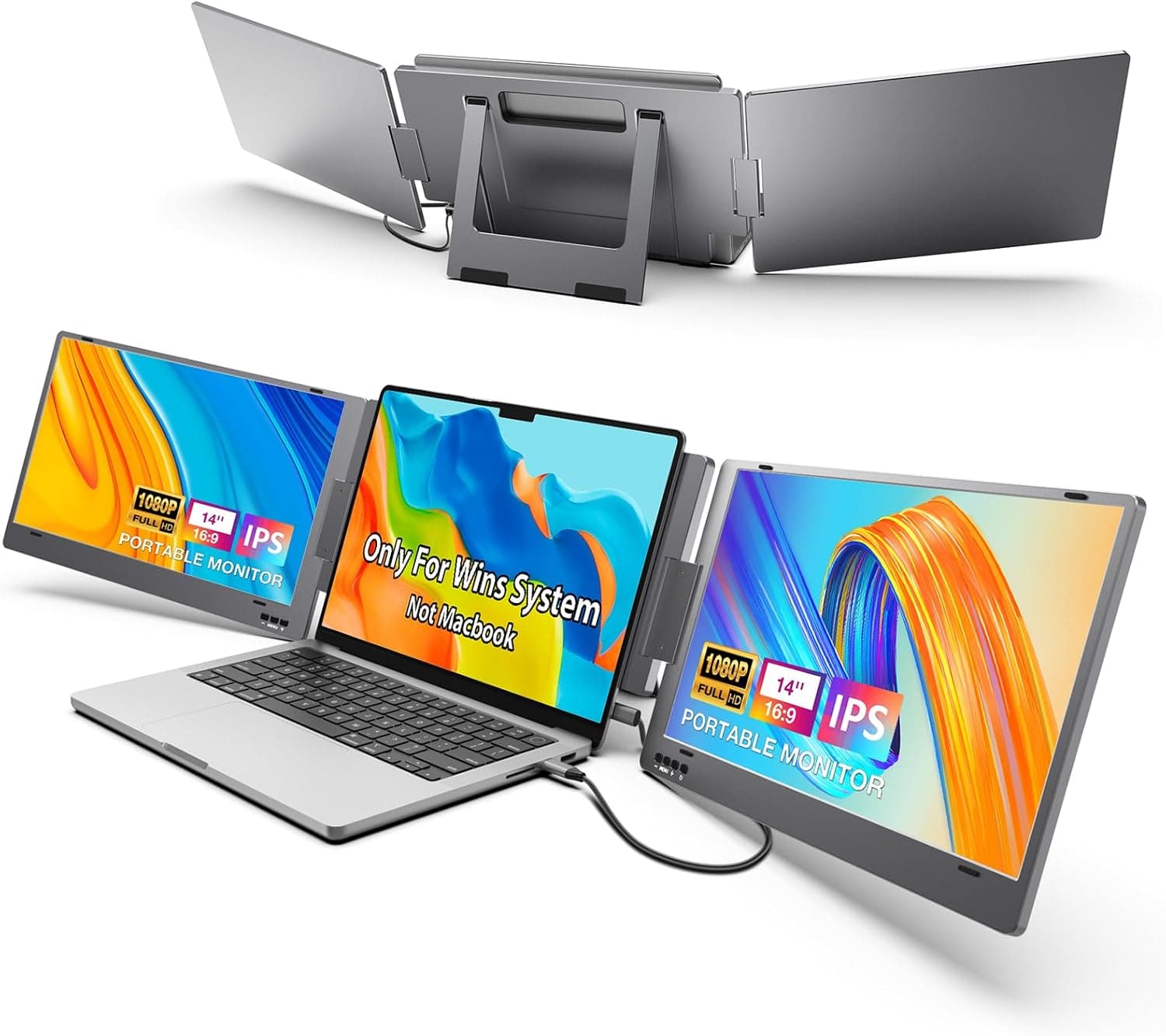
KYY Triple Laptop Screen Extender, 14" 1080P FHD IPS Dual Portable Extended Monitor, USB C Travel for 12-16'' Laptop, 210°Rotation & Kickstand, Plug and Play, X90 (Windows Only)

KYY Triple Laptop Screen Extender, 14" 1080P FHD IPS Dual Portable Extended Monitor, USB C Travel for 12-16'' Laptop, 210°Rotation & Kickstand, Plug and Play, X90 (Windows Only)

3.9 on Amazon479 ratingswww.amazon.com
Review reliability
84/ 100Grade B
Stars and wording mostly agree, all reviews give specific details, most cover balanced topics, ratings lean high with some mid-range, and while 13% use promotional phrasing, 88% sound authentic.
Affiliate link — commission is the same whatever the score.

The 30-second read

Before you decide

A starting point, not a buying verdict

What people like

Easy plug-and-play portable setup

Reviewers consistently praise the simple single-cable USB-C connection and true plug-and-play setup, making it ideal for travel and remote work. Many also value that it can run without a separate power cord.

The main watch-out

Reliability and support concerns

Some users report the screens stopped working after a few months, with issues like constant on/off cycling or 'No Signal' errors. Multiple reviewers also mention difficulty getting responses from customer support.

Before you choose

Check weight and Windows compatibility

A few reviewers note the monitors feel a bit heavy, and the product title specifies Windows only, so verify your laptop's OS and port setup before buying.

From a similar, more-reviewed product in this category: KOORUI 24 Inch Gaming Monitor, 180Hz 1080P VA Display with 3000:1 Contrast

What people like

Good value for the price

Several reviewers describe the monitor as a strong budget purchase, citing impressive specs for the money and satisfaction with gaming use.

The main watch-out

Durability concerns over time

Several reviewers report the monitor failing or coming apart after months to a couple of years, including a dead screen and a failing power cord.

Before you choose

May need manual calibration

Two reviewers note that setup benefits from adjusting settings in your GPU software, including color, brightness, and VRR.

Your use case first

Your concerns

quality

Mixed experiences

17 of 90 mentions describe a negative experience (19%).

portability

Mixed experiences

14 of 50 mentions describe a negative experience (28%).

setup

Mixed experiences

7 of 41 mentions describe a negative experience (17%).

reliability

Mixed experiences

40 of 88 mentions describe a negative experience (45%).

compatibility

Mostly negative

29 of 45 mentions describe a negative experience (64%).

value for money

Mixed experiences

14 of 41 mentions describe a negative experience (34%).

stability

Mostly negative

17 of 34 mentions describe a negative experience (50%).

weight

Mostly negative

28 of 38 mentions describe a negative experience (74%).

One review can mention several topics. Percentages describe the reviews we analysed, not all buyers or the product's overall failure rate.

Compare the trade-offs

Similar products, side by side

A random selection of analyzed products from the same category. Different products are not necessarily interchangeable.

Check the evidence

What the review excerpts say

Included does not mean verified authentic. Flagged does not mean proven fake. These are analytical classifications.

Showing 3 illustrative excerpts, not the complete review set.

Included in analysis5.0/5 stars

KYY Store - A new standard of excellence!

“I am absolutely thrilled to share my overwhelmingly positive experience with the Triple Laptop Screen Extender from KYY Store! This innovative product has truly transformed the way I work and has exceeded all of my expectations. The Triple Laptop Screen Extender is an absolute game-changer. As someone who juggles multiple tasks and applications simultaneously, this extender has revolutionized my workflow. The installation was seamless, and the quality of the materials used is top-notch. The screens are crystal clear, and the additional screen real estate has significantly enhanced my productivity. I can now comfortably have multiple documents, spreadsheets, and communication tools open at once, without the hassle of constantly switching tabs. But it's not just the product that impressed me; it's the overall experience provided by KYY Store. Their attention to customer satisfaction is unparalleled. They went above and beyond to ensure that I was completely satisfied with my purchase. The thoughtful after-sales support and follow-up emails to check on my experience with the product truly set them apart. It's evident that KYY Store takes pride in their products and genuinely cares about their customers. This level of responsiveness and attention to detail ensured that I felt valued and well-informed as a customer. If you're looking for a transformative tool to boost your productivity and enhance your multitasking abilities, combined with a level of service that is truly exceptional, I wholeheartedly recommend the Triple Laptop Screen Extender from KYY Store. Their commitment to excellence, rapid follow-up, and outstanding product quality make them a standout seller in the market. Kudos to KYY Store for setting a new standard of excellence!”

Signals matched: Specific detail: entity · Promotional-style language

Included in analysis5.0/5 stars

Highly Functional Portable Monitor: Ideal for Telework and Travel!

“I travel a lot for work, this monitor is a MUST HAVE. The single connection (HDMI and Power) USB-C cord is great in that I only need one cord to provide power and display information to the monitors. There is no lag time between my main display and other monitors, and the picture quality is great. The monitor itself feels very sturdy, and I have not had any electrical or software issues. Additionally, the monitors have another plug in for power if you don't want to kill your laptop battery, which was a great call by KYY! I previously owned KYY's single portable monitor display, and have experienced great customer service, and quality of product. The monitors themselves connect and fold down into a portable, flat shape that I can take with me anywhere I go. My laptop and monitor easily fit in my backpack, meaning I can go to the Coffee shop, office, home, or really anywhere to do work. I would highly recommend this product for any college students! This is great to bring to a library to have notes on one screen, work on another, and anything else you may need on the last screen. The dual monitor setup got me through college and greatly enhanced my learning abilities! I had the single portable monitor display then, but having this dual display setup, with 3 (including my computer screen) monitors is excellent. This is a quality product, well worth the money. You will get back the money you spend on this through the productivity boost you experience.”

Signals matched: Specific detail: entity, scenario, comparison · Mentions: portability, setup, quality, stability · Reads as an authentic voice

Included in analysis5.0/5 stars

Perfect solution for the mobile workplace

“This little beauty is exactly as advertised. I used it with a laptop to get three screens all horizontal. It sets up so easy it's amazing - just plug the single usb-c into one of your laptop ports. It draws power from the laptop - so no power cord needed. I was actually amazed that the separate signal from each screen and the power can all go through the single usb-c without issue, but it works like a charm. I bought it over a year ago and no problems. I also use it with multiple laptops. No setup required. Just plug it in and it works immediately. It is very stable while standing, and can even angle backwards if you want your screens angled or have less desk space and still is very stable. All the weight is held on the fold out support that is non-slip and very well made. It also folds up to be quite small, about the size of a laptop but a hair thicker, and has its own case. I have a smaller work bag and this easily fits in there with my laptop, padfolio, the laptop cord and some other items. I have to use multiple screens for work or I'll go crazy, and this item really is a lifesaver. If you are on the fence just hit buy and enjoy! I literally have zero complaints.”

Signals matched: Specific detail: quantity, entity, process · Mentions: setup, portability, compatibility · Reads as an authentic voice
One less thing to search

Before you buy: quick questions

Does the KYY X90 work with Mac or only Windows?
From the manufacturer's listing

The manufacturer states the X90 is designed for Windows systems only and is compatible with Windows 12/11/10/8.1/7. No customer review in the provided material mentions using it with a Mac.

How do I connect the monitors to my laptop?
From 5 kept reviews mentioning "setup"From the manufacturer's listing

According to the listing, you connect using a single USB-C to USB-C cable for both screens, with no drivers needed (plug and play), though the laptop's Type-C port must support video output. Reviewers confirm this, describing setup as truly plug-and-play with just one USB-C cable into a laptop port.

Do the monitors need their own power cord, or do they draw power from the laptop?
From 5 kept reviews mentioning "portability"From the manufacturer's listing

Reviewers report the monitors can operate without the power cord and draw power from the laptop through the single USB-C connection. The listing notes the extender has a separate power supply Type-C port in addition to the full-function Type-C port.

How much does the triple monitor setup weigh?
From 2 kept reviews mentioning "weight"From the manufacturer's listing

The manufacturer lists the KYY portable travel monitor at 4.29 lbs. One reviewer also noted the monitors are "a bit heavy."

Is the picture quality good?
From 3 kept reviews mentioning "quality"From the manufacturer's listing

The listing describes a 1080P FHD IPS panel with 16.7M color, 300 nit brightness, 72% NTSC color gamut, and 1:1000 contrast ratio. Reviewers describe the picture quality as great and praise the display quality.

From a similar, more-reviewed product in this category: KOORUI 24 Inch Gaming Monitor, 180Hz 1080P VA Display with 3000:1 Contrast

Does this monitor really run at 180Hz, and what do I need to enable it?

Yes — it's a native 180Hz panel, but you'll need to switch it on manually. Connect via the included HDMI cable (or a DisplayPort-capable setup), then set 180Hz in your GPU's display settings; it defaults to a lower refresh rate out of the box. Many Reddit and YouTube users note that enabling Adaptive Sync/FreeSync alongside it gives the smoothest experience, and it works with both AMD and NVIDIA cards.

How does the VA panel perform for gaming and everyday work?

The 3000:1 contrast gives noticeably deeper blacks than typical IPS budget monitors, which shines in dark game scenes and movies. For fast-paced competitive shooters, some TikTok and Reddit users mention mild ghosting/smearing in dark transitions — it's great for casual gaming, students, and office work, but color-critical creators or hardcore FPS players may prefer an IPS panel.

The stand looks basic — can I adjust the height or mount it?

Correct, the included stand only tilts (-5° to 20°) and doesn't offer height, swivel, or pivot adjustment, and a few users find the base slightly wobbly. The good news: it's VESA 100×100mm compatible, so a monitor arm or desk mount solves ergonomics entirely — a popular fix among dual-monitor and dorm-room setups.

What if I receive a unit with a dead pixel or backlight bleed?

Budget monitors can vary unit to unit, and some buyers report stuck pixels or corner bleed — but KOORUI backs it with a 3-year manufacturer warranty. If your unit arrives defective, contact the seller for a replacement or refund promptly; most users who did so report a smooth resolution, so inspect the screen within the return window.

Is it good value, and who is it best suited for?

At around $120, it's widely praised as one of the best budget 180Hz options — ideal for students, casual gamers, home-office users, and compact or dual-monitor setups. Just set expectations: no built-in speakers, a single HDMI plus VGA, and basic ergonomics. If you need height adjustment, color accuracy, or built-in audio, consider spending more on an IPS alternative.

Answers are limited to the manufacturer's listing and the reviews we analysed. Questions those sources cannot support are not answered here.

Transparent by design

Understand the analysis