quality
Mostly positive6 of 65 mentions describe a negative experience (9%).
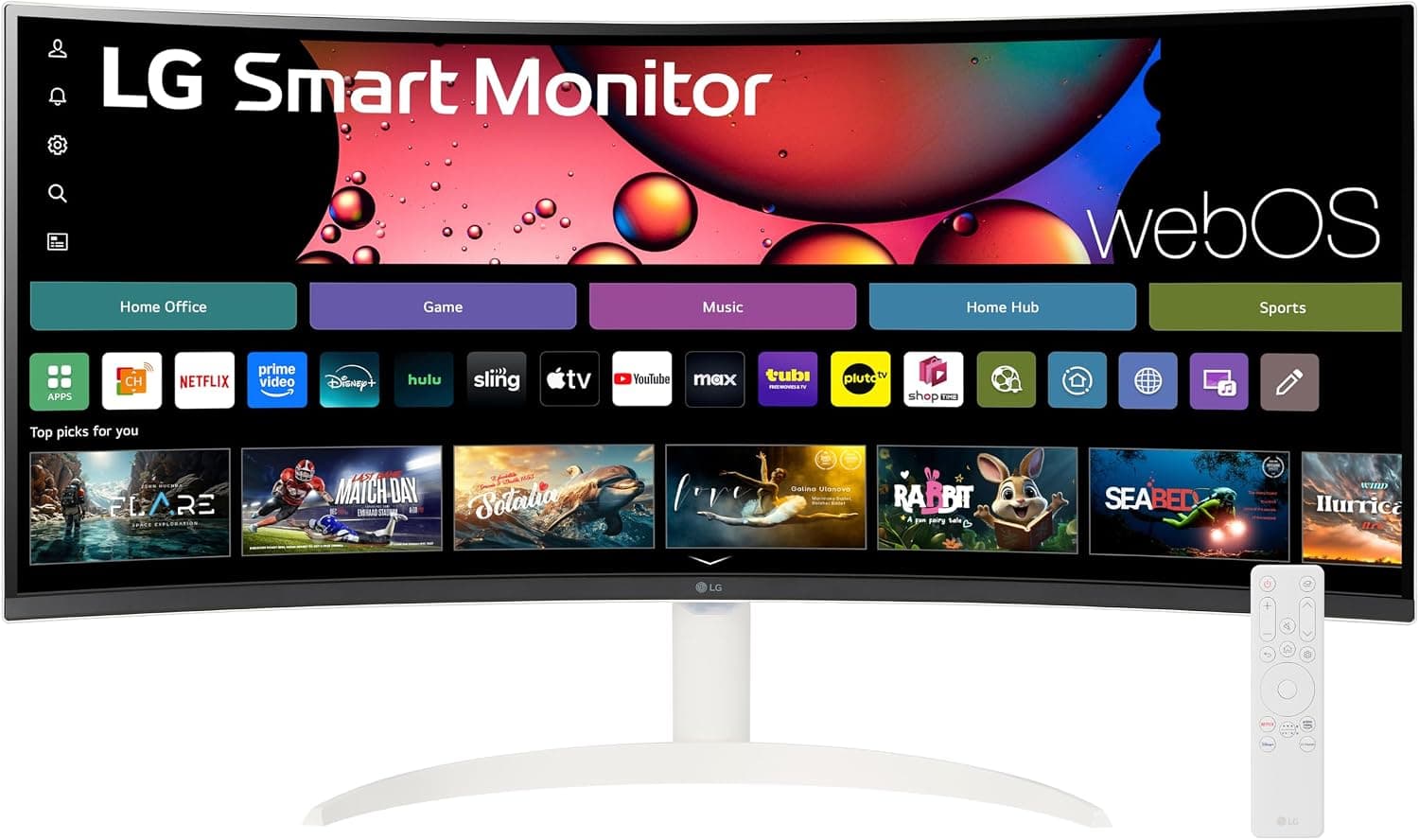
Description
One screen. Endless possibilities. The 21:9 ultra-wide 34” curved Smart Monitor offers stunning widescreen visuals and a sleek design that's perfect for work, play, cinematic viewing and everything in between. Experience vivid color with up to 99% sRGB color gamut expression and impeccable clarity with the 21:9 WQHD (3440x1440) screen, bringing every detail to vivid life. Thanks to LG streaming platform webOS23, find your streaming favorites fast with built-in access to Netflix, Prime Video, the Apple TV app, Disney+, HBO Max and instant access to over 300+ free LG Channels with everything from comedy to movies to sports. Apple AirPlay 2 & HomeKit compatibility allow you to wirelessly control your monitor plus cast and mirror content from iOS or MacOS devices, no Apple TV necessary. Gaming on the monitor’s wide screen with the 100Hz refresh rate assures ultra-smooth action. ¹Internet connection and subscription to streaming services are required. ²Internet connection and subscriptions to streaming services are required. Amazon, Prime Video and all related logos are trademarks of Amazon.com, Inc. or its affiliates. Amazon Prime membership and/or Prime Video fees apply. See primevideo.com/terms for details. HBO Max 2023 Warner Media, LLC. All Rights Reserved. HBO Max is used under license. Number of LG Channels subject to change. ³Home Office services support only Microsoft 10 and 11 or higher. Microsoft 365 and Google registration and subscriptions may be required. Separate services may require payment for subscription. Supported service may vary by country. ⁴Your Apple device must be connected to the same Wi-Fi network as your monitor. Apple, the Apple logo, AirPlay, Apple TV, and HomeKit are trademarks of Apple Inc., registered in the U.S. and other countries. This LG Smart Monitor supports AirPlay 2 and requires iOS 12.3 or later or macOS 10.14.5 or later. Internet connection and subscriptions to streaming services are required for streaming services. ⁵Keyboard and mouse available separately.
Your use case first
6 of 65 mentions describe a negative experience (9%).
9 of 39 mentions describe a negative experience (23%).
6 of 32 mentions describe a negative experience (19%).
4 of 16 mentions describe a negative experience (25%).
0 of 13 mentions describe a negative experience (0%).
1 of 11 mentions describe a negative experience (9%).
1 of 11 mentions describe a negative experience (9%).
6 of 14 mentions describe a negative experience (43%).
One review can mention several topics. Percentages describe the reviews we analysed, not all buyers or the product's overall failure rate.
Compare the trade-offs
A random selection of analyzed products from the same category. Different products are not necessarily interchangeable.

Ingnok Portable Monitor for Laptop,15.6 Inch USB C Screen Extender
14" Triple Laptop Screen Extender - Ultra Thin & Lightweight (2.2lb) Portable Monitor For Laptop, FHD 1080P Travel Display 13-17" Laptops, Plug & Play USB-C/HDMI, Aluminum Extended Screen for Mac/Win
AOC 16" Portable Monitor FHD 60Hz USB-C IPS Ultra Slim Smart Cover 16T20
Check the evidence
Included does not mean verified authentic. Flagged does not mean proven fake. These are analytical classifications.
Showing 3 illustrative excerpts, not the complete review set.
Great Choice!
“I couldn’t be happier with my LG Smart Monitor! The display is crystal clear, and the smart features are a game-changer. I especially love the curved 34-inch screen—it wraps around my view, making everything so immersive. The remote is incredibly easy to use, and right now, I have it connected solely to my laptop, which works seamlessly. The setup was super easy, and the design looks sleek in my game room. If you’re looking for a smart monitor that combines style, functionality, and a premium viewing experience, this is a fantastic choice!”
Signals matched: Specific detail: quantity, entity, scenario, process · Mentions: screen quality, screen size, setup, design, connectivity · Reads as an authentic voice
LOVE THIS: Big work monitor PLUS Smart TV with High Resolution - HUGE value for the price!
“I absolutely love this. Have only had it for 4-5 days. I use it on my desk to get more screen space for working, and I can have 3-5 appliations open on the same big screen at a time - HUGE real estate for multi-tasking without being too big. It still looks nice and sleek on my small home office desk. Also a GREAT smart TV. Multi-function and GREAT value for the price. Everything works well and resolution is excellent. HIGH quality. NO complaints.”
Signals matched: Specific detail: quantity, scenario, process · Mentions: screen size, value for money, design, quality · Reads as an authentic voice
Old schoolers … this one is IT
“I was old school and had two large monitors for YEARS. I got this with “hope” and am amazed how work life is now. I can display three full sized docs at once now. My inner-nerd loves it. Great quality, TV part a nice add. I have mine lifted with an arm and it’s great floating. Enough ports. Easy install. Color and brightness are both great.”
Signals matched: Specific detail: quantity, scenario, process · Mentions: quality, color quality, connectivity, setup · Reads as an authentic voice
One less thing to search
Yes. Reviewers describe it as a big work monitor that is also a smart TV, with one noting they can keep 3-5 applications open on the same screen, and the listing states it has built-in webOS23 with access to Netflix, Prime Video, the Apple TV app, Disney+, HBO Max and 300+ free LG Channels.
Reviewers rate the picture and colors highly, calling the display crystal clear with really good colors for gaming and editing, and the listing cites up to 99% sRGB color gamut expression with HDR10.
Yes. Multiple reviewers call it a great buy and great value for the money, with one describing it as huge value for the price.
Reviewers report the setup was super easy and that connecting solely to a laptop works seamlessly, and the listing notes two HDMI ports and three USB ports for connecting devices.
Reviewers say the speakers sound amazing, and the listing states it has a built-in speaker and is Magic Remote compatible, with the LG Magic Remote available separately.
From a similar, more-reviewed product in this category: KOORUI 24 Inch Gaming Monitor, 180Hz 1080P VA Display with 3000:1 Contrast
Yes — it's a native 180Hz panel, but you'll need to switch it on manually. Connect via the included HDMI cable (or a DisplayPort-capable setup), then set 180Hz in your GPU's display settings; it defaults to a lower refresh rate out of the box. Many Reddit and YouTube users note that enabling Adaptive Sync/FreeSync alongside it gives the smoothest experience, and it works with both AMD and NVIDIA cards.
The 3000:1 contrast gives noticeably deeper blacks than typical IPS budget monitors, which shines in dark game scenes and movies. For fast-paced competitive shooters, some TikTok and Reddit users mention mild ghosting/smearing in dark transitions — it's great for casual gaming, students, and office work, but color-critical creators or hardcore FPS players may prefer an IPS panel.
Correct, the included stand only tilts (-5° to 20°) and doesn't offer height, swivel, or pivot adjustment, and a few users find the base slightly wobbly. The good news: it's VESA 100×100mm compatible, so a monitor arm or desk mount solves ergonomics entirely — a popular fix among dual-monitor and dorm-room setups.
Budget monitors can vary unit to unit, and some buyers report stuck pixels or corner bleed — but KOORUI backs it with a 3-year manufacturer warranty. If your unit arrives defective, contact the seller for a replacement or refund promptly; most users who did so report a smooth resolution, so inspect the screen within the return window.
At around $120, it's widely praised as one of the best budget 180Hz options — ideal for students, casual gamers, home-office users, and compact or dual-monitor setups. Just set expectations: no built-in speakers, a single HDMI plus VGA, and basic ergonomics. If you need height adjustment, color accuracy, or built-in audio, consider spending more on an IPS alternative.
Answers are limited to the manufacturer's listing and the reviews we analysed. Questions those sources cannot support are not answered here.
Transparent by design