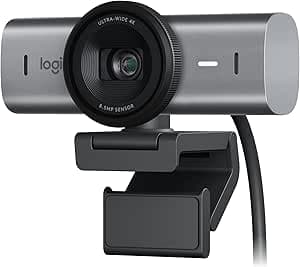
Logitech MX Brio Ultra HD 4K Webcam for Collaboration and Streaming, 1080p 60 FPS, Show Mode, Works with Microsoft Teams, Zoom, Google Meet, Nintendo Switch 2, Graphite
Description
Meet, stream, master with MX Brio’s sharp ultra HD 4k resolution video. With 2x better face visibility and 2x finer image details in difficult light(2), AI enhancements, a Logi-designed lens, 70% bigger pixels(1) and our largest webcam sensor yet. Use Fine Controls(3) to adjust lighting, white balance with ISO, Shutter Speed, Temperature, Tint and Vibrance. Be heard clearly with dual omni-directional mics with noise-reducing technology that suppresses background sound. Share your physical work and notes on video calls by tilting the camera down in Show Mode.
Compare the trade-offs
Similar products, side by side
A random selection of analyzed products from the same category. Different products are not necessarily interchangeable.

EMEET PIXY Dual-Camera AI-Powered PTZ Camera 4K, AI Tracking, PDAF&AI Autofocus 0.2s, 1/2.55'' Sony Sensor, 3 Mics, Presets, Gesture Control, 4K Webcam for Streaming and OBS/Twitch/Switch 2 Compatible

SVPRO 1080P 120fps High Speed USB Camera,12 Megapixels 4K Glof Swing Webcam Manual Focus with 3X Optical Zoom,Industrial Lightburn Cam UVC Plug and Play for Computer Laptop Raspberry Pi

Webcam for PC&1080P HD Web Cam,Webcam with Microphone,Stand for PC/MAC/Laptop/Desktop,Wide Angle Web Cameras for YouTube,Skype,Zoom,Xbox One,Video Calling,Studying Pink
One less thing to search
Before you buy: quick questions
Is the video quality noticeably better on Zoom or Teams, which compress video?
Yes, but with a caveat. The MX Brio's superior sensor and processing provide a cleaner, more detailed image *before* compression, resulting in better skin tones, less noise in low light, and overall more professional output even on compressed calls. However, as many YouTube reviewers note, the leap isn't as dramatic as going from 720p to 1080p. The biggest difference is seen in recorded videos and in applications that support higher bitrates.
How sturdy is the build, especially the hinge for "Show Mode"?
The build is generally premium, but the "Show Mode" hinge receives mixed feedback. The graphite body is solid, and the magnetic privacy shutter is excellent. For the downward-facing Show Mode, the hinge holds position securely on a flat desk, but some Reddit users mention it can feel slightly less stable if nudged. It's perfect for occasionally showing a document, but if you plan to toggle between face and desk view constantly, a dedicated overhead camera might be more suitable.
Does it work easily with a Mac and third-party apps like OBS?
It is fully compatible with Mac, but setup may require an extra step. You'll need to grant camera permissions to each app (like OBS or Zoom) in your Mac's System Settings > Privacy & Security. Once permissions are set, it works flawlessly. A common tip from user forums is to restart your app after connecting the webcam for the first time to ensure it's recognized.
I've heard about overheating. Should I be concerned for long meetings or streams?
For standard 1080p/30fps video calls, overheating is very rare. The reports typically come from users recording or streaming in 4K at 60fps for extended periods (2+ hours). If your primary use is long, high-resolution streaming, it's a valid consideration. For all-day business meetings at standard HD resolutions, it performs reliably. Ensuring good ventilation around the camera is always a good practice.
Who is this webcam really best for, and who might want to look at alternatives?
The MX Brio excels for hybrid professionals and creators who need top-tier, all-in-one audio and video for client calls, podcasting, and creating recorded content. If you value a minimalist setup and premium design, it's a fantastic choice. However, budget-conscious users on primarily compressed calls might find a Logitech C920s sufficient. Dedicated live streamers often prefer a model like the Elgato Facecam for its uncapped framerate and dedicated software, paired with a separate XLR/USB microphone.
From a similar, more-reviewed product in this category: Webcam with Privacy Cover
Does this webcam work with both PC and Mac?
One reviewer reported it is easy plug and play on both PC and Mac. The listing also states it is compatible with laptop, personal computer, tablet, and smartphone.
How is the video quality in low light?
Reviewers describe the image as clear and sharp even in low light, crediting the automatic light correction. The listing confirms the webcam includes Auto Light Correction as a special feature.
Does the built-in microphone pick up sound clearly?
Reviewers say the built-in microphone works well and picks up sound clearly, with one noting the noise cancellation keeps their voice clear without picking up much background noise. The listing lists Noise Cancellation as a special feature.
Does it have a privacy cover?
The listing lists Privacy Shield as a special feature, and the product title is "Webcam with Privacy Cover."
Is the webcam bulky?
One reviewer described it as a bit on the bulky side, though they felt the quality made up for it.
Answers are limited to the manufacturer's listing and the reviews we analysed. Questions those sources cannot support are not answered here.
Transparent by design