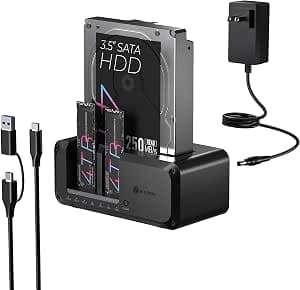
M.2 NVMe & SATA SSD/HDD Hard Drive Docking Station, ICY BOX USB-C 10Gbps NVMe Cloner&Reader, TripleBay Hard Drive cloner for 2.5"/3.5" SSD&HDD Hard Drives, Offline Cloning, Tool-Free (3 Bay)
Description
One-Touch Offline Cloning: Start the cloning process with a single touch—no software installation or complicated PC setup required. Designed for quick, hassle-free data migration to save you time and effort.; Flexible Cloning:Supports cloning between various drive types, including M.2 PCIe NVMe SSDs, 2.5" and 3.5" SATA SSDs and HDDs. Easily clone from NVMe to NVMe or from SATA to NVMe, offering maximum versatility for different storage setups.; Versatile Triple-Bay Design: Equipped with three independent slots, allowing you to connect and access multiple drives simultaneously. The tool-free design makes swapping and docking drives fast and convenient, ideal for professionals managing diverse data sources.; High-Speed USB 3.2 Gen 2 Performance: Features USB 3.2 Gen 2 technology for blazing-fast data transfer speeds up to 10 Gbps. Includes a dual-purpose USB-C/USB-A combo cable, eliminating the need for extra adapters and ensuring easy connectivity across devices.; Multi-OS Compatibility: Designed to work flawlessly with Windows and macOS systems, delivering consistent and stable performance. Compatible with a wide range of devices including PCs, laptops, and game consoles—perfect for users who switch between operating systems or use mixed environments.; What You Get: TripleBay Standalone hard drive cloner, 2 in 1 Cable (USB C to USB C & USB C to USB A Cable), Power adapter, 24-month warranty, and our friendly customer service to solve your problems timely.
Compare the trade-offs
Similar products, side by side
A random selection of analyzed products from the same category. Different products are not necessarily interchangeable.

4 Bay NVMe M.2 & SATA SSD/HDD Hard Drive Docking Station, ICY BOX USB-C 10Gbps NVMe Reader, SATA to M.2 NVMe enclosure, 2.5/3.5 Hard Drive Dock Station Up to 48TB, Individual Power Switches, Tool-Free

SABRENT USB 3.0 to SATA External Hard Drive Lay-Flat Docking Station for 2.5 or 3.5in HDD, SSD [Support UASP] (EC-DFLT)

WAVLINK Dual Bay Hard Drive Docking Station - USB 3.0 to SATA I/II/III for 2.5" & 3.5" HDD/SSD with Fixed Bezel, Supports Offline Clone/Duplicator Function, Supports 2x20TB with UASP 6Gbps - Black
One less thing to search
Before you buy: quick questions
Is the offline cloning feature truly a "one-button" solution for any drive?
While incredibly convenient for straightforward upgrades (like copying a healthy drive to a larger one), it's not magic. Based on user reports, cloning can fail if the source drive has errors, if the drives are from very different manufacturers, or if the target drive is smaller than the used data on the source. It's best for simple, like-for-like or small-to-large upgrades. For complex jobs, using cloning software on your computer is more reliable.
How durable and well-built is the docking station for daily use?
The ICY BOX dock is praised for its versatile design and tool-free convenience. However, some users note the plastic casing can feel lightweight. It's perfectly durable for home, office, or occasional tech service use. If you need a dock for heavy, 24/7 professional workloads in a server-like environment, a more industrial-grade metal enclosure might be a better long-term investment.
I have both M.2 NVMe and M.2 SATA SSDs. Will this dock work with both types?
Yes, this is one of its key features! The M.2 bays support both NVMe (PCIe) and SATA M.2 drives. It automatically detects the type, so you don't need any adapters. This makes it an excellent choice for users managing a mix of modern and older SSD types.
What should I know about drive temperatures during extended use?
When using multiple high-performance drives, especially NVMe SSDs, for prolonged tasks like cloning or large file transfers, both the drives and the dock can generate noticeable heat. This is common for compact enclosures. Many users on tech forums recommend ensuring good ventilation around the dock. For marathon sessions, placing it in a well-ventilated area or using a small USB fan nearby is a smart precaution to maintain optimal performance.
What is the warranty and support like if I encounter an issue?
The product comes with a standard manufacturer's warranty (typically 1-2 years, check your retailer). It's important to note that some users have reported that reaching direct support can require patience. For the quickest resolution, we recommend first contacting the retailer you purchased from (like Amazon). They often handle replacements directly. Keep your receipt, and test all three bays as soon as you receive the unit to ensure everything is working.
From a similar, more-reviewed product in this category: WAVLINK Dual Bay Hard Drive Docking Station - USB 3.0 to SATA I/II/III for 2.5" & 3.5" HDD/SSD with Fixed Bezel, Supports Offline Clone/Duplicator Function, Supports 2x20TB with UASP 6Gbps - Black
Can I use both hard drives at the same time, or does the dock switch between them?
Yes, you can access both drives simultaneously.
Does the offline clone function require a computer?
No, offline data copy works between two hard drives with no computer involved; press the Clone button for about 5 seconds to start the process, and make sure the target disk's capacity is larger than or equal to the source disk's.
Is the power supply compatible with 230V AC?
Yes, it supports 100-240V AC.
Does it include a USB-C adapter?
Yes, it includes a USB-A to USB-C adapter.
Is the dock easy to set up and use?
Reviews describe it as easy to set up and working perfectly, and the listing notes it is tool-free, requires no driver, and is plug and play.
Answers are limited to the manufacturer's listing and the reviews we analysed. Questions those sources cannot support are not answered here.
Transparent by design