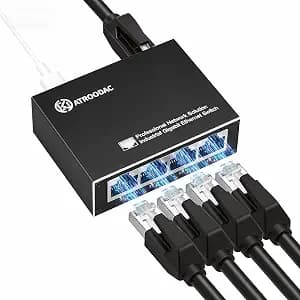
Mini Ethernet Switch 5 Ports Gigabit Enhanced Protection 10/100/1000 Mbps Unmanaged Network Switch Plug & Play Office Ethernet Splitter Fanless Silent Metal Case Network Hub Desktop Design
Description
Enhanced Protection: Aluminum alloy case offers excellent heat dissipation, corrosion resistance, and drop resistance; designed for harsh environments; built-in TVS protection safeguards the circuit board by consuming redundant current, preventing burnouts and extending switch's service life, ideal for enterprise and outdoor use; What You Get: Package includes mini switch, charging plug, USB-C cable, and user manual; Ready to use right out of the box; Plug and Play: Unmanaged ethernet switch requires no software installation or configuration; features auto-negotiation and can be used immediately after power supply; Compact Design: Mini switch measures only 2.79 x 2.12 x 0.90 inches; portable and fits in small spaces, pockets, or laptop bags; maintains performance despite its small size; 5-Port Gigabit Speed: Ethernet splitter with 5 auto-negotiating MDI/MDIX RJ45 ports supporting 10/100/1000Mbps; supports Full/Half-duplex mode for simultaneous data reception and transmission; 20G capacity cache; compatible with non-gigabit devices; Flexible power supply: You can use a USB-C charging cable to power it. If there is no power supply environment on site, you can use the USB port of a laptop to power it and make a C-to-C connection.; Desktop Design: Fanless and silent; switch does not heat up during operation and has good dissipation performance; Technical Support: Professional network signal transmission equipment manufacturer; dedicated technical support team provides assistance during working days
Compare the trade-offs
Similar products, side by side
A random selection of analyzed products from the same category. Different products are not necessarily interchangeable.

UGREEN 2.5Gb Switch, 5-Port Ethernet Switch, 5 x 2.5Gb Uplink, Plug & Play, Metal Case, Unmanaged Ethernet Splitter, Desktop/Wall Mount Network Hub, Fanless Quiet with LED, for NAS, PC, Game Console
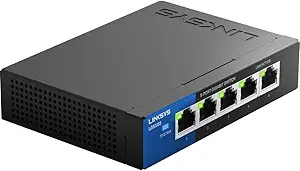
Linksys LGS105: 5-Port Business Desktop Gigabit Ethernet Unmanaged Switch, Computer Network, Wired Connection Speed up to 1,000 Mbps (Black, Blue)

SODOLA 8 Port 2.5Gb Switch, Multi-Gigabit Unmanaged Ethernet Switch for Home Office Gaming, 8 x 2.5GBASE-T Ports, 1X10G SFP+,100Gbps Switching Capacity, Plug & Play, Fanless, Metal
One less thing to search
Before you buy: quick questions
Does this Mini Ethernet Switch come with a power adapter, or do I need to buy one separately?
It ships without a power adapter, which some users find unexpected. You’ll need a standard 5V DC adapter (not included) to power it. Many on TikTok and Reddit recommend checking your cable box or ordering one separately before the switch arrives to avoid delays.
Will this switch slow down my internet if I use all five ports at once?
For typical browsing, streaming, and office tasks, it handles all five ports smoothly at gigabit speeds. However, a few users report slight speed drops under heavy simultaneous data transfers. If you’re doing large file sharing or video editing across all ports, consider a managed switch for better traffic control.
Is this truly plug and play, or do I need to configure anything?
It’s designed as a plug-and-play unmanaged switch – no setup or software required. However, some customers noted that it took a router restart for the switch to be detected initially. Once connected, it works automatically. If you need VLAN or QoS settings, this isn’t the right model for you.
How hot does the metal casing get after continuous use?
The fanless design keeps it completely silent, but the metal case can get warm to the touch after extended use, especially in warmer rooms or enclosed spaces. This is normal for passive cooling. If your setup is in a hot attic or enclosed cabinet, you might want to leave some airflow around it.
Who is this switch best for, and when should I look for a different model?
It’s ideal for home offices, small desk setups, and light network expansions where quiet operation and space-saving matter. Skip it if you need Power over Ethernet (PoE) support, VLAN management, or absolute maximum performance under constant heavy load – in those cases, alternatives like the TP-Link TL-SG105 or a managed switch might suit you better.
From a similar, more-reviewed product in this category: TP-Link Deco X55 AX3000 WiFi 6 Mesh System, Deco X55(3-Pack)
How easy is the Deco X55 to set up?
Reviewers consistently describe setup as easy and quick, using the free Deco app on a phone with clear visual guidance. One novice noted that coordinating reboots of the ISP modem and first router was a bit confusing.
How much area does the 3-pack cover?
The manufacturer states the Deco X55 3-pack covers up to 6,500 square feet and eliminates dead zones. Reviewers report strong coverage in a 1,600-square-foot home, a two-story villa with thick precast walls, and a 240m2 two-floor house with concrete walls.
How many devices can the Deco X55 3-pack connect?
According to the manufacturer's listing, the Deco X55 3-pack is strong enough to connect up to 150 devices with strong and reliable Wi-Fi.
Does it support wired Ethernet connections?
The listing states each Deco X55 has 3 Gigabit Ethernet ports (6 in total for a 2-pack) and supports Wired Ethernet Backhaul for better speeds, and any unit can work as a Wi-Fi router.
How reliable is the connection over time?
One long-term reviewer reported a year of flawless performance with a single network throughout the house and low ping in games. Another reviewer, however, experienced the pods losing connection to the main router every couple of days, which increased to 2-3 times a day until the issue was resolved.
Answers are limited to the manufacturer's listing and the reviews we analysed. Questions those sources cannot support are not answered here.
Transparent by design