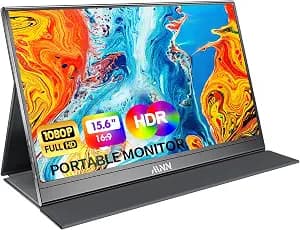
MNN Portable Monitor 15.6inch FHD 1080P 60Hz USB C HDMI Gaming Ultra-Slim IPS Display w/Smart Cover & Speakers,HDR Plug&Play, External Monitor for Laptop PC Phone Mac (15.6'' 1080P)
Description
Full HD Portable Monitor - MNN 15.6inch portable laptop monitor with 1920*1080 resolution, advanced IPS matte screen support 178° full viewing angle, it renders accurate and bright color, draws you into the video or game with lifelike colors and amazing detail.It can effectively reduce blue light radiation damage, no flickering, eye-care, and make it easier to watch for a long time.A second monitor for working from home.; Double Type-C Port -For Plug & Play, the MNN monitor provides 2 Full Feature Type-C ports. Only One USB Type-C Cable is required to connect to the power supply & display signal transmission. NOTE: Your device should support thunderbolt 3.0 or USB 3.1 Type C DP ALT-MODE.which supports multiple connect ways to your laptops, PC, Phones, Macbooks, PS5/PS4, Xbox, and Switch.Tips: Please use the original USB-C to USB-C cable that came with the monitor in box. Don't use the other cables.; Lightweight Ultra Slim for Travel - As a portable external monitor,MNN portable laptop monitor easily accommodate to every suitcase and backpack and stress-free when you are holding it for a long time. They are truly portable computer monitors for travelers, students, gamers,engineers, and everyone.; Give consideration to work and games - through multiple display modes [Copy Mode/Extended Mode/Second Screen Mode/Portrait Mode], we can bring you a clear second screen in the meeting, and expand the screen anytime and anywhere to improve work efficiency and improve the quality of life. Adjusting to HDR mode can upgrade the image to a new level, providing you with brighter highlights,deeper and more realistic colors, more realistic images, and amazing viewing/gaming experience.; Powerful Smart Cover - MNN portable external monitor can work in both landscape and portrait mode, can be used as a gaming monitor, screen extender for laptop or phone. Comes with a scratch-proof smart cover made of durable PU leather exterior, doubles as a stand, provides comprehensive protection for this portable computer monitor.
Compare the trade-offs
Similar products, side by side
A random selection of analyzed products from the same category. Different products are not necessarily interchangeable.

KTC 27 Inch Curved Gaming Monitor, 1440P QHD 144Hz 1500R PC Monitor, H27S5C
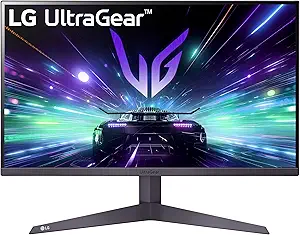
LG 27GS50F-B 27-inch FHD (1920 x 1080) Ultragear Gaming Monitor with 180Hz, 1ms MBR, HDR10, AMD FreeSync, HDMI, DisplayPort, 3-Side Virtually Borderless Design, Black

GeeekPi 7-Inch Screen for Raspberry Pi, 1024x600 IPS LCD Display, HDMI Portable Monitor for Pi 5/4B/3B+/3B, Win11/10/8/7, Free-Driver
One less thing to search
Before you buy: quick questions
Will this monitor work seamlessly with my MacBook, PC, or phone?
Yes in most cases — this monitor supports plug-and-play via USB-C for phones and laptops that support video over USB-C (like recent MacBooks, Samsung Galaxy, and many Windows laptops). For older devices or specific models, you may need an extra USB-C to HDMI adapter (not included). We recommend checking your device’s USB-C specifications before purchasing. Many TikTok users have shown it working great with smartphones for remote work setups.
How durable is the screen for travel?
The monitor is ultra-slim at under half an inch thick, which makes it very portable — but that also means it needs careful handling. The included smart cover provides basic protection during transit, but we wouldn’t recommend tossing it unprotected in a bag full of heavy items. Several Reddit users suggest carrying it in a padded laptop sleeve for extra safety.
Is the HDR feature actually good for gaming or watching movies?
The HDR is entry-level — it boosts contrast a bit but won’t match a proper gaming monitor or high-end TV. For casual gaming (60Hz) and streaming, it looks fine in darker rooms. However, if you’re a competitive gamer or movie enthusiast expecting vibrant HDR, this may disappoint. YouTube reviewers often describe it as “HDR for basic productivity, not for visual media.”
What about the built-in speakers — are they usable?
They work in a pinch for system sounds or quick YouTube videos, but honestly, they’re not great for movies or music. Most buyers end up using headphones, external speakers, or their device’s own audio. Think of the speakers as a bonus convenience feature rather than a main selling point — something we see mentioned frequently in buyer feedback.
What is the return policy if I get dead pixels or compatibility issues?
We offer a 30-day return window for defective units, including dead pixels that appear within that period. However, compatibility issues due to older devices (e.g., needing a special adapter) are not covered as defects. We recommend testing the monitor with your device immediately upon arrival. Many Amazon reviews note that customer support is responsive for screen issues but can be slow for general questions.
From a similar, more-reviewed product in this category: KOORUI 24 Inch Gaming Monitor, 180Hz 1080P VA Display with 3000:1 Contrast
Does this monitor really run at 180Hz, and what do I need to enable it?
Yes — it's a native 180Hz panel, but you'll need to switch it on manually. Connect via the included HDMI cable (or a DisplayPort-capable setup), then set 180Hz in your GPU's display settings; it defaults to a lower refresh rate out of the box. Many Reddit and YouTube users note that enabling Adaptive Sync/FreeSync alongside it gives the smoothest experience, and it works with both AMD and NVIDIA cards.
How does the VA panel perform for gaming and everyday work?
The 3000:1 contrast gives noticeably deeper blacks than typical IPS budget monitors, which shines in dark game scenes and movies. For fast-paced competitive shooters, some TikTok and Reddit users mention mild ghosting/smearing in dark transitions — it's great for casual gaming, students, and office work, but color-critical creators or hardcore FPS players may prefer an IPS panel.
The stand looks basic — can I adjust the height or mount it?
Correct, the included stand only tilts (-5° to 20°) and doesn't offer height, swivel, or pivot adjustment, and a few users find the base slightly wobbly. The good news: it's VESA 100×100mm compatible, so a monitor arm or desk mount solves ergonomics entirely — a popular fix among dual-monitor and dorm-room setups.
What if I receive a unit with a dead pixel or backlight bleed?
Budget monitors can vary unit to unit, and some buyers report stuck pixels or corner bleed — but KOORUI backs it with a 3-year manufacturer warranty. If your unit arrives defective, contact the seller for a replacement or refund promptly; most users who did so report a smooth resolution, so inspect the screen within the return window.
Is it good value, and who is it best suited for?
At around $120, it's widely praised as one of the best budget 180Hz options — ideal for students, casual gamers, home-office users, and compact or dual-monitor setups. Just set expectations: no built-in speakers, a single HDMI plus VGA, and basic ergonomics. If you need height adjustment, color accuracy, or built-in audio, consider spending more on an IPS alternative.
Answers are limited to the manufacturer's listing and the reviews we analysed. Questions those sources cannot support are not answered here.
Transparent by design