
MOFII Wireless Bluetooth Keyboard for Laptop & Android, Connect up to 3 Devices Simultaneously, Portable 100-Key Typewriter Retro Round Keycaps Keyboard - Lipstick Colors
Description
💗【Colorful Retro Round Keycaps】The inspiration of these cute removable round keys come from vintage typewriters offering you visual enjoyment and retro feeling to type; 💗【Stable Bluetooth】 5.1 & MULTI-DEVICE CONNECTION - Inbuilt Bluetooth 5.1 technology. Fast channel switch among 3 devices without any interference or disconnection; 💗【Auto Power-Saving】 This keyboard turn into Power-save mode automatically, click any key or button to wake-up within seconds. When the battery is dying,the low battery indication light in the top right corner will remind you to replace the battery; 💗【Wide Compatibility】 Perfect choice for iPad, iPhone, iMac, MacBook, Smartphone, Windows, IOS, Mac OS, Android (Please note that there must be bluetooth connectivity function for your device ); 💗【Long Connection Distance】Advanced Bluetooth technology provides a cable-free, clutter-free connection. Long effective operating distance: about 6m (20ft)
Compare the trade-offs
Similar products, side by side
A random selection of analyzed products from the same category. Different products are not necessarily interchangeable.

Wireless Keyboard and Mouse Combo,KOORUI 2.4G Silent Full Size Ergonomic Keyboard with 12 Shortcut Keys & 3DPI Mouse,Cordless,Compatible for Laptop/PC/Windows/Mac (Black)

MOFII Wireless Keyboard and Mouse Combo,2.4GHz Retro Full-Size Keyboard with Number Pad and Cute Wireless Mouse for Computer PC Desktops Laptop WindowsxP/7/8/10(Milk Tea Colorful-B)
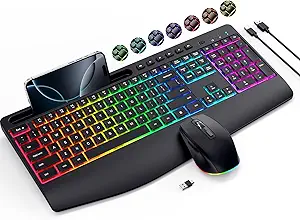
Wireless Keyboard and Mouse Combo- VEILZOR 2.4G Rechargeable Keyboard with Phone Holder, Ergonomic Wrist Rest, 9 RGB Backlit Effects, Silent Keyboard Mouse Set for Windows, Laptop, PC
One less thing to search
Before you buy: quick questions
I use a MacBook. Will this keyboard work properly with macOS, or will I have issues with the key layout?
The keyboard connects via Bluetooth without issue, but it has a standard Windows key layout (with Alt/Windows keys). This means the key labels won't match macOS functions natively. Many Mac users successfully remap the keys in System Settings > Keyboard, but if you prefer a keyboard with dedicated Command/Option keys out of the box, you may want to consider a Mac-specific alternative like the Logitech K380.
How is the battery life, and is the battery indicator reliable?
Most users report excellent battery life, lasting several weeks or even months with regular daily use. However, a common note from reviews is that the battery indicator light (which changes from blue to red) can be a bit vague. It's a good practice to charge it when the light turns red to avoid an unexpected shutdown.
The keycaps look unique. Are they comfortable for long typing sessions, and will the lettering wear off?
Yes! The round, slightly dished keycaps are consistently praised for their comfortable and satisfying typing feel. Regarding durability, the majority of users find the build quality solid. While a few heavy users have mentioned slight fading on commonly used keys after many months, this doesn't affect functionality. The typing experience is a major highlight for most buyers.
Is it truly easy to switch between three devices, and is there any lag?
The 3-device Bluetooth pairing is straightforward and works well for most people switching between, for example, a laptop, tablet, and phone. The connection is stable for everyday typing and browsing. Some users on platforms like Reddit have noted a slight delay or occasional hiccup when actively switching between devices, but for sustained use on one paired device, lag is generally not a problem.
Who is this keyboard really best suited for?
This keyboard is a perfect match for Windows or Android users who value design and a pleasurable typing experience for work, study, or creative projects. It's ideal as a stylish, portable accessory for tablets or as a primary keyboard for those who want their desk to look great. It's less suited for Mac users wanting a seamless setup or competitive gamers who require advanced mechanical features.
From a similar, more-reviewed product in this category: SABLUTE Wireless Keyboard and Mouse Combo, Ergonomic Wave, 30dB Quiet, MA41
Is the keyboard actually quiet when typing?
Yes. Reviewers describe the keys as whisper-quiet, silent, and not loud when typing, and the listing states typing and mouse clicks are reduced by up to 90% (30dB quiet).
How do I connect the keyboard and mouse, and what's included?
It uses a single 2.4GHz USB-A receiver that connects both devices, and a USB-C adapter is included. Reviewers report plug-and-play setup working in a couple of minutes with clear instructions, and one noted it worked immediately with a Linux machine.
What batteries does it take, and how long do they last?
The keyboard requires 2 AAA batteries and the mouse requires 1 AA battery, neither included. The listing states auto sleep technology extends battery life to 6–12 months of daily use, and reviewers report the batteries lasting a long time.
Is the wrist rest comfortable, and how is its quality?
The listing describes a 3-layer memory foam leather palm rest that provides soft cushioning and is durable and easy to clean. One reviewer found the wrist pad foam very thin and cheap-feeling, though still comfortable for the wrists, while others called the wrist rest comfy.
Is the keyboard comfortable for long typing sessions?
Yes. The listing cites an ergonomic wave design with 2 adjustable tilt angles to support natural posture and reduce fatigue, and reviewers say the wave styling is much better to type on and easier on hands and wrists.
Answers are limited to the manufacturer's listing and the reviews we analysed. Questions those sources cannot support are not answered here.
Transparent by design