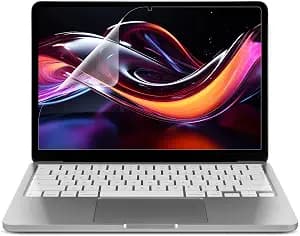
MOSISO 2 Pack Anti Glare Screen Protector Compatible with MacBook Neo 13 inch Case 2026 Model A3404, Matte Reduces Fingerprints Scratches Resistant Screen Filter Film Easy to Install
Description
This 2 pack matte screen protector provide full protection for your screen and touch trackpad against dust, fingerprint or scratch. Perfectly works in office / home for OL, gamer and programmer
Compare the trade-offs
Similar products, side by side
A random selection of analyzed products from the same category. Different products are not necessarily interchangeable.

2Pack Magnetic 14 Inch Laptop Privacy Screen 16:10 Aspect Ratio, Removable Anti-Blue/Glare Protector Film, Anti Spy Desktop Security Private Filter 14in

Spigen Tempered Glass Screen Protector [Glas.tR Slim] Designed for Macbook Air 13 inch M5 (2026) / M4 / M3 / M2

2 Pack 15.6 inch (1920x1080P) Laptop Blue Light Screen Protector, Eye Protection Anti-Scratch and Anti-Glare Screens for Laptops 15.6’’ with 16:9 Aspect Ratio
One less thing to search
Before you buy: quick questions
Will this screen protector fit the new 2026 MacBook Neo 13 model A3404 exactly?
Yes, this 2-pack is precision-cut for the 2026 MacBook Neo 13 inch Case A3404. However, some TikTok users have noted that bezel dimensions can vary slightly between units, so we recommend double-checking your model number in System Information before applying. The protector covers the viewable screen area precisely.
Does the matte surface make the display noticeably blurry?
Matte protectors slightly reduce sharpness compared to glossy glass, which is the trade-off for eliminating glare. Many Reddit users find it excellent for reading and office work, but if you’re doing color-critical tasks like photo editing, you may want a glossy option. For daily use, most customers find the clarity perfectly acceptable once adjusted.
How do I avoid bubbles during installation?
The included installation kit (cleaning wipe, dust sticker, and guide frame) helps minimize bubbles. The best tip from YouTube reviewers: work in a steamy bathroom to settle dust, apply from the center outward slowly, and use the provided squeegee. If bubbles remain, they often disappear within 24–48 hours as the adhesive settles.
Can I remove this protector without damaging my MacBook screen?
Absolutely. The adhesive is designed for clean removal without leaving residue or damaging the screen coating. Simply lift from a corner with a piece of tape or a plastic card, and peel slowly. Many users have swapped protectors several times with no issues.
Is this just for glare reduction, or does it also protect against scratches and drops?
This protector is primarily for anti-glare and scratch resistance – it will shield your screen from keys, zippers, and daily abrasions. However, it is a thin film, not a thick tempered glass, so it won’t absorb impact from drops. For drop protection, consider pairing it with a hard shell case. The matte finish does reduce visible fingerprints significantly compared to bare glass.
From a similar, more-reviewed product in this category: Mamol Magnetic Laptop Privacy Screen 15.6 inch ,16:9 Aspect Removable Anti Glare Protector Blue Light Privacy Screen Filter,Filter Shield Compatible with HP/Dell/Acer/Asus/Samsung/Lenovo/Thinkpad Envy
Will this privacy screen fit my 15.6 inch laptop?
The listing states it is designed for 15.6" laptops with a 16:9 aspect ratio, with a width of 13 9/16" (345 mm) and height of 7 5/8" (194 mm), and it advises verifying your screen's width and height rather than just the diagonal. Some reviewers reported fit issues, so measuring your exact screen dimensions before ordering is recommended.
How does the magnetic attachment work?
The listing describes an automatic snap-on magnetic attachment where you place the screen along the top and side of your laptop and the magnets snap on, with no adhesive needed on the screen. Reviewers confirm it is easy to put on and remove, though some note the magnets only adhere to the top edge and that thin-framed laptops may not hold as well.
Does it leave air bubbles or residue on the screen?
Because it attaches magnetically rather than with adhesive film, reviewers report no air bubbles and no sticky residue on the screen. One reviewer specifically noted it "won't slide or have air bubbles on the screen."
Does the privacy filter actually block the view from the side?
The listing states the viewing angle is narrowed to +/- 30 degrees, so facing the screen you can see it, but off to the side you only see a darkened screen. Reviewers confirm the privacy function works, with several noting people beside them cannot see their screen.
Does it reduce glare and blue light?
The listing states it reduces UV light up to 97% and blue light up to 65% to help with eye strain, and it has a matte finish. Reviewers confirm the matte finish reduces glare and reflections, though some note it can slightly reduce screen brightness and clarity.
Answers are limited to the manufacturer's listing and the reviews we analysed. Questions those sources cannot support are not answered here.
Transparent by design