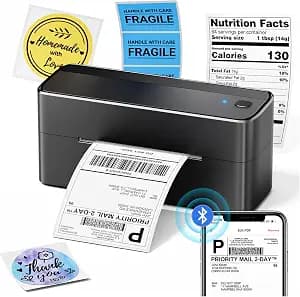
Phomemo Bluetooth Shipping Label Printer, 241BT 4X6 Wireless Thermal Label Printer for Small Business, Labels Printers for Shipping Package, Compatible with iPhone, Android, Amazon, Shopify, Black
Description
[Print Wirelessly] - Phomemo bluetooth shipping label printer supports wireless printing through bluetooth connection. For IOS and Android, need to download the "labelife " APP from Apple Store or Google Play. With easy and simple operations, you can easily print your documents, photos, and more, making your life more convenient! Note: All devices cannot be directly connected to Bluetooth and need to be used through the app; [Print via USB Cable] - For PC, Windows, Mac OS, Chrome OS, and Linux systems. For Chrome OS, need to enter “Labelife” in the Chrome web store and add the extension to your Google Chrome. (PC printing needs to download the driver: labelife.net/pm241); [Multi-Platform Compatibility] - This shipping label printer supports label widths from 1 to 4.6 inches, making it ideal for printing labels compatible with eBay, Shopify, Amazon, Etsy, UPS, USPS, FedEx, and more. Easily print text, barcodes, QR codes, forms, and use pre-made templates for home or business. Note: The printer supports black-and-white printing only. For color labels, purchase compatible thermal color label paper separately.; [Commercial and Home Use] -Phomemo label printer utilizes advanced thermal direct technology for printing, eliminating the need for expensive toner or ink. With a printing speed of 150 mm/s, the printer can produce up to 72 sheets of 4x6 labels per minute. Additionally, the 203 DPI resolution ensures that the printing is clear and precise. With this printer, you can save precious time and money, making it an ideal choice for your labeling needs; [Professional Team] - Phomemo support team provides technical support, including live chat, phone calls, emails even remote desktop operation. If you have any questions or concerns about our Bluetooth shipping label printer, please don't hesitate to let me konw. Phone Call: (9:00-17:00 Mon-Fri EST) Email/ Live Chat: (19:30-4:30 Mon-Fri EST); Phone and Tablet Start Print - Step 1: Download the App 'Labelife'. Step 2: Turn on the 241BT printer and your phone's or tablet's Bluetooth. Step 3: Click the 'Printer' icon in the App to search for the 241bt label printer, connect it via Bluetooth in the App, and select the paper size and file type to start printing; Laptop/PC Starts Printing - Step 1: Please check your laptop/PC's operating system (OS) and download and install the correct 241bt driver from the website (labelife.net/pm241). Step 2: Use the USB data cable to connect the 241bt printer to your computer. Step 3: Select and open your document, and choose 241bt from the printer list.
Compare the trade-offs
Similar products, side by side
A random selection of analyzed products from the same category. Different products are not necessarily interchangeable.

PEDOOLO Label Printer, 4x6 Shipping Label Thermal Printer for Packages, Bluetooth Conection and Compatible with Android, iPhone, Windows, Mac, Chromebook, Amazon, UPS, USPS, FedEx, Shopify

LabelRange Ecommerce Label Printer 4x6, Thermal Shipping Label Printer, Support Amazon, Ebay, USPS, Pirate Ship, Bluetooth and USB Connection

NIIMBOT Label Maker Bluetooth Mini Label Printer D11 2024 Version, Portable Label Maker with Tape Thermal Sticker Small Labeler, 300 DPI High Clearity Rechargeable, Black
One less thing to search
Before you buy: quick questions
Is the setup truly wireless, and how difficult is the Bluetooth connection?
Yes, it's completely wireless! The #1 compliment from users is the easy Bluetooth setup. Most people pair it with their iPhone or Android in under a minute using the free "Phomemo" app. You do not need a computer to operate it—everything can be managed from your smartphone or tablet.
I sell on Shopify and eBay. Will this printer work seamlessly with those platforms?
Absolutely. This printer is fully compatible with major selling platforms like Shopify, Amazon Seller Central, eBay, and Etsy through their respective apps or by using the "Print from App" function. Many small business owners highlight how it streamlined their shipping process directly from their phone.
What kind of labels do I need to buy, and is the print quality reliable for shipping?
You need to purchase 4x6 inch thermal shipping labels (no ink or toner required). Avoid adhesive paper labels—they will not work. As for quality, reviews consistently praise the sharp, smudge-proof prints for barcodes and addresses. A quick tip from experienced users: stick to name-brand or recommended label rolls for the best alignment and to prevent jams.
How durable is this for a busy small business? Could it handle 50+ labels a day?
It's designed and praised by users for reliable daily low-to-medium volume use, which includes 20-50 labels per day. Its compact size is a plus for saving space, but some users note it feels lightweight. If your business consistently ships 100+ packages daily, you might outgrow it and want to consider a heavier-duty, direct-connect model. For most small businesses and side hustles, it's perfectly durable.
What if I have issues with label alignment or the app glitches?
Alignment can require a quick calibration in the app settings—a common minor hurdle mentioned in reviews. The app has adjustment tools to fix this. For occasional Bluetooth or app glitches, the standard fix is to restart the app and printer. The user community online (like on Reddit) has great troubleshooting tips. If hardware issues arise, Phomemo offers support and a standard warranty, but checking reviews suggests most problems are solved in setup.
From a similar, more-reviewed product in this category: MUNBYN RealWriter 941 Bluetooth USB 4x6 Shipping Thermal Label Printer
Will this printer work with my computer, and is setup really as easy as people say?
For the vast majority of users, yes. The RealWriter 941 supports Windows, macOS, and Chromebook via USB, with Bluetooth as a convenient wireless option. Most reviewers say they were printing labels within 10–15 minutes. One tip from seasoned users: install the MUNBYN driver first and set your label size to 4x6 before your first print — that's the step that trips up a few people.
Do I have to use MUNBYN labels, and does it need ink or toner?
No ink, no toner — ever. It's a true thermal printer, which is one of the biggest reasons small sellers love it. You can use any standard 4x6 thermal labels, though MUNBYN's own labels are the most commonly recommended for consistent feed and print quality. Just make sure they're direct thermal (not thermal transfer).
Is the Bluetooth connection reliable enough for daily shipping, or should I stick with USB?
Honest answer: USB is the most rock-solid option, and many power users keep it plugged in for high-volume days. Bluetooth works well for most people, but a few TikTok and Reddit users noted occasional pairing hiccups with older laptops or certain macOS versions. If you print dozens of labels a day, USB is your safest bet; for lighter use, Bluetooth is perfectly fine.
How fast and quiet is it, and can it handle a busy shop's daily volume?
It prints up to 150mm/s — fast enough that most sellers describe it as "instant" compared to inkjet label printing. It's also notably quiet; several reviewers said they can print while on calls without anyone noticing. Small business owners and Amazon FBA sellers consistently call it reliable for daily, high-volume shipping.
What if something goes wrong — is customer support actually helpful, and what about returns?
This is one of the most praised aspects of the product. Reviewers repeatedly mention fast, friendly support that resolves issues — including replacements for the rare unit that arrives damaged or with a jammed roller. It also comes with a standard warranty and is eligible for returns through the platform you purchased from, so you're covered if it's not the right fit for your workflow.
Answers are limited to the manufacturer's listing and the reviews we analysed. Questions those sources cannot support are not answered here.
Transparent by design