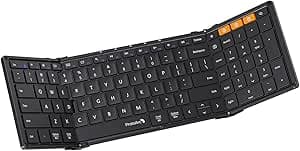
ProtoArc Foldable Bluetooth Keyboard, XK01 Full-Size Portable Wireless Keyboard for Travel, 105 Keys, 0.65" Keycaps, Multi-Device Sync for iPad Tablet Smartphone Laptop PC Windows iOS Android, Black
Description
【Tri-Fold & Travel-Ready Design】The folding keyboard can folds to just 8.46 x 4.68 x 0.78 inches. Internal aluminum hinge tested for 10,000+ folds, delivers reliable durability for the frequent traveler. The simple fold-and-go design requires no locking clips, so you can set up and start typing in seconds, anywhere. PLEASE NOTE: the keyboard has no backlight, for backlit version, consider our upgraded "XK01 Plus" model; 【True Full-Size Portable Keyboard】105 keys with 0.65in keycaps deliver a desktop-grade, precise typing experience - full numeric pad, dedicated function row and precise navigation controls. No compromises for developers, writers, and professionals working from a café, co-working space, or home office(Keyboard is flat, NO TILT); 【Seamless 3-Device Switching】Connect up to three devices simultaneously via Bluetooth 5.1 and switch instantly with a single button press. Perfect for multitaskers who move between a laptop, tablet, and phone. Works seamlessly across Windows, macOS, iOS, and Android, keeping your workflow fluid and interruption-free; 【Long-Lasting USB-C Rechargeable】Quick recharge via the included USB-C cable(not for connecting). The travel keyboard features an auto-sleep function extends standby time to 150 days. That means less time charging and more time being productive; 【Quiet Scissor-Switch Typing】Designed for noise-sensitive environments, the low-profile scissor-switch keys provide library-level silence. Type without distraction or complaints in shared spaces, ideal for creators, developers, and remote professionals working in coffee shops, open offices, or during travel; 【Productivity-Enhancing Shortcut Keys】Speed through tasks with 12 dedicated multimedia shortcut keys for instant access to home, app switching, volume, and more. Toggle between media keys and function keys (F1–F12) by pressing Fn + ESC. Streamlining your workflow and boost productivity
Compare the trade-offs
Similar products, side by side
A random selection of analyzed products from the same category. Different products are not necessarily interchangeable.

CZUR Rechargeable Bluetooth Keyboard with Touchpad, Portable Computer Keyboard with Trackpad, Wireless Ultra Slim Keyboard for PC/Laptop/Tablet/Phone, for Windows/Android/Mac/iOS

Logitech K250 Bluetooth Keyboard with Numpad, Easy Connectivity, Compact Wireless Keyboard Made with Recycled Plastic, Spill-Resistant, Comfortable Keys - Windows/MacOS - Graphite

MOFII Wireless Bluetooth Keyboard, Typewriter Retro Round Keycaps Keyboard, Bluetooth 5.1 Tech Compatible with iPhone, iPad, Android, Windows, PC, Mac, Perfect for Home/Office (Blue Colorful)
One less thing to search
Before you buy: quick questions
L'expérience de frappe sur ce clavier pliable est-elle similaire à celle d'un ordinateur portable ?
C'est différent. De nombreux utilisateurs sur Reddit décrivent les touches comme étant plates et silencieuses, ce qui est idéal pour les voyages, mais elles peuvent sembler "molles" si vous êtes habitué aux claviers mécaniques ou aux claviers d'ordinateurs portables traditionnels. Si vous êtes un dactylographe tactile très rapide, une courte période d'adaptation pourrait être nécessaire. Le compromis de sa conception ultra-mince et pliable est une frappe de touche plus douce.
La charnière pliante est-elle résistante ? Je crains qu'elle ne se casse dans mon sac.
La charnière est conçue pour être portable, mais elle est en plastique, pas en métal. Bien que la plupart des voyageurs ne signalent aucun problème, certains critiques sur YouTube notent un léger grincement ou une fragilité perçue. Nous recommandons d'utiliser l'étui de transport inclus pour une protection supplémentaire. Elle est conçue pour un pliage/dépliage fréquent, mais un traitement délicat garantira la durée de vie la plus longue.
La commutation multi-appareils entre mon iPad, mon téléphone et mon ordinateur portable est-elle vraiment transparente ?
Cette fonction fonctionne bien pour la majorité des utilisateurs, vous permettant d'appairer trois appareils et de basculer d'un simple clic. Cependant, certains utilisateurs de TikTok ont mentionné que le basculement peut prendre 2 à 3 secondes et nécessite occasionnellement un ré-appairage si un appareil n'a pas été utilisé depuis un certain temps. Pour des échanges quotidiens rapides entre appareils Apple/Android/Windows, elle est très fiable.
Ce clavier dispose-t-il de touches rétroéclairées pour travailler dans une faible luminosité ?
Non, il n'en dispose pas. C'est un point de clarification fréquent. Le ProtoArc XK01 n'est pas doté de rétroéclairage ou de touches illuminées. Son principal avantage est sa portabilité et son autonomie de batterie (jusqu'à 400 heures), qui serait considérablement réduite par l'ajout de LED.
À qui ce clavier convient-il le mieux, et qui devrait peut-être chercher ailleurs ?
Il est parfait pour les étudiants, les professionnels nomades et les voyageurs qui ont besoin d'un clavier compact avec une disposition complète pour l'utiliser avec des tablettes et des smartphones en déplacement. Si votre priorité absolue est une sensation de frappe haut de gamme ou des touches rétroéclairées pour le jeu, vous préférerez peut-être un clavier non pliable comme le Logitech K780. Ce clavier excelle en tant que solution très portable, et non en tant que remplacement principal d'un clavier de bureau.
From a similar, more-reviewed product in this category: Razer Joro Wireless Gaming Keyboard, Portable Compact 75%, Low Profile Keys
Does the Razer Joro work wirelessly with Bluetooth, and how many devices can it pair with?
The listing states Bluetooth 5.0 with pairing for up to three devices across Windows, Mac, handhelds, and mobile, with shortcuts to switch between them. Reviews are mixed on wireless reliability: one reviewer reported stable, fast Bluetooth, while others reported connection problems and missed keystrokes after the keyboard sleeps.
How does the keyboard feel to type and game on?
The listing describes ultra low-profile switches with quick, precise actuation and satisfying tactile feedback. Reviewers who liked it compared the feel to laptop scissor keys and Apple-style chiclet keys, calling it quiet with good tactile response, though one noted the spacebar is small.
Is the Razer Joro actually portable and well built?
The listing says it weighs 374 g and is 16.5 mm thin with a full function row and full-sized arrow keys. Reviewers described it as sturdy and minimalist, and one noted the static angle is a deliberate trade-off for a keyboard meant to be carried around.
What are the complaints about the RGB lighting?
The listing advertises Chroma RGB with 16.8 million colors and dynamic effects. Reviewers reported a glow around the keys rather than through the lettering, secondary symbols that are hard to see, and one said the lighting stayed on while the PC was locked.
Do I need Razer Synapse software to use all the keyboard's features?
The listing ties Snap Tap and Chroma customization to Razer Synapse 4. Reviewers noted that some functions, such as turning off Fn lock to use F1–F12 directly, require Synapse, and one complained there is no Synapse software for SteamOS.
Answers are limited to the manufacturer's listing and the reviews we analysed. Questions those sources cannot support are not answered here.
Transparent by design