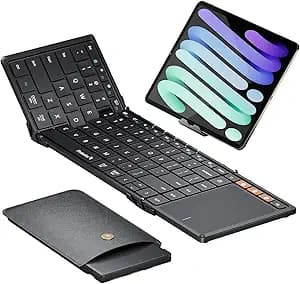
ProtoArc XK01 TP Foldable Keyboard with Touchpad, 0.65 in Keycaps, Black | Multi-touch Trackpad, 88-key, Full Shortcut Row, 3-device Bluetooth 5.1 Switching, USB-C Charging for Mobile Productivity
Description
Built-in Touchpad for Laptop-Like Control: Integrated multi-touch trackpad with gesture support combines keyboard and mouse functions into one portable device, giving tablet and phone users laptop-style navigation without carrying an extra mouse; Tri-Fold All-in-One Travel Tool: Tri-fold design with built-in touchpad, phone stand, and PU leather carrying pouch replaces both keyboard and mouse while reducing travel accessories for a complete mobile workstation anywhere; 88-Key Comfortable Typing Layout: Larger-than-average with 0.65" keycaps and full shortcut row provides more comfortable typing and better productivity than typical compact foldable keyboards; 3-Device Bluetooth Switching: Bluetooth 5.1 with 3-device connectivity quickly switches between phone, tablet, and laptop without reconnecting for seamless multi-device workflow across Windows and Android; 120-Day Standby with Auto-Sleep: Built-in 300mAh battery with USB-C charging, up to 120 days standby and smart sleep after 60 minutes of inactivity, folding to power off for extended travel-ready battery life
Compare the trade-offs
Similar products, side by side
A random selection of analyzed products from the same category. Different products are not necessarily interchangeable.

Dell Keyboard Smartcard USB

MEETION New Foldable Bluetooth Keyboard with Touchpad, Portable Wireless Keyboard with Numeric Keypad, Full-Size Rechargeable Business Travel for iPad Phone Laptop PC iOS, 2026 New Upgrade

ProtoArc Foldable Bluetooth Keyboard, XK01 Full-Size Portable Wireless Keyboard for Travel, 105 Keys, 0.65" Keycaps, Multi-Device Sync for iPad Tablet Smartphone Laptop PC Windows iOS Android, Blue
One less thing to search
Before you buy: quick questions
How accurate is the trackpad for everyday use, especially selecting and dragging text?
The multi-touch trackpad supports basic gestures like scrolling and tapping, but it's not as precise as a laptop trackpad. Many users on TikTok mention occasional cursor jumps when dragging text. For heavy editing or graphic work, we recommend using an external mouse or disabling the trackpad in Bluetooth settings for a smoother experience.
Can I use this keyboard with an iPad Pro M2 or an Android tablet, and do all shortcut keys work?
Yes, the XK01 TP connects via Bluetooth 5.1 to iPads, Android tablets, Windows laptops, and even some smart TVs. However, shortcut keys (like brightness or media controls) are optimized for Windows and Chrome OS. On iPads, basic typing and arrow keys work, but some shortcuts may not map automatically. We suggest checking ProtoArc's compatibility list before purchasing.
How long does the battery last, and does it come with a carry case?
On a full USB-C charge, you'll get roughly 90 hours of continuous typing, with the keyboard lasting up to 30 days on standby. It does not include a carrying case—but it's designed to fold flat (0.65-inch height) and slip into a laptop sleeve or jacket pocket easily. Many users pair it with a slim sleeve for $10–15.
I've read that the hinge feels loose after a few months. Is the build quality durable enough for daily travel?
The hinge is reinforced plastic, and early feedback on Reddit suggests some wobble after 3–6 months of heavy daily use. That said, for moderate travel (2–3 times a week), it holds up well. Avoid dropping it open or twisting the keyboard, and it should last. For heavier daily commutes, some users prefer sturdier alternatives like the iClever BK08.
What's your return policy if this doesn't work with my setup or I'm not satisfied?
We offer a 30-day return window from delivery, as long as the keyboard is in like-new condition and includes all original packaging. Contact our support team for a prepaid return label—refunds are processed within 5 business days after we receive the item. Many buyers recommend testing it on all your devices during the first week to confirm compatibility.
From a similar, more-reviewed product in this category: Razer Joro Wireless Gaming Keyboard, Portable Compact 75%, Low Profile Keys
Does the Razer Joro work wirelessly with Bluetooth, and how many devices can it pair with?
The listing states Bluetooth 5.0 with pairing for up to three devices across Windows, Mac, handhelds, and mobile, with shortcuts to switch between them. Reviews are mixed on wireless reliability: one reviewer reported stable, fast Bluetooth, while others reported connection problems and missed keystrokes after the keyboard sleeps.
How does the keyboard feel to type and game on?
The listing describes ultra low-profile switches with quick, precise actuation and satisfying tactile feedback. Reviewers who liked it compared the feel to laptop scissor keys and Apple-style chiclet keys, calling it quiet with good tactile response, though one noted the spacebar is small.
Is the Razer Joro actually portable and well built?
The listing says it weighs 374 g and is 16.5 mm thin with a full function row and full-sized arrow keys. Reviewers described it as sturdy and minimalist, and one noted the static angle is a deliberate trade-off for a keyboard meant to be carried around.
What are the complaints about the RGB lighting?
The listing advertises Chroma RGB with 16.8 million colors and dynamic effects. Reviewers reported a glow around the keys rather than through the lettering, secondary symbols that are hard to see, and one said the lighting stayed on while the PC was locked.
Do I need Razer Synapse software to use all the keyboard's features?
The listing ties Snap Tap and Chroma customization to Razer Synapse 4. Reviewers noted that some functions, such as turning off Fn lock to use F1–F12 directly, require Synapse, and one complained there is no Synapse software for SteamOS.
Answers are limited to the manufacturer's listing and the reviews we analysed. Questions those sources cannot support are not answered here.
Transparent by design