What people like
Good for multitasking and gaming
Several reviewers were happy with the monitor's performance for having multiple windows open, racing games, and movies, and one noted better-than-expected brightness and no dead pixels.
Our buying verdict
Some buyers praise multitasking and gaming, but several report connection failures and defects.
Buyers who want a large ultrawide screen for multitasking, racing games, and movies, and who can verify connectivity and return options before buying.
Buyers who need reliable Mac or HDMI laptop connectivity, or who want straightforward warranty support.
The 30-second read
What people like
Several reviewers were happy with the monitor's performance for having multiple windows open, racing games, and movies, and one noted better-than-expected brightness and no dead pixels.
The main watch-out
Several reviewers reported the monitor would not connect or display properly, including with laptops and Macs, and some received defective units or had warranty support issues.
Before you choose
One reviewer could not get the desired window sizing for 3-4 apps and suspected their graphics card, so check your setup can support the layout you want.
From a similar, more-reviewed product in this category: KOORUI 24 Inch Gaming Monitor, 180Hz 1080P VA Display with 3000:1 Contrast
What people like
Several reviewers describe the monitor as a strong budget purchase, citing impressive specs for the money and satisfaction with gaming use.
The main watch-out
Several reviewers report the monitor failing or coming apart after months to a couple of years, including a dead screen and a failing power cord.
Before you choose
Two reviewers note that setup benefits from adjusting settings in your GPU software, including color, brightness, and VRR.
Description
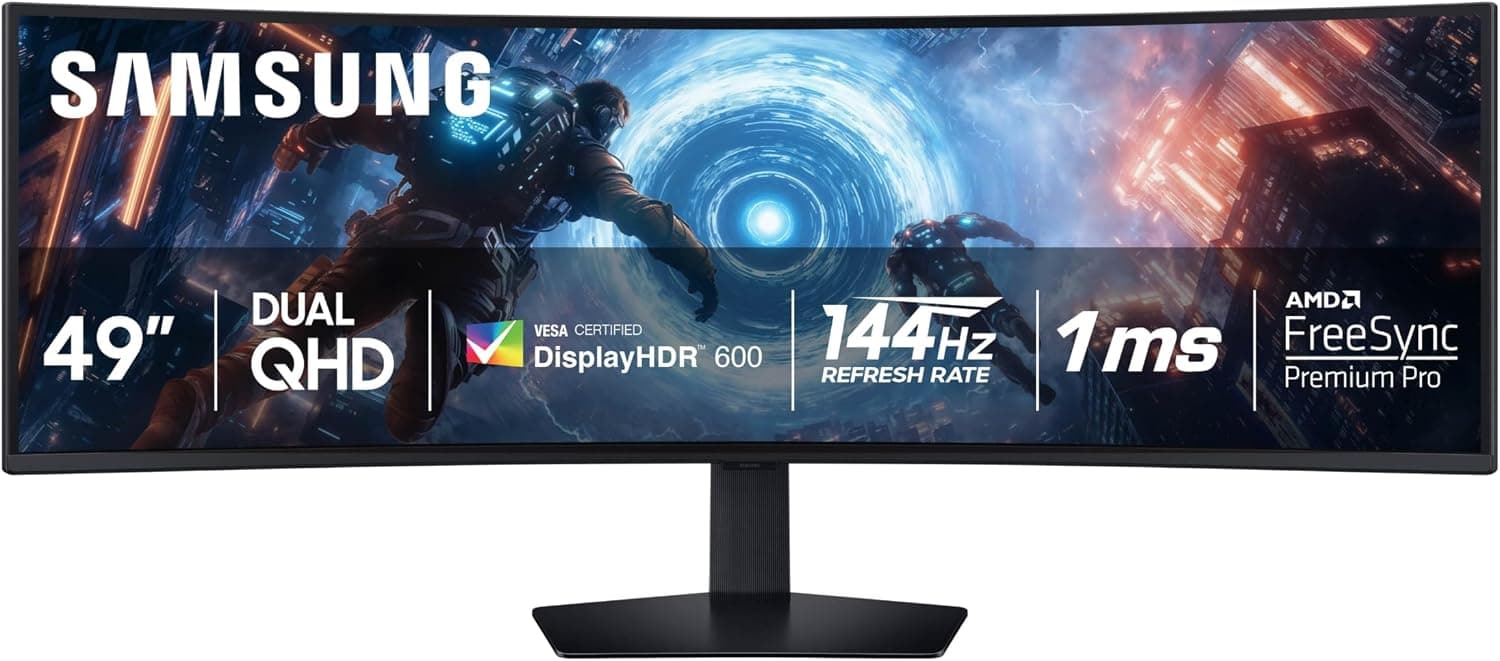
Samsung's 49" Odyssey G9 Curved Gaming Monitor with a 1000R curved display creates an immersive panoramic gaming experience. Curved Dual QHD features an ultra-wide 32:9 screen, equivalent to two side-by-side 16:9 monitors, providing a full view with unsurpassed details. VESA DisplayHDR 600 delivers more contrast with deeper blacks and brighter whites. 144Hz Refresh Rate and near-instant 1ms Response Time (GtG) captures all your moves with reduced lag for ultra-smooth gameplay. AMD FreeSync™ Premium Pro and VRR (variable refresh rate) reduce choppiness, screen lag, and image tears, even for the most intense fast-action gaming sessions. Picture-by-Picture enables a split screen that can be used to its maximum potential for side-by-side gameplay, while Picture-in-Picture allows seamless multitasking to manage all content on a single screen. Auto Source Switch+ instantly switches to a new source signal when connected devices are turned on, without having to use multiple inputs. The ergonomic stand makes it simple to tilt and adjust the monitor for total gaming comfort.¹Refresh rate and response time may vary based on the performance of the input source. ‘1ms’ means one millisecond, which is the average response time range between 1.00ms and 1.99ms, truncated to a whole number. Based on GtG measured under internal test conditions. Results may vary by content and monitor settings (Requires ‘Extreme mode’ setting.) GtG (Gray to Gray) measures the time taken for a monitor pixel to change from one gray value to another. ²Screen images simulated for illustrative purposes.
Compare the trade-offs
A random selection of analyzed products from the same category. Different products are not necessarily interchangeable.

Sceptre 4K IPS 27" 3840 x 2160 UHD Monitor up to 70Hz DisplayPort HDMI 99% sRGB Build-in Speakers, Black 2021 (U275W-UPT)

KTC 32 Inch 4K Gaming Monitor, 165Hz UHD (3840x2160P) Fast IPS Screen, 1ms (MPRT), Adaptive Sync, 3000:1 Contrast,121% sRGB,HDMI 2.1 Display Port 1.4, Tilt/Height Adjustment, VESA Mount, H32P22P

Philips 22 Inch Computer Monitor FHD 120Hz Overclocked IPS VESA, 22E2N1100
Check the evidence
Included does not mean verified authentic. Flagged does not mean proven fake. These are analytical classifications.
Showing 3 illustrative excerpts, not the complete review set.
Defective monitor and warranty not honored by Samsung
“I purchased this monitor on April 11, and it did not work correctly. The data ports failed, and the HDMI connection also began having problems. Samsung confirmed that it was covered by the factory warranty. I was willing to have it repaired, but Samsung said it did not have a technician in my area. Its resolution was to pick up the original monitor and replace it. Samsung collected the original monitor on June 4 and confirmed in writing that I would receive a replacement. When I ordered the replacement, I selected delivery without a signature. Samsung changed the delivery requirements without notifying me. After unsuccessful delivery attempts, including one made several hours before the stated delivery window, the shipping company returned the replacement to Samsung. Samsung confirmed that it received the returned monitor on June 17. For months, Samsung representatives have said they were verifying the timeline, escalating the matter, or waiting for another department. Samsung also sent the same already-used replacement coupon more than once, even though it could not be used to order another monitor. It has now been more than five months since I purchased the monitor and more than three months since Samsung took the original. Samsung has both the defective original and the returned replacement. I have neither monitor, but I continue making payments for the purchase. My state Attorney General’s office has contacted Samsung, yet Samsung still has not provided a usable replacement coupon, a replacement monitor, or a refund. I regret relying on Samsung’s warranty process and wish I had handled the defective product directly through Amazon.”
Signals matched: Specific detail: entity, process · Reads as an authentic voice
Disappointed right now!
“After waiting a couple of days to get the monitor and spending a couple of hours putting it together and cleaning up wires turned it on and bam screen was broken. Talked to CS and now I wait to see what is going to be done. Well I will be sending it back after talking to Samsung buying the monitor from Amazon meant no warranty with them. I used to be a fan of Samsung after this I am done with them. I work for a manufacturer and understand what they meant as far as the warranty being carried by the dealer but still 2 days old broken in box and they say no warranty with them and if I 2ant to get it fixed it would cost me 😮. I'm good.”
Signals matched: Specific detail: process, entity · Reads as an authentic voice
Multiple Open Apps
“I bought this to be able to have 3-4 windows open while I work. I could not get the correct sizing to make it work. Could be my graphics card. Not sure. Ended up getting 3 separate 27" monitors.”
Signals matched: Specific detail: quantity, scenario, comparison · Reads as an authentic voice
One less thing to search
It's worth measuring first—this is a genuinely huge panel, and many Reddit and TikTok users say the biggest surprise was how much desk depth the 1000R curve and stand demand. A deeper desk (or a sturdy monitor arm with sufficient weight rating) makes setup far more comfortable. If space is tight, consider a 34" or 38" ultrawide instead.
It shines for multitasking—Picture-by-Picture and Picture-in-Picture let you run two full windows side by side, and remote workers often call it a "two-monitors-in-one" upgrade. That said, some users report a short adjustment period for reading text near the edges, so if crisp document work is your priority, a flat dual-4K setup may suit you better.
You'll want a capable modern GPU and DisplayPort 1.4 to hit full resolution at 144Hz with FreeSync Premium Pro enabled—HDMI may cap your refresh rate depending on the source. Many buyers ask this before purchasing, and the honest answer is: check your GPU's max output first, because the monitor can only deliver what your system feeds it.
DisplayHDR 600 delivers noticeably deeper blacks and brighter highlights than standard panels, and gamers praise the immersion—but savvy reviewers caution it isn't OLED-level HDR. If true cinematic contrast is your top priority, an OLED ultrawide is the better fit; if you want vivid, smooth, tear-free gaming at a strong value, this delivers.
This is one of the most common pre-purchase worries, and it's a fair one for any large panel. Buy from a retailer with a clear dead-pixel and return policy, inspect the screen on arrival, and keep the packaging until you're satisfied. Most buyers report smooth experiences, and Samsung's warranty covers defects—just document anything unusual right away.
From a similar, more-reviewed product in this category: KOORUI 24 Inch Gaming Monitor, 180Hz 1080P VA Display with 3000:1 Contrast
Yes — it's a native 180Hz panel, but you'll need to switch it on manually. Connect via the included HDMI cable (or a DisplayPort-capable setup), then set 180Hz in your GPU's display settings; it defaults to a lower refresh rate out of the box. Many Reddit and YouTube users note that enabling Adaptive Sync/FreeSync alongside it gives the smoothest experience, and it works with both AMD and NVIDIA cards.
The 3000:1 contrast gives noticeably deeper blacks than typical IPS budget monitors, which shines in dark game scenes and movies. For fast-paced competitive shooters, some TikTok and Reddit users mention mild ghosting/smearing in dark transitions — it's great for casual gaming, students, and office work, but color-critical creators or hardcore FPS players may prefer an IPS panel.
Correct, the included stand only tilts (-5° to 20°) and doesn't offer height, swivel, or pivot adjustment, and a few users find the base slightly wobbly. The good news: it's VESA 100×100mm compatible, so a monitor arm or desk mount solves ergonomics entirely — a popular fix among dual-monitor and dorm-room setups.
Budget monitors can vary unit to unit, and some buyers report stuck pixels or corner bleed — but KOORUI backs it with a 3-year manufacturer warranty. If your unit arrives defective, contact the seller for a replacement or refund promptly; most users who did so report a smooth resolution, so inspect the screen within the return window.
At around $120, it's widely praised as one of the best budget 180Hz options — ideal for students, casual gamers, home-office users, and compact or dual-monitor setups. Just set expectations: no built-in speakers, a single HDMI plus VGA, and basic ergonomics. If you need height adjustment, color accuracy, or built-in audio, consider spending more on an IPS alternative.
Answers are limited to the manufacturer's listing and the reviews we analysed. Questions those sources cannot support are not answered here.
Transparent by design