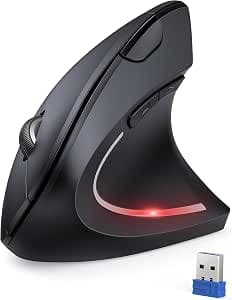
TECKNET 2.4G Ergonomic Mouse Vertical Wireless - 4800 DPI Optical Carpal Tunnel Mouse Right Hand, 5 Adjustable DPI, Quiet Clicks, 6 Buttons for Laptop, Desktop, PC, Computer - Black
Description
ARM PROTECTION: The ergonomic vertical mouse allows you to adjust your arm and wrist for a comfortable position and less stress. An adaptation period of 1-2 weeks is recommended for optimal comfort.; PRECISE CONTROL: With 5 Adjustable DPI 4800/3200/2400/1600/800, providing higher sensitivity for smooth and precise tracking.; SILENT CLICKS: Clicking noise is reduced by more than 90%, avoiding disturbing others and ensuring your office or home work not be interrupted.; EASY TO USE: Just plug the 2.4G receiver for 49ft connection distance.The vertical mice requires an available USB-A port. An adapter may be needed for computers with only USB-C ports.; ENERGY SAVING: The computer mice will enter sleep mode after 8 minutes of inactivity, press the left or right button to wake it up. The erqonomic mice is required 2XAAA batteries(not included).; WIDE USE: The ergo mouse is compatible for various computer s such as laptop, desktop, pc, and Systerms such as Windows 11/10/8/7/XP/Vista/Linux.; 2 SIDE BUTTONS: The forward/backward buttons will greatly improve your work efficiency when browsing websites/emails. (Note: The side buttons are not suitable for Mac systems).; 36 MONTH SUPPORT: If you encounter any problems in using the product, feel free to reach out to the TECKNET friendly customer service, enjoying 36-Month Support(Registered Only).; Red Indicator Light: The LED light will flash red when you switch different DPI and when the battery is low.; FOR Right Hand: Please measure you right palm for the great fit.Suitable palm length: 6.7-8.3 in (17-21 cm), Palm Width: 3.5-4.7 in (9-12 cm)
Compare the trade-offs
Similar products, side by side
A random selection of analyzed products from the same category. Different products are not necessarily interchangeable.

ProtoArc EM11 NL Wireless Ergonomic Vertical Mouse, Rechargeable, Black | 58° vertical design supports a natural wrist posture, connect 3 devices via Bluetooth/2.4G USB-A, 500mAh USB-C rechargeable.

Macally Wired USB C Mouse for Mac & Windows - 3 Button & Scroll Wheel USB Type C Mouse - Comfortable Ambidextrous Design - Compact Wired Mouse with Optical Sensor & DPI Switch 800/1200/1600/2400

Logitech M510 Wireless Mouse, Mouse for Laptop and PC with USB Unifying Receiver, Programmable Buttons - Graphite
One less thing to search
Before you buy: quick questions
Tengo dolor de muñeca o síndrome del túnel carpiano. ¿Realmente me ayudará este ratón?
Según los comentarios abrumadoramente positivos de usuarios con problemas similares, sí, es muy probable que proporcione alivio. La postura vertical de "apretón de manos" está diseñada para reducir la tensión en los tendones. Muchos reseñistas de Reddit y Amazon con lesiones por esfuerzo repetitivo informan una disminución significativa del dolor. Sin embargo, prepárese para un período de adaptación de 3 a 7 días mientras sus músculos se acostumbran al nuevo agarre.
¿Es adecuado para personas con manos pequeñas?
Este es un punto de comentario común. El ratón TECKNET tiene un diseño "único para la mayoría" que algunos usuarios con manos pequeñas encuentran demasiado grande para agarrar cómodamente. Si tienes manos más pequeñas, es posible que notes que tus dedos se estiran demasiado para hacer clic. Para una forma vertical más compacta, es posible que desees investigar modelos diseñados específicamente para agarres más pequeños.
¿Cuánto dura el período de adaptación y es difícil de usar al principio?
Casi todos los usuarios nuevos mencionan una curva de aprendizaje inicial de varios días a una semana. Las tareas que requieren gran precisión (como la edición detallada de fotos) se sentirán incómodas al principio. La clave es el uso constante: su memoria muscular *se adaptará*. Como dijo un reseñista de YouTube: "Persevere durante una semana. La torpeza temporal vale la pena por la comodidad a largo plazo."
¿Con qué dispositivos y sistemas operativos es compatible?
Es ampliamente compatible. El receptor USB plug-and-play funciona con PC con Windows, Mac, portátiles e incluso Chromebooks. Para los usuarios de Mac, los botones laterales pueden requerir software para asignar funciones específicas, pero las funciones básicas de apuntar y hacer clic funcionan de inmediato. No es compatible con Bluetooth.
¿Cuál es la duración real de la batería y hay una advertencia de batería baja?
Con la pila AA incluida, la mayoría de los usuarios informan de 4 a 6 meses de uso diario en la oficina. Una sugerencia frecuente de la comunidad es que al ratón le falta un indicador luminoso dedicado para avisar de la batería baja—suele funcionar hasta que se detiene de repente. Un buen hábito proactivo es cambiar la pila cada 4 o 5 meses para evitar tiempos de inactividad inesperados.
From a similar, more-reviewed product in this category: TECKNET Wireless Mouse, BT 5.0/2.4G, Rechargeable 6-DPI Silent, Grey
How long does the battery last on a full charge?
The listing states a full charge takes 1.5 to 2 hours and delivers 3 months of use at 2 hours per day. Reviewers back this up, with one reporting no charge needed after a month and a half of roughly 9 hours daily use, and another saying one charge lasts for months.
Are the mouse clicks actually quiet?
Yes. The manufacturer describes silent technology for noiseless clicks, and reviewers consistently call the left and right clicks "super silent," "quiet but satisfying," and a good fit for offices and quiet environments.
How do I connect it, and can I use it with more than one device?
It supports both a USB-A dongle and Bluetooth (3.0/5.0), and you can connect two devices at once and switch between them with a slide switch. Reviewers confirm both the USB and Bluetooth connections work well and are easy to set up, and the dongle is stored in a slot underneath the mouse.
Is this mouse suitable for small hands?
The listing notes it is better suited for small to medium-sized hands, though larger-handed users who prefer a smaller mouse may still like it. A reviewer who wears a small women's glove said it fits perfectly, and another described it as somewhat small but still comfortable in a man's hand.
Does it work with macOS?
The listing says it is compatible with Windows, macOS, Chrome OS, and Linux, but notes that the side buttons are not compatible with macOS.
Answers are limited to the manufacturer's listing and the reviews we analysed. Questions those sources cannot support are not answered here.
Transparent by design