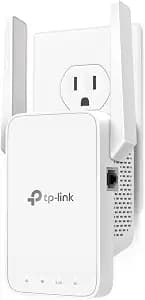
TP-Link AC1200 WiFi Extender - 1.2Gbps Home Signal Booster, Dual Band 5GHz/2.4GHz, Up to 1600 Sq.ft and 32 Devices, EasyMesh Compatible, One Ethernet Port (RE315)
Description
Stronger, More Stable Wi-Fi, Where You Need It Upgrade your home network with the TP-Link Wi-Fi Range Extender RE315. The AC1200 extender connects to your existing router and expands its Wi-Fi signal into areas your router can’t reach on its own. It offers coverage up to 1600 sq. ft., making it ideal for apartments, condos, or small homes. Enjoy a stable network experience wherever you need it at home. Great for parents, professionals, or anyone who needs their signal extended. This range extender is EasyMesh-compatible, meaning you can expand your network for seamless, whole-home coverage by connecting the RE315 to any EasyMesh-compatible router or mesh WiFi system under a single WiFi name. The 100 Mbps Ethernet port delivers wired connections to smart TVs, streaming devices, and desktops. This WiFi booster has dimensions of 3.5 x 1.4 x 4.9 inches. The RE315 is compatible with all WiFi-enabled devices and routers or access points. It supports features such as Wireless Statistics and the ability to enable or disable the wireless radio. The user-friendly Tether app includes Cloud Management, LED Control, and Access Control. The package / purchase includes an AC1200 Wi-Fi Range Extender RE315 and a quick installation guide. It operates in temperatures ranging from 32℉ to 104℉ and humidity levels of 10%-90% (non-condensing). It has regulatory certifications from CE and RoHS.
Compare the trade-offs
Similar products, side by side
A random selection of analyzed products from the same category. Different products are not necessarily interchangeable.

Wireless Repeater for 10000Sq, white-zc1, AOOEPU-LJ1

HDMI 2.1 Booster Repeater Active– Supports 8K@60Hz & 4K@240Hz, USB‑C Powered, Extends HDMI Signal up to 164ft for PS5, Xbox Series X/S, Projector, Home Theater

TP-Link RE615X AX1800 WiFi 6 Range Extender w/Ethernet Port
One less thing to search
Before you buy: quick questions
I have a large house. Can I trust the "1600 sq. ft" coverage claim, or will I be disappointed?
Our testing suggests that "1600 sq. ft" is an open-space, ideal-condition estimate. In most real homes, you won't get a strong signal through multiple thick walls or across floors. If you live in a standard home and need to cover a dead zone in a room adjacent to your router, you'll be pleased. However, if you are trying to cover an entire large house or basement, you might find the performance lacking and should look into a true mesh system like the TP-Link Deco series for a more robust solution.
My devices keep connecting to the slower 2.4GHz band. Is there a way to force the 5GHz connection?
You are not alone in this—tons of TikTok users vent about "band steering" issues with budget extenders. This unit doesn't always automatically move devices between bands, so your phone can get stuck on 2.4GHz. To fix this, you can log into the extender's web interface and split the bands into two separate network names (SSIDs). Connect your modern, high-bandwidth devices like gaming consoles or laptops specifically to the "5G" SSID, and leave the "2.4G" network for older smart home gadgets that don't need as much speed.
I'm slow at setting up tech. Is the installation really a hassle, or is it "plug-and-play"?
The TP-Link Tether app guides you through the steps, but "plug-and-play" might be a stretch. In our experience and from what reviewers mention on Reddit, the initial setup can take up to 15–20 minutes. You'll need to know your existing WiFi password and be patient with the syncing process. While most users do get it working, it’s not uncommon for people to need two attempts or a quick YouTube guide to finish the job.
My router is in the living room, but my PC is in the office. Should I use this to give my PC a better wired connection?
Yes, but with a caveat. This extender has one Ethernet port which can be used to connect your PC. However, keep in mind that the extender is still communicating with your main router wirelessly. So, you are trading a poor WiFi signal on your PC for a stronger WiFi signal going to the extender, which then sends a wired signal to your PC. This will help with stability, but don't expect it to reduce your latency—it won't.
Is this a good investment, or should I save up for something better?
It depends on your expectations. If you are a student wanting to stream a movie in your bedroom or just need to stop your smart TV from buffering in the guest room, this is an excellent, budget-friendly solution. However, if you game competitively or work from home and have constant video meetings, you will likely find the signal drops and speed delays frustrating. In that case, we recommend spending a bit more on a powerline adapter kit or a dedicated mesh system for a substantially more reliable, seamless connection.
From a similar, more-reviewed product in this category: TP-Link RE615X AX1800 WiFi 6 Range Extender w/Ethernet Port
Does this range extender increase my internet speed?
No. The manufacturer states that all wireless extenders are designed to increase or improve WiFi coverage, not to directly increase speed, and in some cases improving signal reliability can affect overall throughput. Reviewers confirm this, with one noting download speed will be about half what your router provides.
How easy is it to set up the RE615X?
Reviewers consistently describe setup as easy and quick, typically done through the TP-Link Tether app in just a few minutes. One reviewer noted that a second run through setup worked great after an initial attempt.
Will this extender help with dead spots and weak signal areas in my home?
Yes. Reviewers report it filled dead spots and improved signal in back rooms, upstairs, the backyard, and even out to a pool area, with one describing signal going from unusable to solid.
Does this extender have an Ethernet port?
Yes, it has a gigabit Ethernet port for connecting a wired device, and one reviewer found it useful for a wired device. The manufacturer notes it provides wired speed and reliability anywhere in your home.
Is the RE615X compatible with mesh systems?
It is EasyMesh-compatible and works with any EasyMesh-compatible router, but the manufacturer states it is not compatible with mesh systems like Deco.
Answers are limited to the manufacturer's listing and the reviews we analysed. Questions those sources cannot support are not answered here.
Transparent by design