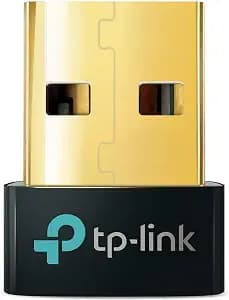
TP-Link USB Bluetooth Adapter for PC - Bluetooth 5.4 USB Dongle Receiver
Description
UB500 is highly portable and much smaller than a flash drive. Plug and play in Windows 8/8.1/10/11 systems to enjoy a wireless communication with Bluetooth-enabled devices. This Bluetooth adapter supports advanced Bluetooth 5.4 with EDR and Bluetooth low energy technology, enabling wireless connectivity a wide range of devices such as computers, printers, phones, headsets, speakers, keyboards, controllers, etc. Note: Plug and play for Windows 8.1, Windows 10, and Windows 11 (make sure your computer is connected to the internet).
Compare the trade-offs
Similar products, side by side
A random selection of analyzed products from the same category. Different products are not necessarily interchangeable.

Bluetooth Audio Adapter for Music Streaming Sound System, Esinkin Wireless Audio Adapter Works with Smartphones and Tablets, Bluetooth Receiver for Home Stereo

UGREEN USB Bluetooth 5.3 Adapter for PC, Plug & Play for Windows 11/10/8.1, Bluetooth Receiver & Transmitter for Keyboard/Mouse/Headphone/Speakers/Printer

TRENDnet Micro Bluetooth 5.0 USB Adapter, Supports Basic Rate(BR), Bluetooth Low Energy(BLE), Enhanced Data Rate(EDR), 100m (328ft.) Range, Supports Windows OS, Black, TBW-110UB (Pack of 1)
One less thing to search
Before you buy: quick questions
Is this truly "plug-and-play" for Windows, or do I need to install drivers?
For the vast majority of modern Windows 10 and Windows 11 desktops and laptops, it's 100% plug-and-play—just insert it, wait a second, and your device is ready to pair. However, a few users on older Windows 10 builds have reported needing to manually download the driver from TP-Link's website. If you don't see the "successfully installed" pop-up within 30 seconds, we recommend grabbing the latest driver from the official TP-Link support page to avoid potential connectivity hiccups.
I want to connect my wireless headset and my controller at the same time. Will this handle it without cutting out?
Yes, it can handle multiple peripherals simultaneously—you can have a mouse, keyboard, and headset all connected at once. However, users have noted a minor caveat: when you are pushing heavy data transfer to multiple devices at the same time (like gaming while on a voice call), you might experience a very brief audio stutter. For standard daily use (music + mouse + keyboard), it handles the load smoothly without needing to re-pair devices.
Can I use this adapter to connect my phone, iPad, or Mac to my PC?
This specific adapter is designed primarily for Windows PCs. While it will power on and be detected by other operating systems, the full functionality and future firmware updates are tailored specifically for Windows 10/11. Many users have noted that trying to use it with an iPad or Apple TV is hit-or-miss. If you are using a Mac, we recommend checking out TP-Link's UB400 (which has wider macOS support) or a dedicated macOS-specific dongle.
The box says "Bluetooth 5.4"—will I actually get the super-long range and better sound quality?
Bluetooth 5.4 offers improved connection stability and power efficiency compared to 5.0, but the "long range" figure printed on the box (often up to 200 meters) is an ideal, open-air test result. In a real house, you can expect solid connectivity through one wall (roughly 15-20 meters). Regarding sound quality: this adapter transmits the signal perfectly, but it cannot magically upgrade the sound of cheap $20 earbuds. If you are using high-end audio gear, you'll get a stable connection with no audio dropouts, but the sound profile is still limited by the Bluetooth codec your headphones support.
Is this the best choice for me, or should I get the cheaper TP-Link UB500?
It depends on your hardware. If you have a very new laptop with Bluetooth 5.0 or 5.1, upgrading to this 5.4 adapter won't offer a massive, noticeable leap in performance for a simple mouse or keyboard—the UB500 (older version) might save you a few dollars. However, if you are building a new desktop PC, using this on a USB 3.0 port will ensure you have the lowest latency possible with the newest wireless tech. We recommend this 5.4 version if you plan to connect a modern console controller or multiple devices simultaneously; choose the UB500 if you just need a basic, reliable connection for a single mouse.
From a similar, more-reviewed product in this category: Internet Splitter 1 in 4 Out, Gigabit Ethernet LAN Splitter High Speed
Can both connected devices get full gigabit speed at the same time?
No. The manufacturer states this is a passive splitter, so only one device can actively use the connection at a time unless paired with a network switch or router that supports network bridging. It physically splits one Ethernet cable into four but does not double the bandwidth.
Does this splitter support Power over Ethernet (PoE) devices?
No. The listing states this splitter does not support PoE passthrough, and connecting a PoE-enabled device through it may result in unstable performance or no connection. A dedicated PoE splitter or injector is recommended instead.
Does using this splitter reduce internet speed?
The manufacturer says it is built with high-quality materials and gold-plated contacts to minimize signal loss, but as a passive splitter it does not manage traffic and is meant for alternating connections rather than simultaneous high-speed use. One reviewer reported both connected devices getting full 1000Mbps Gigabit speeds simultaneously using Cat 6 cables, while another said they could not detect any loss of performance.
Is the splitter well made and durable?
Reviews are mixed on this point. One reviewer said it works fine but seems made of very cheap plastic and questioned how long it would last, and another reported it stopped providing Ethernet after a brief power outage about two months in, while other reviewers described it as good quality with no problems so far.
Is it easy to set up for someone who is not tech-savvy?
One reviewer said it needs clearer instructions for a novice non-techie, though it seemed to work for different tasks and laptops. Others found it convenient, including one who noted the USB power supply makes it easy to use by simply connecting it to a computer.
Answers are limited to the manufacturer's listing and the reviews we analysed. Questions those sources cannot support are not answered here.
Transparent by design