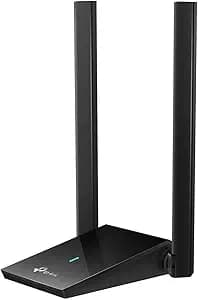
TP-Link WiFi 6 USB Adapter for Desktop PC - (Archer TX20U Plus) AX1800 Wireless Network Adapter with 2.4GHz, 5GHz, High Gain Dual Band 5dBi Antenna, WPA3, Supports Windows 11/10
Description
TP-Link USB WiFi 6 Adapter for Desktop PC AX1800 Wireless Network Adapter with 2.4GHz/5GHz High Gain Dual Band 5dBi Antennas, Supports Windows 11/10 (Archer TX20U Plus) High Speed, Dual Band WiFi The Archer TX20U Plus grants your PC access to 802.11ax technology while receiving WiFi signals on two separate bands, boosting speeds up to 1.8 Gbps (up to 574 Mbps on the 2.4GHz band and 1201 Mbps on the 5GHz band). Granting you better networking experience for all your online needs. Supported systems: Windows 10, 11(32, 64 bit) Please use USB 3.0 port to ensure optimal performance and disable your device’s internal Wi-Fi first before installing Industry-Leading Support TP-Link offers 24/7 technical support and 2-year warranty for most home products, 1 more year than most networking brands.
Compare the trade-offs
Similar products, side by side
A random selection of analyzed products from the same category. Different products are not necessarily interchangeable.

High Gain 9dBi Long Range Dual Band WiFi 2.4GHz 5GHz 5.8GHz SMA Male Antenna for Back Up RV Camera Boost Wireless WiFi Bluetooth Signals Range Security IP Camera, Eifagur

ZAHARA 2.4/5.8/6GHz RP-SMA Tri Band WiFi 6E Antenna for ASUS ROG Strix B550-F Gaming WiFi II/B550-PLUS/Prime B450M-A II/ROG Strix B650-A B650-PLUS B650E-F B550-A B760-I Z690-I Z790-Plus Z790-A Z790-E

TP-Link USB WiFi Adapter, AC1300Mbps Dual Band 5dBi High Gain Antenna 2.4GHz/ 5GHz Wireless Network Adapter for Desktop PC (Archer T4U Plus)- Supports Windows 11/10, Mac OS 10.9-10.14
One less thing to search
Before you buy: quick questions
Is the setup truly "plug and play," or will I need to install drivers manually?
For the vast majority of users on Windows 10 and 11, it is plug and play—Windows will automatically install a driver and you'll be online in minutes. However, based on community feedback, some systems (especially newer Windows 11 builds) may require a manual driver download from the TP-Link website for optimal performance. We recommend checking the site for the latest driver to ensure a smooth experience.
I've heard about random disconnections. Is this a common issue?
While most users report a very stable connection, a small percentage have experienced intermittent drops. This can often be resolved by updating to the latest driver, ensuring your router's firmware is up to date, or adjusting power management settings for the USB port in Windows. The included high-gain antennas generally provide a strong, consistent signal for typical home use.
Will I see a real speed improvement if I don't have a Wi-Fi 6 router yet?
Absolutely. While you'll need a Wi-Fi 6 router to unlock its full AX1800 potential, this adapter is also backward compatible with older Wi-Fi 5 (AC) and Wi-Fi 4 (N) routers. Many Reddit users have noted a significant speed and stability boost over their old USB adapters, even on an AC router, thanks to modern technology and the improved antennas.
How does this USB adapter compare to an internal PCIe Wi-Fi card?
This USB adapter is perfect for a simple, tool-free upgrade. It's easier to install and move between PCs. An internal PCIe card (like a model with an Intel AX200 chip) may offer slightly more consistent performance and lower latency, as it connects directly to your motherboard, but requires opening your PC case. For most users, the Archer TX20U Plus provides excellent performance without the hassle.
Who is this adapter best suited for, and who might want to consider something else?
This adapter is an ideal, value-packed solution for desktop PC owners looking for an easy way to upgrade to faster, more stable Wi-Fi without installing internal hardware. It's great for students, remote workers, and gamers on a budget. If you demand the absolute pinnacle of network stability for competitive gaming or heavy server use, or if you've had consistent driver issues with USB devices in the past, you might prefer researching a premium PCIe card alternative.
From a similar, more-reviewed product in this category: TP-Link Deco X55 AX3000 WiFi 6 Mesh System, Deco X55(3-Pack)
How easy is the Deco X55 to set up?
Reviewers consistently describe setup as easy and quick, using the free Deco app on a phone with clear visual guidance. One novice noted that coordinating reboots of the ISP modem and first router was a bit confusing.
How much area does the 3-pack cover?
The manufacturer states the Deco X55 3-pack covers up to 6,500 square feet and eliminates dead zones. Reviewers report strong coverage in a 1,600-square-foot home, a two-story villa with thick precast walls, and a 240m2 two-floor house with concrete walls.
How many devices can the Deco X55 3-pack connect?
According to the manufacturer's listing, the Deco X55 3-pack is strong enough to connect up to 150 devices with strong and reliable Wi-Fi.
Does it support wired Ethernet connections?
The listing states each Deco X55 has 3 Gigabit Ethernet ports (6 in total for a 2-pack) and supports Wired Ethernet Backhaul for better speeds, and any unit can work as a Wi-Fi router.
How reliable is the connection over time?
One long-term reviewer reported a year of flawless performance with a single network throughout the house and low ping in games. Another reviewer, however, experienced the pods losing connection to the main router every couple of days, which increased to 2-3 times a day until the issue was resolved.
Answers are limited to the manufacturer's listing and the reviews we analysed. Questions those sources cannot support are not answered here.
Transparent by design