
UGREEN NVMe M.2 USB 3.2 SSD Enclosure Adapter with Cooling Pad 10 Gbps for NVMe PCIe M-Key/M+B Key in 2230/2242/2260/2280 with USB CC and AC Cable Tool-Free
Description
10 Gbps lightning fast transmission: The NVMe enclosure with USB C 3.2 Gen 2 interface supports the transfer rate of up to 10 Gbps, so the NVMe external enclosure can reach the read and write speed of up to 950 Mbps. You can not only transfer large file in seconds, but also migrate the system and software from the original system to a larger capacity M.2 hard drive.; Wide compatibility: The M2 SSD enclosure is compatible with NVMe PCIe M-Key/M+B key. e.g. B. Compatible with 970 EVO / 970 EVO Plus / 970 PRO; Crucial P1 / P2; Corsair MP510; Such a small M.2 case can be compatible with up to 4TB hard drives. This case can also increase the capacity of your iPhone 15.; UASP and TRIM support: The M.2 case supports UASP and TRIM protocol, which can improve fast read speed and write speed. The "automatic sleep mode" function offers you protection for the drive, which makes your hard drive economical and sustainable.; Better heat dissipation: The high-quality aluminium housing of M.2 housing provides this M.2 SSD adapter excellent heat dissipation. The built-in cooling pad can help the hard drive dissipate heat better and protect the hard drive more effectively.; Easy assembly: The NVMe SSD enclosure adapter is installed without tools and takes only a few seconds. Because it has a built-in locking clasp. In addition, the LED indicator allows an overview of the operating status.
Compare the trade-offs
Similar products, side by side
A random selection of analyzed products from the same category. Different products are not necessarily interchangeable.

ICY BOX EXT. 2.5" SATA Enclosure Plastic USB 3.2 IB-200T-C3

Inateck Hard Drive Enclosure 3.5 USB 3.0, External HDD Enclosure for 2.5 Inch / 3.5 Inch SATA HDD and SSD, Supports UASP and Maximum 20 TB Drives, 12 V/2 A Power Supply
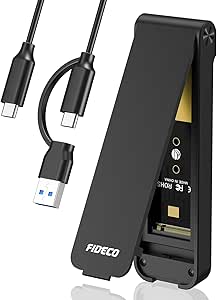
FIDECO M.2 NVMe SSD Enclosure, USB 3.2 Gen 2 (10Gbps) M.2 NVMe USB Adapter, Sandwich Style Design, Tool-free Installation, Supports UASP and Trim
One less thing to search
Before you buy: quick questions
Is the installation truly tool-free, or will I need other tools?
For the vast majority of standard NVMe SSDs (like Samsung 970/980 or WD Blue/Black), it's completely tool-free—just slide open, insert your drive, and close. A small number of users with drives that have unusually thick labels or pre-applied thermal pads have noted they needed to make minor adjustments. The design is built for ease, but if your drive has significant added thickness, a simple alignment tweak might be needed.
I'm confused about compatibility. Will this work with my laptop's SSD?
This enclosure is designed specifically for NVMe PCIe M.2 SSDs (both M-Key and B+M Key). It will NOT work with older SATA M.2 drives (which have a different notch configuration). Before buying, check your drive's model number. It's compatible with common sizes: 2230 (Steam Deck), 2242, 2260, and 2280 (most laptops/desktops). Many TikTok and Reddit users have successfully used it with drives from Samsung, WD, Crucial, and SK Hynix.
How effective is the built-in cooling pad, and do I need an extra heatsink?
The silicone cooling pad helps dissipate heat during typical file transfers and moderate use, which most users find perfectly adequate. However, if you plan on doing sustained, heavy read/write tasks (like continuously editing 4K video directly from the drive), tech reviewers on forums suggest that a dedicated heatsink enclosure might manage thermals better for peak performance. For everyday use and large file transfers, the built-in cooling is generally sufficient.
What's included in the box, and is the cable long enough?
You get the enclosure itself, a USB-C to C cable (approx. 20cm / 8 inches), a USB-C to A adapter, and a small rubber strap. The included cables cover most needs, but as some YouTube reviewers have pointed out, if you need to connect to a desktop PC under your desk, you may want a longer USB-C cable for convenience.
Is this good value for money, and who is it best suited for?
With over 15,000 reviews praising its high-speed performance and premium build, it's consistently rated as excellent value. It's ideal for: 1) Users upgrading their laptop/PC and wanting to reuse their old NVMe SSD as fast external storage. 2) Gamers and content creators moving large files. 3) Those wanting a reliable, sleek enclosure without screws. If your primary need is the absolute lowest price and you don't mind a plastic build, there are cheaper alternatives, but for the combination of speed, design, and included accessories, this is a top-tier choice.
From a similar, more-reviewed product in this category: ICY BOX EXT. 2.5" SATA Enclosure Plastic USB 3.2 IB-200T-C3
Do I need tools to install a drive in the IB-200T-C3?
No. The enclosure uses completely tool-free mounting — slide the cover, insert the 2.5" drive, slide the cover back on. Reviewers confirm the installation is quick and easy.
Which drives fit in this enclosure?
The listing states it accepts 2.5" SATA I/II/III HDDs or SSDs up to a maximum height of 9.5 mm. Reviewers report using 2.5" SATA SSDs such as WD Blue models successfully, while one reviewer reported it was not compatible with their Intel SSD.
How fast is the data transfer?
The manufacturer specifies USB 3.2 Gen 1 with up to 5 Gbps. One reviewer described it as the fastest SATA USB enclosure they had tested out of five, while another reported extremely slow access with a particular drive.
Does it work with Mac, Windows and Chrome OS?
The listing says the enclosure is compatible with Windows, macOS and Chrome OS. A reviewer confirms it works with Mac and PC and that Android recognized it as well, though it requested a format for a drive holding Time Machine and exFAT partitions.
What is included in the box?
The box contents are the IB-200T-C3 enclosure, a USB Type-C to Type-A/Type-C combo cable, and a manual.
Answers are limited to the manufacturer's listing and the reviews we analysed. Questions those sources cannot support are not answered here.
Transparent by design