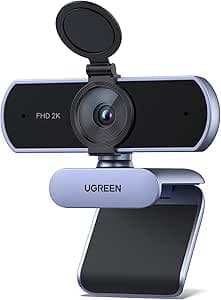
UGREEN Webcam 2K, Webcam with Microphone, Camera PC, 86° Field of View, USB A Camera with Privacy Cover, Auto Focus, Automatic Light Correction, Stereo Sound, Plug & Play, USB Camera for Windows/MacOS
Description
2K USB webcam: the webcam is equipped with a 4 megapixel CMOS image sensor and supports a resolution of 2K 30FPS to provide you with clear and fluid images. The automatic light correction ensures a bright and professional image. Fast and precise autofocus ensures that you are always in focus during your video call. The 86° field of view allows more people to participate, making it ideal for video conferencing, live streaming, online classes, etc.; Webcam with microphone: the webcam with microphone has two built-in omnidirectional microphones with noise cancellation that can record sounds from up to 3 metres away. The noise cancellation system provides a better communication environment for video calls. Stereo audio ensures that your calls sound natural and clear at all times.; Webcam with privacy cover: the webcam is equipped with a privacy cover. The uniquely designed and removable cover allows you to no longer worry about your privacy. If your video call or meeting is interrupted, you can protect your privacy with just one cover. Perfect for your home or office.; Plug and play: this USB webcam is plug and play. It does not require any driver and works with Windows 7/8/10/11, Linux, Mac OS X 10.6 and above, Android 5.0 and above. The webcam is automatically detected when the USB 2.0 port is connected to the computer. A 2 m USB cable is included. It can be used with a clip on your computer screen, horizontally on a desk or with a tripod (not included).; Wide compatibility: the PC camera is compatible with standard software. You can use this streaming webcam for live streams on Youtube/Facebook/Tiktok, join a video conference on Zoom, or make a video call with your family on Skype/Whatsapp/Wechat. To ensure that the cover fits tightly and is not easy to peel off, first attach the snap to the bottom of the cover to the camera and then the top to the camera.
Compare the trade-offs
Similar products, side by side
A random selection of analyzed products from the same category. Different products are not necessarily interchangeable.

1080P HD Webcam with Microphone, Noise Cancellation, Privacy, Wide Angle Lens, Auto Light Correction, Plug & Play USB Webcam, Desktop, PC, Mac, Zoom, Skype, Streaming, Jet Black

Microsoft LifeCam Studio (Retail Packaging)

EMEET S600 Webcam 4K, 1080P 60FPS Plug & Play for Home Office & Zoom
One less thing to search
Before you buy: quick questions
क्या अंतर्निहित माइक्रोफ़ोन वीडियो कॉल के लिए पर्याप्त अच्छा है, या क्या मुझे अभी भी एक अलग माइक की आवश्यकता होगी?
अधिकांश उपयोगकर्ताओं के लिए, हाँ — स्टीरियो माइक्रोफ़ोन एक उत्कृष्ट विशेषता हैं। समीक्षाएँ लगातार स्पष्ट, तेज़ ऑडियो का उल्लेख करती हैं जो लैपटॉप माइक को आसानी से पछाड़ देता है। कई TikTok और YouTube निर्माता पुष्टि करते हैं कि यह बैठकों, ऑनलाइन कक्षाओं और आकस्मिक स्ट्रीमिंग के लिए पर्याप्त है। यदि आप बहुत शोरगुल वाले वातावरण में हैं या पेशेवर पॉडकास्ट रिकॉर्ड कर रहे हैं, तो एक समर्पित USB माइक बेहतर हो सकता है, लेकिन रोज़मर्रा के उपयोग के लिए, यह एक उत्कृष्ट ऑल-इन-वन समाधान है।
मैं "ऑटोफोकस शोर" के बारे में सुनता रहता हूं। यह वास्तव में कितना ध्यान देने योग्य है?
यह उपयोगकर्ता फीडबैक के आधार पर एक उचित चिंता है। ऑटोफोकस तंत्र समायोजित होने पर हल्की सी सनसनाहट या मुलायम क्लिक की आवाज पैदा कर सकता है, जो बहुत शांत कमरों में आपके माइक्रोफोन की संवेदनशीलता अधिक होने पर रिकॉर्ड हो सकती है। पृष्ठभूमि शोर (जैसे टाइपिंग या एसी) के साथ सामान्य उपयोग में, ज्यादातर लोग इसे नहीं सुनते हैं। यदि आपकी रिकॉर्डिंग के लिए पूर्ण मौन महत्वपूर्ण है, तो आप फिक्स्ड फोकस वाले वेबकैम या किसी भिन्न ऑटोफोकस सिस्टम पर विचार कर सकते हैं।
क्या यह Mac कंप्यूटर के साथ ठीक से काम करता है, या फिर कोई संगतता संबंधी समस्याएं हैं?
यह आधिकारिक रूप से MacOS के साथ संगत है और अधिकांश उपयोगकर्ताओं के लिए वास्तविक प्लग-एंड-प्ले तरीके से काम करता है। Reddit जैसे फोरम पर MacBook उपयोगकर्ताओं की एक छोटी संख्या ने बताया है कि, कई USB परिधीय उपकरणों की तरह, कंप्यूटर के स्लीप से जागने के बाद इसे कभी-कभी दोबारा प्लग करने की आवश्यकता हो सकती है। यह एक सामान्य USB-C हब/MacOS की विशेषता है, जो इस वेबकैम के लिए अद्वितीय नहीं है। Zoom, Teams, या FaceTime पर दैनिक उपयोग के लिए, इसे विश्वसनीय रूप से पहचाना जाता है।
कम रोशनी वाले होम ऑफिस में छवि गुणवत्ता कैसी रहती है?
स्वचालित प्रकाश सुधार छवि को उज्जवल बनाने में मदद करता है, लेकिन इसकी सीमाएं हैं। कई ईमानदार समीक्षाओं में उल्लेख किया गया है, यदि आपका कमरा बहुत अंधेरा है, तो छवि दानेदार हो सकती है। यह कुछ परिवेश प्रकाश के साथ सबसे अच्छा प्रदर्शन करता है—एक डेस्क लैंप या खिड़की की रोशनी से काफी अंतर पड़ता है। कम रोशनी में लगातार स्पष्ट वीडियो के लिए, एक साधारण रिंग लाइट के उपयोग पर विचार करें, जिसे कई क्रिएटर इष्टतम परिणामों के लिए इस वेबकैम के साथ जोड़ते हैं।
मैं एक स्ट्रीमर हूँ। क्या 86° का दृश्य क्षेत्र मेरी डेस्क सेटअप दिखाने या दो लोगों को फिट करने के लिए पर्याप्त चौड़ा है?
86° का निश्चित दृश्य क्षेत्र एक स्पष्ट, केंद्रित हेडशॉट या ऊपरी शरीर के शॉट के लिए आदर्श है, जो कॉल और प्रस्तुतियों के लिए बिल्कुल सही है। हालाँकि, यदि आका मुख्य लक्ष्य एक विस्तृत दृश्य जैसे कि पूरा डेस्क सेटअप, गेमिंग रिग दिखाना या कैमरे पर दो लोगों को आराम से फिट करना है, तो आपको यह बहुत संकीर्ण लग सकता है। सिनेमाई, वाइड-एंगल लुक चाहने वाले स्ट्रीमर अक्सर समायोज्य या अल्ट्रा-वाइड लेंस वाली विशेष वेबकैम चुनते हैं, जो उच्च कीमत पर आती हैं।
From a similar, more-reviewed product in this category: EMEET S600 Webcam 4K, 1080P 60FPS Plug & Play for Home Office & Zoom
Does the EMEET S600 work with Microsoft Teams?
Yes. One reviewer bought it specifically because an older camera stopped working with MS-Teams, and reports that this camera "funktioniert tadellos" with Teams and delivers a sharp image. The listing also names Microsoft Teams and Zoom among supported software.
Is the image quality good enough for everyday home-office use?
Reviewers describe the resolution as "wunderbar" for home-office use and the picture as "gestochen scharf," and one calls the 1080p 60fps performance "ordentlich." Note that one 3-star reviewer felt the 4K promise and the software were disappointing.
Is the camera really 4K, or is it upscaled?
The listing states it is "no false upscaling, only pure 4K quality," but also notes the default resolution is 1080P and must be adjusted on the PC. One reviewer explicitly doubts the 4K claim ("4k Glaube ich nicht"), while another is satisfied with the 1080p 60fps performance.
Is it easy to set up and use?
Yes. The listing describes USB Plug & Play with a standard USB interface and a Type-C adapter, and reviewers call the operation "sehr einfache Bedienung" and say setting it up is no problem. One reviewer did note it took three attempts before everything (OBS, Discord, Animaze) worked.
Does it have a privacy cover and a microphone?
Yes. The listing states the webcam comes with a privacy cover to switch the camera off, and includes built-in dual microphones with background-noise cancellation algorithms.
Answers are limited to the manufacturer's listing and the reviews we analysed. Questions those sources cannot support are not answered here.
Transparent by design