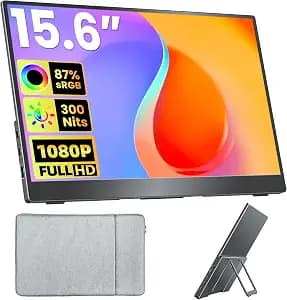
Upperizon Portable Monitor 15.6 inch FHD 87% sRGB 60Hz IPS HDR HDMI USB-C Travel Monitor for Laptop MacBook PC Surface PS5 Xbox, External Display with Kickstand & Speakers, VESA Compatible
Description
Portable Monitor for Laptop: Upperizon portable monitor is 15.6 inch 1920 x 1080P FHD Super Clear HDR IPS A-grade Screen. FreeSync at 60 Hz, 178° Wide viewing angle, 87% sRGB, 1200:1 contrast ratio, 300 Nits Brightness, Low Blue Light for Eye Care. Portable laptop monitor for Macbook, Surface Pro, Surface Laptop, HP Laptop, Lenovo Laptop, ASUS Laptop, Dell Laptop and etc; Plug&Play USB-C Monitor: This portable screen is equipped with Two full-featured USB-C Ports and One HDMI Port, this laptop monitor can work with multiple devices, such as Laptop, PC, PS4, PS5, Xbox and etc. Portable monitor power pass through, No driver or software required. Please confirm the USB-C port on your Laptop supports DisplayPort Alt mode or Thunderbolt 3/4/5; Frameless, Slim, Lightweight & Portable: Made of sleek and solid aluminum, upperizon portable display is only 1.54 pounds lightweight, easy to carry and well-designed. Laptop screen extender monitor portable can work in both landscape and portrait mode. Portable external monitor supports Duplicate and Extend Mode to be second screen for laptop. Travel monitor for laptop boosts your work productivity, provides extra screen space to stay organized while on the go; VESA Mountable: This 15.6 inch external monitor for laptop with two VESA holes can be easily and stably mounted on a stand for landscape and vertical mode. Two vesa holes can hold the monitor to a vesa stand stably; Upgraded Accessories: This portable second screen comes with 3 cables (HDMI Cable/USB-C to USB-C Display Cable/USB-C to USB-A Power Cable), a power adapter, and a sleeve case
Compare the trade-offs
Similar products, side by side
A random selection of analyzed products from the same category. Different products are not necessarily interchangeable.

KTC 32 Inch 4K Gaming Monitor, 165Hz UHD (3840x2160P) Fast IPS Screen, 1ms (MPRT), Adaptive Sync, 3000:1 Contrast,121% sRGB,HDMI 2.1 Display Port 1.4, Tilt/Height Adjustment, VESA Mount, H32P22P

8.8 Inch Mini Touchscreen Stretched Bar Monitor 1920 * 480, Metal Shell IPS Portable Touch Display, HDMI, USB-C, Small Screen for Raspberry Pi Laptop Aida64 GPU CPU RAM Monitoring PC Case

KOORUI 24 Inch Gaming Monitor, 180Hz 1080P VA Display with 3000:1 Contrast
One less thing to search
Before you buy: quick questions
Do I need to plug in the monitor separately for it to work, or can it run off a single USB-C cable?
Great question! For most modern laptops (like MacBooks and newer Windows machines with full-featured USB-C ports), the monitor will run off a single cable — delivering both video and power. However, if you’re using an older laptop or connecting via HDMI (say, for a PS5 or Xbox), you’ll need to plug the monitor into a power source using the included power adapter. Many TikTok users actually shared this tip, so it’s worth checking your laptop’s USB-C specs before you buy.
How is the picture quality and color accuracy for photo editing or gaming?
Users consistently praise the display as crisp and vibrant, with 87% sRGB coverage that holds up well for light photo editing and content creation. While it’s not a professional-grade color-accurate panel, it’s a big step up from standard laptop screens. For gaming, the 60Hz refresh rate and IPS panel deliver smooth visuals, and several console gamers confirmed it works flawlessly with PS5 and Xbox via HDMI. Just keep in mind the screen is glossy, so you may want to avoid direct sunlight or bright overhead lights.
Is this monitor sturdy enough for travel, and does the kickstand hold up over time?
Yes — the lightweight design is a huge selling point, but it doesn’t feel flimsy. Multiple reviewers mentioned the kickstand is notably sturdy and holds the screen at multiple angles confidently, even on uneven surfaces like a bed or couch. The monitor is slim enough to slip into a backpack sleeve without adding much weight. A few long-term users mentioned owning it for over six months with no issues, so durability seems solid for regular travel use.
Can it be used as a second screen for a laptop or phone?
Absolutely. Most users say it’s plug-and-play with laptop models that support USB-C video output. For phones with USB-C (like recent Samsung Galaxy or iPhone 15 and newer), it also works as a portable display. Just note that if your phone doesn’t support video out over USB-C, you may need extra software or an adapter. Many people use it to extend their workspace while on the go — a popular setup among remote workers and students.
What about the speakers and audio quality?
Honest answer — the built-in speakers are functional but not spectacular. They’re fine for system alerts, quick YouTube videos, or casual conference calls, but you’ll notice they lack bass and depth. If you’re planning to watch movies or game seriously, most users recommend using your laptop speakers, a good pair of headphones, or external Bluetooth speakers. That said, for a monitor in this price range and weight class, the audio is about what you’d expect — and the visual performance more than makes up for it.
From a similar, more-reviewed product in this category: KOORUI 24 Inch Gaming Monitor, 180Hz 1080P VA Display with 3000:1 Contrast
Does this monitor really run at 180Hz, and what do I need to enable it?
Yes — it's a native 180Hz panel, but you'll need to switch it on manually. Connect via the included HDMI cable (or a DisplayPort-capable setup), then set 180Hz in your GPU's display settings; it defaults to a lower refresh rate out of the box. Many Reddit and YouTube users note that enabling Adaptive Sync/FreeSync alongside it gives the smoothest experience, and it works with both AMD and NVIDIA cards.
How does the VA panel perform for gaming and everyday work?
The 3000:1 contrast gives noticeably deeper blacks than typical IPS budget monitors, which shines in dark game scenes and movies. For fast-paced competitive shooters, some TikTok and Reddit users mention mild ghosting/smearing in dark transitions — it's great for casual gaming, students, and office work, but color-critical creators or hardcore FPS players may prefer an IPS panel.
The stand looks basic — can I adjust the height or mount it?
Correct, the included stand only tilts (-5° to 20°) and doesn't offer height, swivel, or pivot adjustment, and a few users find the base slightly wobbly. The good news: it's VESA 100×100mm compatible, so a monitor arm or desk mount solves ergonomics entirely — a popular fix among dual-monitor and dorm-room setups.
What if I receive a unit with a dead pixel or backlight bleed?
Budget monitors can vary unit to unit, and some buyers report stuck pixels or corner bleed — but KOORUI backs it with a 3-year manufacturer warranty. If your unit arrives defective, contact the seller for a replacement or refund promptly; most users who did so report a smooth resolution, so inspect the screen within the return window.
Is it good value, and who is it best suited for?
At around $120, it's widely praised as one of the best budget 180Hz options — ideal for students, casual gamers, home-office users, and compact or dual-monitor setups. Just set expectations: no built-in speakers, a single HDMI plus VGA, and basic ergonomics. If you need height adjustment, color accuracy, or built-in audio, consider spending more on an IPS alternative.
Answers are limited to the manufacturer's listing and the reviews we analysed. Questions those sources cannot support are not answered here.
Transparent by design