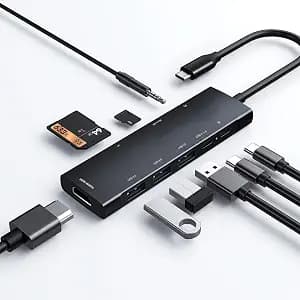
USB C HUB for iPad Pro 9-in-1 Adapter iPad Pro M4 M2 M1 13 12.9 11 inch iPad Air 5 4 Docking Station with 4K HDMI, USB-C PD, SD/TF Card Reader, USB 3.0, 3.5mm Headphone Jack, Type C Data, iPad mini 6
Description
Massive Expansion: Turn your iPad Pro’s single USB-C port into a huge 9 ports. With HDMI port, a USB-C PD port, 3.5mm headphone jack, a USB-C Data port, 3 USB 3.0 port, and an SD/microSD card reader, you have everything you’ll ever need.; Powerful Pass-Through Charging: Connect a 100W wall charger to the Power Delivery input port to provide high-speed pass-through charging to your iPad.; Vivid Display: Mirror or extend your screen in stunning 4K@60Hz via the HDMI port.backward support 2K@60Hz / 1080p@60Hz resolutions to mirror or extend screen.; 3.5mm & Type-C Audio Jack: Connect earphone,headphone or speaker.Support Microphone input.Built-in DAC audio chip processes digital signal into Hi-Res sound, up to 384khz-32bit audio output.; Files Transfer: USB 3.0 Port and USB-C data port with 5Gbps super speed data transfer,Transfer files in seconds; Convenient access to files from SD and Micro SD Card.; Switch 2 Avaliable: This product is also suitable for Switch 1/2 video output,you can bring this for travel instead of the offical one.
Compare the trade-offs
Similar products, side by side
A random selection of analyzed products from the same category. Different products are not necessarily interchangeable.

Powered USB Hub 10Gbps, intpw YH9AC 12 Port USB C Hub with 10Gbps USB C 3.2+2 USB A 3.2, 7 USB 3.0, 2 PD 45W Charging Port, 65W Power Adapter + 3.3FT Cable, Aluminum USB Hub for Laptop/iPhone 17/16/PC

USB C to USB Hub Multiport Adapter with 4 USB-A & 3 USB-C 3.0 Port

Docking Station for Steam Deck/ROG Ally/Legion Go,10 in 1 Double Fan Steam Deck Dock.1000Mbps Ethernet,3.0 PD100W Charging,HDMI 2.0 4K@60Hz.6 USB Port. SD/TF Double Card Slot Steam Deck Dock.
One less thing to search
Before you buy: quick questions
¿Este USB-C HUB cabrá en mi iPad si uso una funda protectora o un dock de teclado?
Es compacto y, por lo general, encaja con muchas fundas, pero las fundas voluminosas o ciertos docks pueden interferir. Si tienes poco espacio, intenta quitar la funda o comprobar los límites de espacio antes de colocar firmemente el hub.
¿Puedo cargar mi iPad mientras uso el hub, y cómo funciona USB-C PD aquí?
Sí. El hub admite el paso de PD por USB-C, por lo que puedes cargar el iPad mientras usas los otros puertos. Usa un cargador PD compatible para mantener la energía estable.
¿La salida HDMI admite 4K a 60 Hz de forma fiable?
Sí. El hub admite salida HDMI 4K a 60 Hz, adecuada para reproducción de video de alta calidad y presentaciones. El rendimiento real depende de la fuente y del modelo de iPad.
¿Cómo es la calidad de construcción y el calor durante un uso prolongado?
La construcción se siente robusta y sólida para el trabajo diario. Algunos usuarios notan que se calienta bajo uso intenso (p. ej., largas sesiones de 4K o varios dispositivos activos). Una buena ventilación ayuda, y está diseñada pensando en la seguridad.
¿Qué pasa si necesito Ethernet, o qué debo saber sobre devoluciones y soporte?
Este hub de 9 en 1 se centra en HDMI, SD/TF, USB 3.0, audio de 3,5 mm y PD a través de un único puerto USB-C; no incluye puerto Ethernet. Si prevés necesitar Ethernet, considera un modelo de hub diferente. Para devoluciones y soporte, consulta la política del minorista; la mayoría ofrece plazos de devolución estándar y canales de soporte, pero las políticas varían según el vendedor.
From a similar, more-reviewed product in this category: USB C to USB Hub Multiport Adapter with 4 USB-A & 3 USB-C 3.0 Port
Does this hub support charging?
No. The manufacturer's note states this device only supports data transmission, not charging.
How many devices can I connect at once?
Up to 7 devices can be connected simultaneously through a single port, including a keyboard, mouse, external HDD, and flash drives.
What data transfer speed does this hub offer?
It uses USB 3.0 technology with data transfer rates up to 5Gbps, which the listing describes as 10x faster than USB 2.0.
How long is the cable on this hub?
The hub has an integrated 1-foot cable, which the listing describes as offering a balance of reach and neatness for routing on a desk, in a laptop stand, or behind a monitor.
What operating systems and devices is this hub compatible with?
It supports Windows, macOS, and Linux, and is listed as compatible with laptops, MacBook, tablets, USB flash drives, and iMac.
Answers are limited to the manufacturer's listing and the reviews we analysed. Questions those sources cannot support are not answered here.
Transparent by design