What people like
Sturdy, well-built, and easy to assemble
Reviewers repeatedly describe the mount as sturdy, heavy-duty, and well machined, with simple assembly that takes only minutes. Many also highlight strong value for the price.
The 30-second read
What people like
Reviewers repeatedly describe the mount as sturdy, heavy-duty, and well machined, with simple assembly that takes only minutes. Many also highlight strong value for the price.
The main watch-out
One reviewer noticed slight wobble, though they attributed it partly to a carpeted desk and the weight of three monitors rather than the mount itself.
Before you choose
The mount supports multiple installation methods and stacked configurations, so confirm your desk type and monitor sizes fit your intended setup before buying.
From a similar, more-reviewed product in this category: FORGING MOUNT Heavy Duty Single Monitor Arm Stand Fits 17-42" Computer Screen, Adjustable Gas Spring Desk Mount Holds up to 33lbs, Full Motion with Clamp/Grommet Base, VESA Mount 75x75/100x100
What people like
Reviewers consistently praise the build quality and find it secure for larger screens, with many noting straightforward installation.
The main watch-out
Some users report that attaching the mounting plate can be difficult, and adjusting the gas spring tension requires many turns.
Before you choose
One reviewer needed an extra plate to mount a 40-inch TV, and another received an opened package, so verify VESA compatibility and expect possible packaging issues.
Your use case first
73 of 1040 mentions describe a negative experience (7%).
55 of 658 mentions describe a negative experience (8%).
25 of 328 mentions describe a negative experience (8%).
24 of 269 mentions describe a negative experience (9%).
3 of 151 mentions describe a negative experience (2%).
86 of 278 mentions describe a negative experience (31%).
108 of 231 mentions describe a negative experience (47%).
91 of 220 mentions describe a negative experience (41%).
One review can mention several topics. Percentages describe the reviews we analysed, not all buyers or the product's overall failure rate.
Compare the trade-offs
A random selection of analyzed products from the same category. Different products are not necessarily interchangeable.

Heavy Duty Single Monitor Mount for 13"-49" Curved Screens, Black

HUANUO Dual Monitor Mount for 2 Monitors up to 32 inches, Each Arm Holds Max 22lbs, Dual Monitor Stand with Advanced System, Height-Adjustable/Tilt/Swivel/Rotate, VESA Standard 75mm or 100mm

BONTEC Monitor Arm Desk Mount, Gas Spring Monitor Stand, Adjustable Full Motion VESA with C Clamp & Grommet Base, Supports 6.6-19.8lbs LCD/LED Tilt, Swivel, Rotation (Single Arm, 15-32 Inch)
Check the evidence
Included does not mean verified authentic. Flagged does not mean proven fake. These are analytical classifications.
Showing 3 illustrative excerpts, not the complete review set.
Overall, very good for the price.
“For the price, I’m pleased with it. Overall, it’s a sturdy stand with quality machining. All the screws went in easily, poorly machined products have crooked holes or bad threads. The mount base comes with 2 types, standard mount for a desktops surface. The other one is for desktops with monitor holes/cabling drilled through them. All the parts are heavy gauge and I encountered no difficulty during assembling. There seems to be a tension screw for the tilt feature. I had to tighten the screw that holds the tilt joint together because out of the box, the monitor flopped forward hard. I had to be mindful while mounting it to the main arm so it wouldn’t slam into my glass desktop. The 2 arms that allow you to move the monitor forwards and back, left and right were a little stiff, I loosened the screw a bit on the main arm, at the pole. That seemed to be all that was required. I tried to loosen the bolt where the 2 arms meet, and it wouldn’t budge. I didn’t force the issue. The instructions were adequate for assembly without covering anything else, like adjusting the tilt bolt for the weight of the monitor. So, while I think this was a good mount for the investment, there are tradeoffs to mention. I’m accustomed to swinging my monitors upward and dusting underneath them. Height is fixed by a screw on this one. I was struggling to install the monitor cables when I realized you can tilt the bottom toward you until the top or the monitor hits the pole, or, until it’s sitting nearly flat like a table. Elevated several inches above the desktop. I consider this a Pro / Con feature. Where the arm ties into the VESA mount, the fit is a little sloppy. It’s not a safety concern but I can wiggle the monitor backwards and forwards at the outer edges “About ¾ inch “before feeling any resistance from the mount. Same goes for tilting. I don’t see this as much of an issue. Normally, I don’t foresee any outside forces acting in the monitor to create a problem. However, there’s room for improvement. The rest of the machining seemed steller. I have multiple computers in different rooms. 32” monitors are used as primary monitors with 32” to 23” as secondaries. I like mine roughly 1” above the desk. That places the top of the monitor at my eye level and the ideal viewing angle. I have fully articulated, hydraulic mounts on most of my monitors. Nice ones for large heavy monitors run $75 to $100 and up. I paid $36 for this one. The……… WALI Monitor Arm Mount for Desk, Single Extra Tall Computer Desk Mount, Monitor Bracket Mount Stand Single, up to 32 inch, 22 lbs (M001XL), Black. Amazon lumps the reviews of similar products together, so I specified which mount I purchased. I’m using this one on a glass desktop, I’m attaching it to the same point I constructed from wood for a different mount. It didn’t lower the monitor low enough either. So, the top of that mounting point is 4” lower than the surface of the glass top. Despite being that low, I didn’t actually need the 32” pole / monitor mount, the 16” model would have worked. There’s still 2” of pipe available above the arm. The 32” was on sale & I didn’t know if the 16” would suffice. The pole is a screw together 2 piece. I unscrewed / removed the other pole as it looked out of place in my dual computer setup. That leaves a hole in the top of the pipe / mount. I wish they included a cap for that. The top pipe has a cap but of a different diameter. I’d like to give it 4 ½ Stars but Amazon won’t let me. I’ve got to go with 4. Height adjustments with heavy monitors and an Allen wrench can present a challenge, it’s the nature of the beast and I won’t give it 5 stars for a few reasons. The sloppy VESA mount and loose tilt motion. No instructions that cover that, or if I was supposed to loosen the arm at the pole to improve motion. I would recommend this mount to others.”
Signals matched: Specific detail: quantity, entity, process · Mentions: value for money, sturdiness, quality, construction · Reads as an authentic voice
Super Affordable and Well Built Quad Monitor Stand
“Like many people during the pandemic, I was forced to work from home. Living in a studio apartment, working space is at a premium, so I can't afford to have all of my work space dominated by monitor stands. I went looking for a monitor stand that could support 3 or 4 monitors, in a stacked orientation, that clamped to the work surface. A lot of the competitors were up in the $100-$200+ range, and some of those didn't even have the table clamp. I don't know what person in their right mind would mount this much weight (let alone $$$) to a stand, and just rely on a stand with legs to hold it. But I digress. - Assembly. As others have mentioned, this stand assembles incredibly simply. Everything comes in 2 boxes (way smaller than you would expect for how big it actually gets), and is labelled in bags. The instructions are very straightforward, and without rushing, I had everything assembled in about 20 minutes. I then spent another 10 minutes cable managing. You could spend more time with this if you were more OCD than I am. - Positive Impressions. Other than being easy to assemble, I feel like a monitor stand should just sit there unobtrusively, which this one does.. I am running 19" monitors on top, a 15" monitor on the bottom right, and have the bottom left open, and am using my laptop in that space. I like that the cable management running vertically has a space for the hex keys that are used in installation. I don't feel like the stand is insufficient in terms of support in any way. I also like the way in which everything can be adjusted easily without too much effort. I also like that I have the option to through-mount this through a grommet. I can't speak to that, but I'm glad it was an included option. Also, the price was something you can't overlook. Build quality is excellent for the price. The monitors stay where you put them, and you can easily tilt the monitors as you see fit. The attachment mechanism to join the monitors to the stand is also pretty excellent. Things that could use improvement: - Cable management. As others have mentioned, by the time you get down to the bottom, you can't fit 8 cables through it. Also, the plastic clips that run along the arms are good when there's nothing in them, but they tend to flex a fair bit once you have cables running through them. Not bad, but could use some help. - Articulation. If you're using smaller screens like I am, you may have some difficulty getting all the screens to meet in the middle. This is due to the fact that the arms don't clear the hinges very far, and can only fold up to about 65 or 70 degrees. See one of the pictures. - Included spacers. I'm glad that they included spacers and screws, but the ones that they included were too big for my smaller portable 15" monitor. I actually had to cut the plastic spacers in half in order to get them to work. Another set of shorter screws would be nice. This is shown in the second included picture. Things to be aware of: - Won't flush mount to the wall if your desk is up against the wall. Because of the way arm-based mounts articulate, unless you're running the max size monitors that the stand supports (27" for this), you will lose some space behind, and subsequently, lose some space on your desk. Not a design flaw. Overall, I 100% love this stand. There are some minor picky points that I have, but I would buy it again. I also will probably buy another arm portion if I need to expand in the future, which you can totally do, as I am pretty sure that WALI sells the parts seperately. Highly recommend. If this review was helpful to you, please mark it as such, so that I can know that you appreciated the review, and that others who may have questions about this product can find helpful information.”
Signals matched: Specific detail: quantity, scenario, comparison · Mentions: value for money, construction · Reads as an authentic voice
Fantastic Product
“The Wali Single Monitor Desk Mount works better than I expected. First, the basics. The mount comes well packed and the instructions are very simple to understand. There is so little assembly required that the instructions are almost not needed. Assembly and installation can be done in less than ten minutes (not including cable management if you choose to use that feature). Adjusting everything is easy. Overall quality of the parts and the assembled product are quite good. I have two monitors that I wanted to mount on a flat desktop. I needed to be able to get the monitors right next to each other and still have the desk flat against the wall. Most double monitor stands will not allow for this unless your monitors are the perfect size for the spread of the arms. The movable arms will usually flex toward the wall if you want the monitors to be edge-to-edge with each other. The result is the desk having to be offset from the wall to accommodate this. By using two single monitor stands, I am able to move the posts to positions that allow the arms to be extended in such a way that everything is flat with the wall. The other frequently stated issue with most monitor stands is that the arms have hydraulic pistons and/or springs to deal with the weight of the attached monitors so they are easy to move up and down. These pistons and springs are often of poor quality and either fail quickly or don't work as expected from the get-go. This is not a problem with the Wali Single Monitor Desk Mount. The arm is solidly attached to the 16" pole and only moves up and down by loosening the arm mounting and sliding the arm up or down on the pole. The arm, once set to the desired height, can be move forward, backward, side-to-side and tilt. This makes for a much sturdier setup with no pistons or springs. This system works very well, since I (and I think most people) have little need to move a monitor up or down after the initial installation. I leave the included Allen wrench stuck in one of the vertical facing screws behind a monitor so that it is always handy but out of sight. If I do need to move the monitors up or down, the tool is right there. I will buy two more of these for my wife's desk.”
Signals matched: Specific detail: entity, process, quantity · Mentions: adjustability, construction · Reads as an authentic voice
One less thing to search
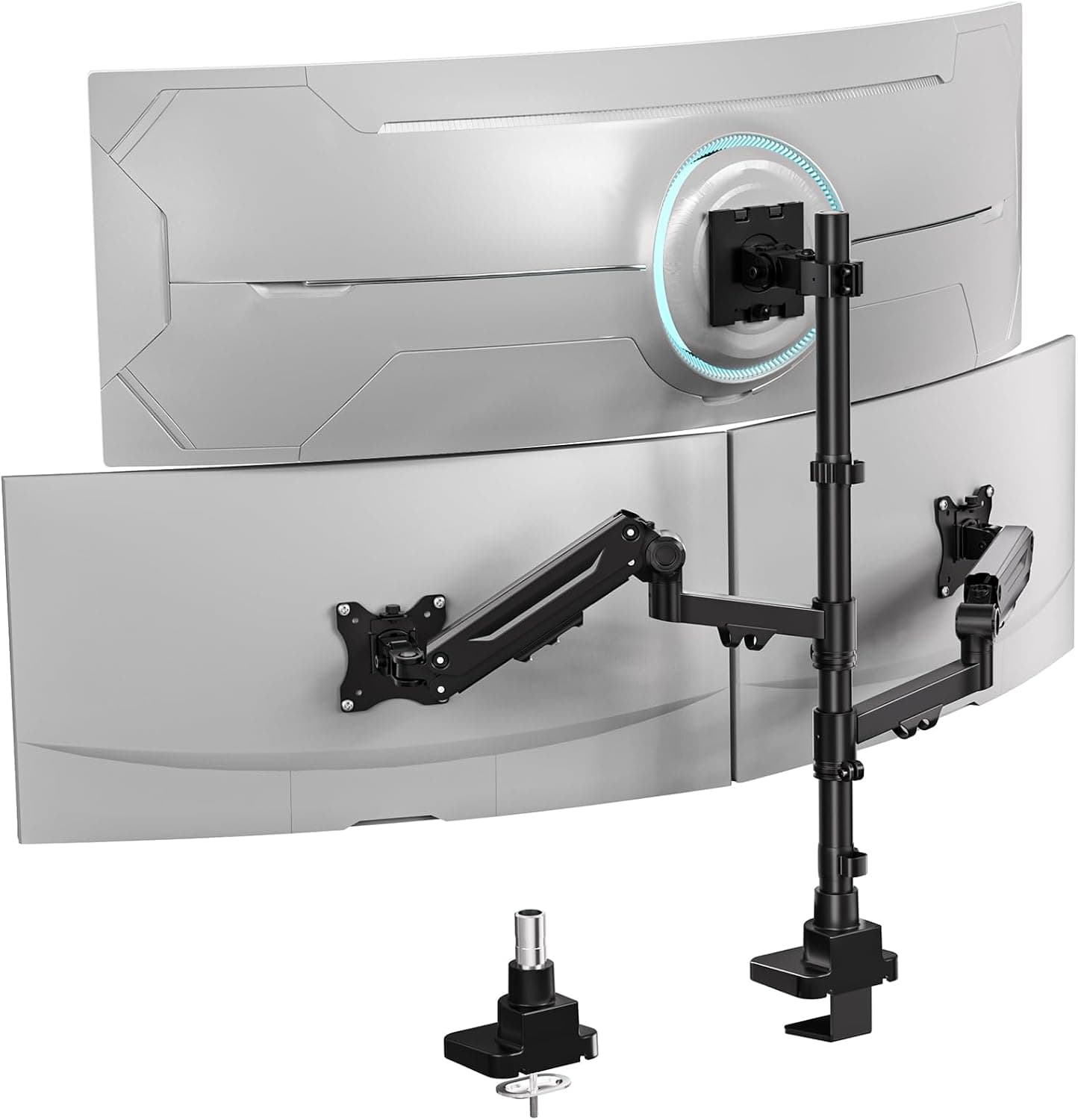
It fits one ultra-wide monitor up to 49" on the top bracket and two standard screens up to 34" on the lower arm brackets, using VESA 75x75mm or 100x100mm mounting holes. The listing advises verifying your monitor's specifications before purchasing.
The top bracket holds up to 44 lbs, and each lower bracket holds up to 26.4 lbs.
Reviewers describe it as sturdy and well built, with one noting only slight wobble that they attributed to a carpeted desk and the weight of three monitors. Another reviewer said their monitors are not wobbly.
Reviewers report it was super easy to set up, with simple instructions and little assembly required—one said installation can be done in less than ten minutes, not counting cable management. The listing notes all tools are included and that setup is straightforward even for beginners.
Yes. The center monitor adjusts with +50° to -20° tilt and +/-90° swivel, while the side arms offer ±55° tilt, +/-90° swivel, and ±180° rotation. A reviewer also noted you are able to customize the position of each screen.
From a similar, more-reviewed product in this category: FORGING MOUNT Heavy Duty Single Monitor Arm Stand Fits 17-42" Computer Screen, Adjustable Gas Spring Desk Mount Holds up to 33lbs, Full Motion with Clamp/Grommet Base, VESA Mount 75x75/100x100
Yes — reviewers regularly mount 40" and 43" displays and report a secure, stable hold. Just keep your monitor (plus the VESA plate) under the 33 lb limit, and expect to spend a few minutes tightening the gas spring tension the first time. Once dialed in, it stays put.
It's the most common gripe, and honestly it's fair — the arm ships at minimum tension, so heavier screens need many turns of the included Allen key before they hold position. It's not hard, just tedious. Do it *before* mounting the monitor if you can, and you'll save yourself some frustration.
The C-clamp works on most desks up to about 2" thick with a flat underside, while the grommet base is the better choice for thicker tops or desks with a metal frame or lip underneath. If you have a glass desk or an unusually beveled edge, measure first — and check the return policy before drilling anything.
For most users, yes — 15 to 30 minutes solo with the included hardware and instructions. You'll need a Phillips screwdriver and the supplied Allen key. The only step that trips people up is tension tuning, and having a second person help lift larger monitors onto the plate makes it much smoother.
If you want heavy-duty capacity, both clamp and grommet mounting, and smooth gas-spring motion without paying Ergotron prices, this is a strong value pick — many TikTok and YouTube reviewers call it a "budget HX." If you need tool-free tension adjustment or plan to mount something over 35 lbs, step up to a premium arm instead.
Answers are limited to the manufacturer's listing and the reviews we analysed. Questions those sources cannot support are not answered here.
Transparent by design