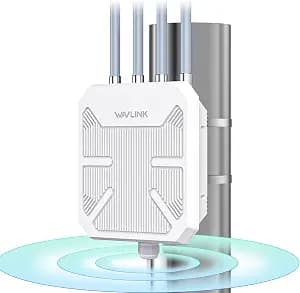
WAVLINK AX1800 Outdoor WiFi 6 Extender, Long-Range, IP67 Weatherproof | Compatible with Starlink, Outdoor Access Point with Engineered Antennas, PoE Power Supply, Ideal for Yard, Farm, RV & Garage.
Description
After-Sales Support: If you have any questions or need assistance, please don’t hesitate to reach out. Phone Support: +1 (888) 973-0883 (Mon–Fri, 9:00 AM–6:00 PM, UTC-5). Email Support: Contact@wavlink.com. Amazon Messaging: You can also contact us directly through Amazon. We aim to respond within 8 hours and provide lifetime technical support to ensure you have the best experience with our product.; Designed for Large Outdoor Spaces & Open-Area Coverage: Ideal for single-family homes, large yards, farms, estates, garages, RV parking areas, and other open outdoor environments where indoor routers cannot reach. Designed to extend WiFi across spacious outdoor areas with stable, long-range coverage.; Reliable Long-Range Outdoor Connectivity: Equipped with four custom-engineered 8dBi fiberglass antennas, this outdoor access point provides focused signal distribution and dependable wireless coverage over extended distances. Engineered for consistent long-range connectivity and stable transmission in demanding outdoor deployments where consistent transmission matters more than antenna quantity.; True IP67 Weatherproof for Extreme Outdoor Conditions: Built with a true IP67-rated enclosure and durable fiberglass antennas, this outdoor WiFi extender is fully protected against heavy rain, snow, dust, strong winds, UV exposure, and extreme temperatures—ensuring reliable performance in harsh outdoor environments year after year.; WiFi 6 AX1800 Dual-Band Performance — Starlink Compatible: Featuring WiFi 6 (AX1800) dual-band technology (2.4GHz & 5GHz) with MU-MIMO and Beamforming, it efficiently supports multiple devices while reducing interference and congestion. Fully compatible with Starlink systems, making it an ideal solution for remote, rural, and off-grid internet setups.; Flexible Setup Modes with PoE & WAVLINK Support: Supports multiple operating modes including Access Point (AP), Router, Repeater, and WISP modes to fit different network needs. Compatible with both 802.3af/at PoE and Passive PoE power supply for flexible outdoor installation using a single Ethernet cable. Supports Mesh networking within the WAVLINK ecosystem and is backed by WAVLINK’s professional customer support for added peace of mind.
Compare the trade-offs
Similar products, side by side
A random selection of analyzed products from the same category. Different products are not necessarily interchangeable.

One less thing to search
Before you buy: quick questions
Is the WAVLINK AX1800 truly "long range," and will it cover my entire 1-acre yard?
It genuinely performs well, but "long-range" comes with a caveat: it thrives on a clear path. Many Reddit users report excellent coverage across open fields and driveways. However, if your signal needs to pass through multiple thick walls, metal siding, or dense tree lines, your range will shrink significantly. For best results, mount it high on a pole or eave with a clear line-of-sight to your intended coverage area. It's an extender, not a magic wand—obstacles will impact performance.
I have Starlink. Will this plug directly into my router, or do I need extra equipment?
You can connect it directly to the standard Starlink router via an Ethernet cable using the included PoE injector—no separate switch is required. However, several TikTok reviewers noted occasional connection drops when using it with Starlink mesh nodes. If you rely heavily on mesh roaming, you might experience a brief hiccup when your device hands off between the Starlink node and the WAVLINK. For a dedicated outbuilding or a stationary device (like a security camera), it works flawlessly with Starlink.
The IP67 rating sounds great, but can it survive extreme heat, snow, and constant rain for years?
Yes, the casing is genuinely rugged. Users on fishing and farming forums have praised its ability to withstand direct sun, freezing winters, and monsoon-style rain without any degradation in performance. The UV-resistant plastics are also a plus—they don't become brittle or yellowed quickly. Just ensure that the Ethernet cable enters the unit correctly (using the provided waterproof gland), as improper installation is the main cause of moisture ingress for any outdoor device.
How difficult is the setup? Do I need to be a tech expert?
The device offers two modes: "Access Point" (wired backhaul) and "Extender" (wireless repeating). You must manually select your mode during setup; it doesn't auto-detect. If you're comfortable reading a network diagram, you'll be fine. But if you're a novice, the manual can be confusing. A pro-tip from YouTube reviewers: skip the WAVLINK app and use the web browser interface (by typing the default IP address) for a more stable setup experience. The app is functional, but the web UI offers more control and fewer glitches.
Is this a better buy than a standard mesh WiFi system for my detached garage or workshop?
If your garage is within 100 feet of your house and you can run a single Ethernet cable to it, this WAVLINK is a far better value and offers superior throughput (up to 1800 Mbps) compared to a mesh satellite, which can lose half its speed through walls. However, if you can't run a cable and need a true wireless mesh experience, a dedicated mesh system with a dedicated wireless backhaul band will be more reliable. The WAVLINK is ideal for a "fixed installation" (like a shed, RV, or yard camera) where you can wire it up once and forget it—it's not a replacement for a whole-home mesh system.
From a similar, more-reviewed product in this category: Omada 7, BE5000 Wireless Access Point, 2.5G Port, w/ DC Adapter(EAP720)
Do I need a special PoE injector, or does the included power adapter work?
Good news — the box includes a DC power adapter, so you can run it without any PoE gear at all. If you'd rather power it over Ethernet, note that it requires **802.3at (PoE+)** — a standard 802.3af injector won't be enough. Several Reddit users learned this the hard way, so double-check your switch or injector before buying.
Can I use this on its own, or do I need an Omada controller?
It works standalone in access-point mode, but you'll unlock its real value — centralized management, mesh, seamless roaming, and ZTP — through the free Omada controller (cloud, app, or local). If you're not already in the Omada ecosystem, expect a bit of a learning curve; as one YouTube reviewer put it, "budget an afternoon for setup." For existing Omada users, adoption is quick and painless.
Will I actually see Wi-Fi 7 speeds, or is that just marketing?
It depends on your clients and internet plan. The headline 5 Gbps requires Wi-Fi 7 devices and multi-gig broadband — older laptops and phones won't show a dramatic jump. That said, the **2.5G Ethernet port** is the upgrade most reviewers call out as genuinely future-proof, since it removes the wired bottleneck now and when you move to multi-gig internet later.
How much area does one unit really cover?
TP-Link lists up to ~1,500 sq ft, but real-world coverage depends on walls, ceilings, and placement. In open offices or open-plan homes, one unit often suffices; through multiple interior walls, many buyers end up adding a second AP for seamless mesh coverage. If you're unsure, start with one and scale — that's exactly what the Omada system is designed for.
Is this the right choice for a home user, or is it overkill?
It shines for small businesses, home labs, and prosumers who want business-grade stability, dense-device handling (250+ clients), and centralized control. Casual home users who want a single plug-and-play router may be happier with a mesh kit like TP-Link Deco — and budget buyers should factor in PoE+ hardware costs. If you're already running Omada or planning a scalable multi-AP network, this is excellent value for the specs.
Answers are limited to the manufacturer's listing and the reviews we analysed. Questions those sources cannot support are not answered here.
Transparent by design