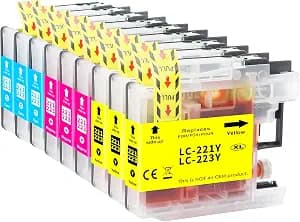
Yowell 9 x LC223XL Colour Cartridges Compatible with Brother LC223 XL LC-223 Cyan Magenta Yellow Cartridges for Brother MFC-J5320DW MFC-J4420DW DCP-J562DW MFC-J480DW MFC-J880DW DCP-J4120DW
Description
Yowell 9 x LC223XL Colour Cartridges Compatible with Brother LC223 XL LC-223 Cyan Magenta Yellow Cartridges for Brother MFC-J5320DW MFC-J4420DW DCP-J562DW MFC-J480DW MFC-J880DW DCP-J4120DW
Compare the trade-offs
Similar products, side by side
A random selection of analyzed products from the same category. Different products are not necessarily interchangeable.

CANON PG-210 OEM Ink Cartridge, BLACK
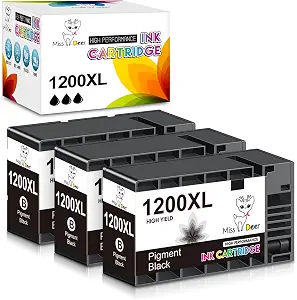
Miss Deer 1200XL Black Ink Cartridges Compatible for Canon PGI-1200XL PGI 1200 XL,Work for Canon Maxify MB2720 MB2050 MB2350 MB2320 MB2020 MB2120,3-Pack

5Pcs Thermal Printer Cleaning Kit - White Cleaning Pens for Thermal Printers, POS Machines, and More - Portable, Compatible with Brother, Epson, Zebra and More
One less thing to search
Before you buy: quick questions
Sind die Yowell LC223XL Tintenpatronen mit allen auf der Seite aufgeführten Brother-Modellen kompatibel?
Ja. Sie sind so konzipiert, dass sie mit allen sechs gezeigten Modellen funktionieren (MFC-J5320DW, MFC-J4420DW, DCP-J562DW, MFC-J480DW, MFC-J880DW, DCP-J4120DW). Erkennt ein Drucker eine Patrone nicht sofort, versuchen Sie, die Patrone erneut einzusetzen und sicherzustellen, dass die Firmware des Druckers aktuell ist.
Beinhaltet diese Patronen Chips, die von meinem Drucker direkt gelesen werden können?
Ja. Jede Farbtintenpatrone hat einen kompatiblen Chip, den die meisten Brother-Drucker ohne Probleme lesen. Wenn Sie einen Fehler sehen, befolgen Sie die beiliegenden Schritte zur Fehlerbehebung oder wenden Sie sich an den Support, um Hilfe zu erhalten.
Wie verhält sich die Farbqualität im Vergleich zu OEM-Tintenpatronen?
Für den alltäglichen Farbdruck sind die Ergebnisse hell und konstant und geeignet für den Einsatz zu Hause bzw. im Büro. Wenn Sie kritische Fotodrucke erstellen, können Sie leichte Unterschiede in der Farbwiedergabe bemerken.
Wie einfach ist die Installation, und wie sieht es mit Verpackung und Lieferung aus?
Die meisten Kunden berichten von einer schnellen Plug-and-Play-Installation. Die Patronen kommen sicher verpackt mit intakten Chips an. Wenn die Verpackung beschädigt ankommt oder eine Patrone nicht gelesen wird, wenden Sie sich an den Support für einen Ersatz.
Ist das ein gutes Preis-Leistungs-Verhältnis, und was ist die Rückgaberichtlinie?
Der LC223XL bietet eine hohe Ausbeute und geringere Kosten pro Seite als Standardtinten, was ihn zu einem guten Wert für häufigen Farbdruck macht. Wenn Sie nicht zufrieden sind, prüfen Sie die Rückgaberichtlinien des Verkäufers; viele Angebote beinhalten ein Rückgabe-Fenster, um es risikofrei auszuprobieren.
From a similar, more-reviewed product in this category: CANON PG-210 OEM Ink Cartridge, BLACK
Will this PG-210 cartridge fit my Canon PIXMA printer?
It's designed for a specific set of PIXMA models — including the iP2700/iP2702, MP240/MP250/MP270/MP280/MP480/MP490/MP495, and MX330/MX340/MX350/MX360/MX410/MX420. If you own a newer model like the MX492, you'll need a different cartridge (PG-245), so double-check your printer's model number before ordering. A quick glance at your printer's front panel or manual will save you a return.
Is 220 pages a realistic yield, or will it run out sooner?
Canon's 220-page estimate is based on standard text documents at roughly 5% coverage — real-world mileage depends on what you print. Many users report getting close to that for plain text, but photo-heavy or graphics-dense printing drains ink faster. If you print a lot, the high-yield PG-210 XL is worth considering for a better cost-per-page.
Is this a genuine Canon cartridge or a third-party/compatible one?
This is a genuine OEM Canon cartridge (part number 2974B001), sealed and backed by Canon's limited warranty — not a remanufactured or third-party product. That matters if you've had clogging or recognition issues with off-brand inks; reviewers consistently praise the sharp, smudge-free output and reliable plug-and-play installation.
My printer says "low ink" or won't recognize the cartridge — what should I do?
First, remove and reseat the cartridge firmly until it clicks, then run a cleaning cycle from your printer's menu. A small number of users report premature "low ink" warnings or recognition errors, which usually resolve with a reseat or a power cycle. If the issue persists on a brand-new sealed cartridge, contact the seller for a replacement under warranty.
Is it worth paying more for OEM versus a cheaper third-party cartridge?
It depends on your priorities. Budget shoppers often compare this against third-party multipacks that cost significantly less, but many reviewers say they switched back to genuine Canon after dealing with clogs, streaks, or inconsistent output from knockoffs. For low-volume home and school printing where reliability matters most, the OEM cartridge is a solid, low-hassle choice — just factor in the higher per-page cost.
Answers are limited to the manufacturer's listing and the reviews we analysed. Questions those sources cannot support are not answered here.
Transparent by design