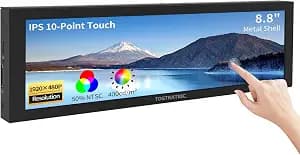
8.8 Inch Mini Touchscreen Stretched Bar Monitor 1920 * 480, Metal Shell IPS Portable Touch Display, HDMI, USB-C, Small Screen for Raspberry Pi Laptop Aida64 GPU CPU RAM Monitoring PC Case
Description
Mini Touchscreen IPS Display: 8.8 Inch stretched bar monitor with 10 points multi-touch functionality for responsive and smooth touch experience. IPS panel with 1920x480 resolution ensures wide viewing angles and accurate color reproduction, making this touchscreen monitor ideal for any environment. Please Note: This 8.8 inch small touch monitor is not available for smartphone and Apple devices.; Multiplt Connection: With HDMI Interface of this small touch monitor, easily connect to laptops, gaming consoles, and other devices for a seamless experience. The USB-C interface only for power supply and touch functionality. Please Note: The USB-C port does not supports video output.; 400cd/m² Brightness Computer Secondary Monitor: Using this portable touchscreen monitor as a PC secondary screen while playing games or doing other things. With 400cd/m² brightness, the small touch screen monitor offers clarity images.; Compact and Portable Design: With its lightweight and slim profile, this mini screen is perfect for on-the-go use. When you're using it as a secondary display for laptop or PC, it fits effortlessly into any setup.; Durable Metal Shell: The robust metal shell of this mini touchscreen monitor not only enhances the aesthetic appeal but also provides durability and protection, ensuring that your monitor withstands daily use.
Comparez les compromis
Produits similaires, côte à côte
Une sélection aléatoire de produits analysés de la même catégorie. Des produits différents ne sont pas nécessairement interchangeables.

Acer Nitro 27” Gaming Monitor | Full HD 1920 x 1080 | IPS | ZeroFrame | AMD FreeSync | 144Hz Refresh Rate | 1ms (VRB) | sRGB 99% | 1 x Display Port 1.2 and 1 x HDMI 1.4 | KG271 P6bip

KOORUI 27 Inch Curved Gaming Monitor 180Hz FHD 1080P, 1500R VA Display

BenQ GW2790 Computer Monitor 27" FHD 1920x1080p | IPS | 100 hz | Eye-Care Tech | Low Blue Light | Anti-Glare | Adaptive Brightness | Tilt Screen | Built-in Speakers | DisplayPort | HDMI x2
Une chose de moins à chercher
Avant d'acheter : questions rapides
Is this truly a "plug-and-play" monitor, or is setup technical?
For video display, it's plug-and-play via HDMI. However, to enable the touchscreen functionality on Windows, you will likely need to install a driver manually. Many Reddit users have shared straightforward guides and links to the correct driver, which is a one-time setup. For Raspberry Pi, touch often works with standard configuration.
Can I power the monitor through a single USB-C cable from my laptop?
No, the USB-C port on this monitor is for power input only, not video. You must use the HDMI port for the video signal. Additionally, the monitor requires separate power via the included DC adapter or a compatible USB-C power source. As several TikTok reviewers noted, "You need two cables: one for video (HDMI) and one for power."
How sturdy is the mounting solution? What are my options?
The monitor includes a basic VESA mount plate, but feedback from the community indicates it's best for light-duty mounting. For secure installation inside a PC case or on a desk arm, many enthusiasts recommend using the 75x75mm VESA pattern with a more robust, third-party arm or a custom 3D-printed bracket tailored to your specific case—this is a popular upgrade mentioned in DIY forums.
The aspect ratio looks unusual. What is it actually good for?
The 1920x480 "stretched bar" format is uniquely suited for real-time system monitoring. It's perfect for displaying long, detailed sensor readouts from software like Aida64, HWiNFO, or Rainmeter, showing your CPU/GPU temps, usage, and fan speeds all at once. It's also great as a dedicated stream chat display or a secondary panel for timeline editing in video/audio software.
What's the actual build quality like, and are there any common quirks?
The metal shell is consistently praised for feeling solid and premium. The IPS panel offers excellent color and wide viewing angles. A minor quirk some users report is a bright power LED. This is easily remedied with a tiny piece of opaque tape if it's distracting in a dark setup. Overall, the build quality is considered very high for its niche.
D'un produit similaire mieux noté dans cette catégorie : KOORUI 24 Inch Gaming Monitor, 180Hz 1080P VA Display with 3000:1 Contrast
Does this monitor really run at 180Hz, and what do I need to enable it?
Yes — it's a native 180Hz panel, but you'll need to switch it on manually. Connect via the included HDMI cable (or a DisplayPort-capable setup), then set 180Hz in your GPU's display settings; it defaults to a lower refresh rate out of the box. Many Reddit and YouTube users note that enabling Adaptive Sync/FreeSync alongside it gives the smoothest experience, and it works with both AMD and NVIDIA cards.
How does the VA panel perform for gaming and everyday work?
The 3000:1 contrast gives noticeably deeper blacks than typical IPS budget monitors, which shines in dark game scenes and movies. For fast-paced competitive shooters, some TikTok and Reddit users mention mild ghosting/smearing in dark transitions — it's great for casual gaming, students, and office work, but color-critical creators or hardcore FPS players may prefer an IPS panel.
The stand looks basic — can I adjust the height or mount it?
Correct, the included stand only tilts (-5° to 20°) and doesn't offer height, swivel, or pivot adjustment, and a few users find the base slightly wobbly. The good news: it's VESA 100×100mm compatible, so a monitor arm or desk mount solves ergonomics entirely — a popular fix among dual-monitor and dorm-room setups.
What if I receive a unit with a dead pixel or backlight bleed?
Budget monitors can vary unit to unit, and some buyers report stuck pixels or corner bleed — but KOORUI backs it with a 3-year manufacturer warranty. If your unit arrives defective, contact the seller for a replacement or refund promptly; most users who did so report a smooth resolution, so inspect the screen within the return window.
Is it good value, and who is it best suited for?
At around $120, it's widely praised as one of the best budget 180Hz options — ideal for students, casual gamers, home-office users, and compact or dual-monitor setups. Just set expectations: no built-in speakers, a single HDMI plus VGA, and basic ergonomics. If you need height adjustment, color accuracy, or built-in audio, consider spending more on an IPS alternative.
Les réponses se limitent à la fiche du fabricant et aux avis que nous avons analysés. Les questions que ces sources ne permettent pas de traiter restent sans réponse ici.
Transparent par conception