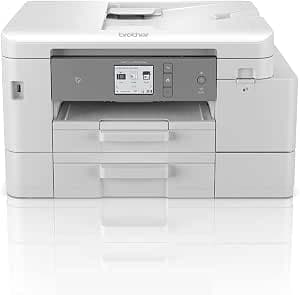
Brother MFC-J4540DW XL Wireless Colour Inkjet Printer | 4-in-1 (Print/Copy/Scan/Fax) | High Paper Capacity | A4 | Photos | All-In-Box Bundle
Description
HIGH YIELD INKS IN-BOX: The All in Box professional print bundle comes with 6,000 page black and 5,000 page colour ink cartridges in the box. Enough to keep you printing for up to 3 years.; WIRELESS & NFC CONNECTIVITY: Print wirelessly from your laptop, tablet or smartphone. NFC connectivity also allows for quick and secure print release for users.; LCD TOUCHSCREEN: Compact and desktop friendly, the MFCJ-4540DWXL has a 6.8cm colour LCD touchscreen making it quick and simple to use.; ENHANCED PAPER CAPACITY: Keep productivity levels at their highest with the extra paper tray providing 400 sheet paper input, plus 20 sheet ADF for multipage scanning.; ENHANCED PAPER CAPACITY Keep productivity levels at their highest with the extra paper tray providing 400 sheet paper input, plus 20 sheet ADF for multipage scanning.
Une chose de moins à chercher
Avant d'acheter : questions rapides
Is the Wi-Fi connection reliable, or will I have dropouts?
Most users find the Wi-Fi works well for daily printing, but it's a common point of feedback that the connection can sometimes be lost after the printer sleeps or after a network update. A quick power cycle usually resolves it. For the most stable experience, many home office users recommend connecting via the included Ethernet cable if your setup allows.
How good is the scanner, and is the software easy to use?
The physical scanner hardware produces excellent quality scans. However, the bundled PaperPort software receives mixed reviews; some find it functional, while others call it slow and buggy. A popular tip from YouTube and Reddit users is to skip it and use your operating system's built-in tools (like Windows 'Fax & Scan' or macOS 'Image Capture') for a faster, more reliable experience.
Does the "All-In-Box" and "XL" branding mean lower long-term ink costs?
The "All-In-Box" bundle is a major benefit, providing full, high-yield starter cartridges so you can start printing immediately. The "XL" refers to the capacity of these *starter* cartridges. For replacements, you'll purchase standard Brother high-yield (XL) cartridges. While cost-effective for an inkjet, reviewers often note that if your *primary* concern is ultra-low cost-per-page over years, a tank-style printer (like an Epson EcoTank) might be a better fit.
Is this printer suitable for someone who isn't tech-savvy?
The physical setup (loading paper and ink) is very straightforward. The initial software and driver installation from the Brother website can be confusing for some, as there are multiple options. Searching for "Brother MFC-J4540DW setup" on YouTube will provide clear, step-by-step visual guides that many have found helpful. Once set up, daily printing and copying are very easy.
Who is this printer best for, and who might want to look elsewhere?
This printer is a fantastic fit for a home office or busy household that needs fast, high-quality color printing, copying, scanning, and faxing in one device, especially valuing the large paper capacity and duplex printing. If you require absolute, set-and-forget wireless reliability or are a very high-volume scanner dependent on advanced software, you might consider a Brother laser model or a dedicated document scanner, respectively.
D'un produit similaire mieux noté dans cette catégorie : Brother HL-L3220CW Colour Wireless LED Printer | Single Function
How easy is it to set up this printer?
Multiple reviewers describe setup as easy or straightforward, including one who was up and printing within minutes of unboxing and another who set it up easily with a Chromebook. One reviewer did note the installation process was frustrating because it pushes an EcoPro toner subscription screen with no clear skip option.
What is the print quality like?
Reviewers consistently describe print quality as good, with sharp, clear text and vibrant colour suitable for everyday needs.
How does the wireless connectivity work?
Reviewers report that Wi-Fi setup was easy, with laptops and phones finding the printer quickly and mobile printing working smoothly and reliably. The manufacturer's listing states it has a 5GHz Wi-Fi module for remote printing when connected to the same Wi-Fi network, plus USB connectivity.
Is this printer quiet?
One reviewer describes it as quiet, and the manufacturer states it prints quietly, quieter than an average office conversation, making it suitable for desktop working.
What are the running costs and toner options?
The listing states the printer ships with 1,000 page yield black and colour in-box toner, with 2,300 page yield black and 3,000 page yield colour toners available. One reviewer notes third-party cartridges are accepted and that the TN229XL high-yield cartridges offer the best cost-per-page ratio, though other reviewers warn that replacement toner cartridges are expensive.
Les réponses se limitent à la fiche du fabricant et aux avis que nous avons analysés. Les questions que ces sources ne permettent pas de traiter restent sans réponse ici.
Transparent par conception