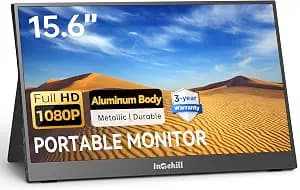
Intehill 15.6" FHD 1080P Portable Monitor, Premium IPS External Display with Dual Speakers, Ultra-Slim Aluminum Alloy Design, Magnetic Folio Stand, USB-C & HDMI Second Screen for Laptop, F15ZA
Description
VIVID FHD IPS DISPLAY FOR DAILY PRODUCTIVITY: Enjoy crisp detail on a 15.6" portable monitor with 1920×1080 FHD resolution. The matte screen reduces reflections while maintaining consistent colors from wide viewing angles, making it ideal as a second monitor for laptop during work, study, or travel; TRUE-TO-LIFE COLOR WITH HDR SUPPORT: With wide color gamut and HDR support, this F15ZA portable laptop monitor delivers rich, accurate colors for photo editing, content creation, and streaming. Whether you're designing, watching movies, or gaming, this portable screen for laptop enhances every visual with vibrant clarity; WITH PROTECTIVE FOLIO STAND & VESA SUPPORT: Comes with a durable smart cover that doubles as a stand, letting you quickly set up your portable monitor for laptop on desk. Built-in two 75×75mm VESA holes, compatibility supports wall or arm mounting, perfect for home office setups or extended workspace use; ULTRA-SLIM & LIGHTWEIGHT FOR TRAVEL: Crafted with premium aluminum alloy body, this travel monitor for laptop is slim, lightweight, and built to last. Easily slip it into your bag for business trips, remote work, or digital nomad setups. Intehill F15ZA portable monitor is an ideal portable second monitor wherever you go; MULTI-DEVICE COMPATIBILITY FOR WORK & PLAY: Featuring one HDMI standard port and two full-featured USB-C ports, this fhd 1080p portable monitor easily connects to laptops, PCs, phones and gaming consoles. Switch between devices for work, gaming or presentations with ease, making it versatile external screen for laptop anytime, anywhere; 3-YEAR WARRANTY FOR RELIABLE LONG-TERM USE: Backed by 3-year warranty, this portable monitor for laptop is built for durability and long-term reliability. Manufactured by a professional supplier with over 10 years of experience and certified by FCC, PSE, and CE, it offers trusted quality support. Contact us anytime for support or quality concerns
Comparez les compromis
Produits similaires, côte à côte
Une sélection aléatoire de produits analysés de la même catégorie. Des produits différents ne sont pas nécessairement interchangeables.

ASUS 27” 1080P Eye Care Monitor (VU279HFI-W) - Full HD, IPS, 100Hz, SmoothMotion, Adaptive Sync, Nano-ion, Eye Care Plus, Blue Light Filter, Flicker Free, VESA Wall Mountable, 3 yr Warranty

Philips 27" Computer Monitor FHD 100Hz VA VESA Eye Care, 271V8LB

8.8 Inch Mini Touchscreen Stretched Bar Monitor 1920 * 480, Metal Shell IPS Portable Touch Display, HDMI, USB-C, Small Screen for Raspberry Pi Laptop Aida64 GPU CPU RAM Monitoring PC Case
Une chose de moins à chercher
Avant d'acheter : questions rapides
Will this monitor work directly with my iPad Pro, Nintendo Switch, or MacBook Air?
Yes—provided your device supports USB-C video output (DisplayPort Alt Mode). iPads Pro (2018+), MacBooks, and the Nintendo Switch connect via a single USB-C cable for both power and video. For older laptops or devices without USB-C video, use the included HDMI cable with the power adapter. Many Reddit users confirmed it works seamlessly in “clamshell mode” with MacBooks.
I’ve heard the screen is glossy—how bad is glare in a bright room?
This is an accurate concern. The glossy panel delivers vibrant colors and sharp contrast in controlled indoor lighting, but direct sunlight or overhead lamps cause strong reflections. If your workspace faces a window, consider positioning the monitor away from light sources. TikTok reviewers often note it’s excellent in dim or evening settings, but less ideal for outdoor patios or sunlit coffee shops.
Why are the ports all on the left side? Does this cause issues?
The ports are grouped on the left side to keep cable routing clean for right-handed users, but it can feel awkward if your laptop is on the right or when using portrait mode. Some users solve this by using a short right-angle USB-C cable to reduce bulk. It’s a minor ergonomic quirk—not a design flaw—that affects layout preferences, not performance.
Can I adjust brightness or contrast directly on the monitor?
No, the Intehill F15ZA lacks an on-screen display (OSD) menu. Brightness and contrast must be adjusted through your laptop’s display settings or operating system controls. This simplifies setup and reduces weight but means you can’t fine-tune picture settings without software. Most users find it a non-issue since modern OS tools work well.
Is this monitor good for gaming, or should I look elsewhere?
It’s suitable for casual gaming and console use—the 60Hz panel has low input lag for RPGs, strategy games, or Nintendo Switch titles. However, competitive gamers seeking 120Hz+ refresh rates for fast-paced shooters should consider dedicated gaming portable monitors. The dual speakers and vivid IPS panel make it great for single-player or co-op gaming on the go.
D'un produit similaire mieux noté dans cette catégorie : KOORUI 24 Inch Gaming Monitor, 180Hz 1080P VA Display with 3000:1 Contrast
Does this monitor really run at 180Hz, and what do I need to enable it?
Yes — it's a native 180Hz panel, but you'll need to switch it on manually. Connect via the included HDMI cable (or a DisplayPort-capable setup), then set 180Hz in your GPU's display settings; it defaults to a lower refresh rate out of the box. Many Reddit and YouTube users note that enabling Adaptive Sync/FreeSync alongside it gives the smoothest experience, and it works with both AMD and NVIDIA cards.
How does the VA panel perform for gaming and everyday work?
The 3000:1 contrast gives noticeably deeper blacks than typical IPS budget monitors, which shines in dark game scenes and movies. For fast-paced competitive shooters, some TikTok and Reddit users mention mild ghosting/smearing in dark transitions — it's great for casual gaming, students, and office work, but color-critical creators or hardcore FPS players may prefer an IPS panel.
The stand looks basic — can I adjust the height or mount it?
Correct, the included stand only tilts (-5° to 20°) and doesn't offer height, swivel, or pivot adjustment, and a few users find the base slightly wobbly. The good news: it's VESA 100×100mm compatible, so a monitor arm or desk mount solves ergonomics entirely — a popular fix among dual-monitor and dorm-room setups.
What if I receive a unit with a dead pixel or backlight bleed?
Budget monitors can vary unit to unit, and some buyers report stuck pixels or corner bleed — but KOORUI backs it with a 3-year manufacturer warranty. If your unit arrives defective, contact the seller for a replacement or refund promptly; most users who did so report a smooth resolution, so inspect the screen within the return window.
Is it good value, and who is it best suited for?
At around $120, it's widely praised as one of the best budget 180Hz options — ideal for students, casual gamers, home-office users, and compact or dual-monitor setups. Just set expectations: no built-in speakers, a single HDMI plus VGA, and basic ergonomics. If you need height adjustment, color accuracy, or built-in audio, consider spending more on an IPS alternative.
Les réponses se limitent à la fiche du fabricant et aux avis que nous avons analysés. Les questions que ces sources ne permettent pas de traiter restent sans réponse ici.
Transparent par conception