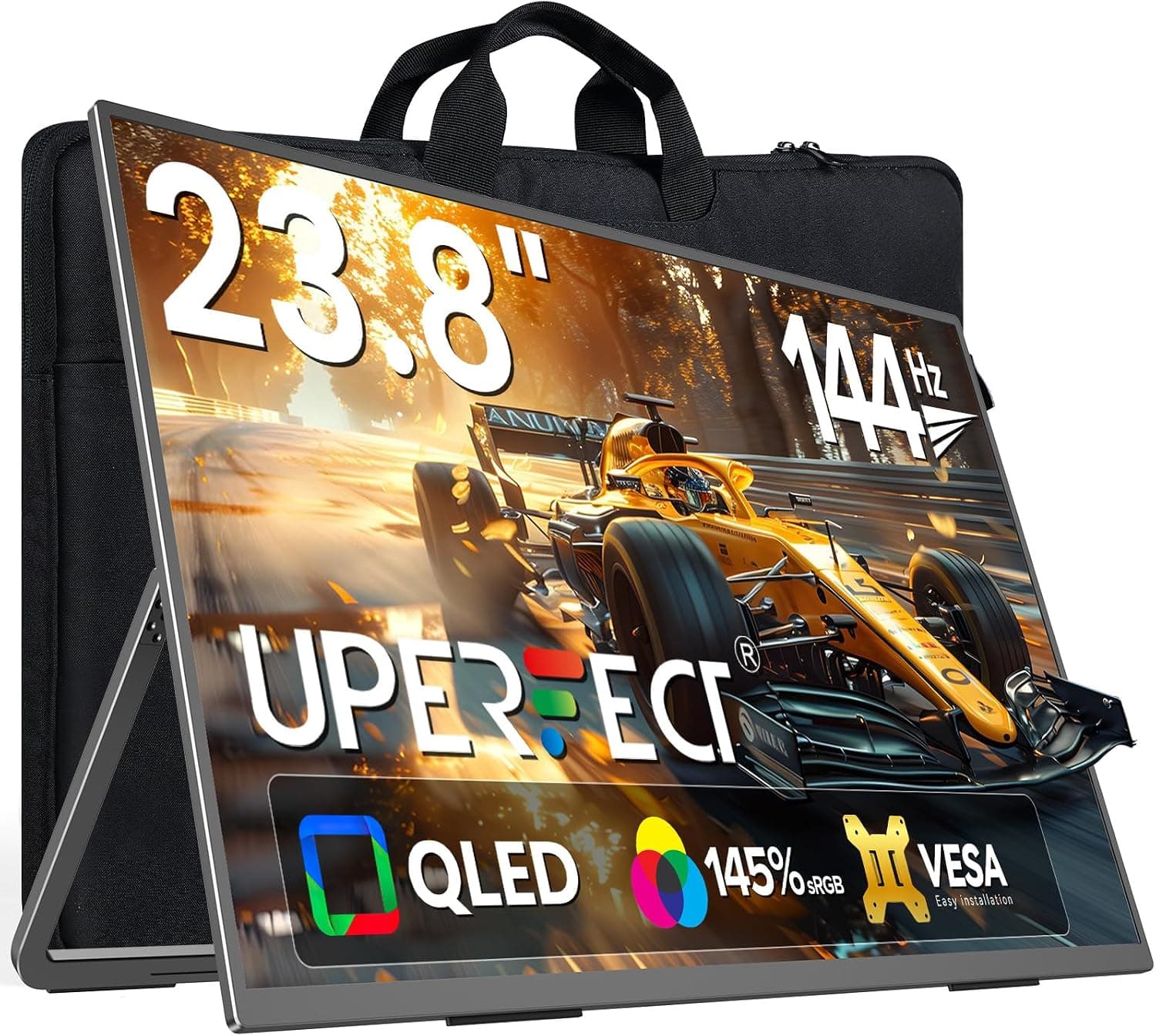
UPERFECT 24" 144Hz Portable Monitor, QLED 145% sRGB 450Nits Gaming Monitor

UPERFECT 24" 144Hz Portable Monitor, QLED 145% sRGB 450Nits Gaming Monitor

4.4 sur Amazon2,654 noteswww.amazon.com
Fiabilité des avis
82/ 100Note B
Reviews are largely consistent with their star ratings, all contain specific verifiable details, cover the same topics with balanced coverage, and are entirely top-rated, authentic-sounding, and free of promotional phrasing.
Lien affilié — la commission est la même quel que soit le score.

La lecture de 30 secondes

Avant de décider

Un point de départ, pas un verdict d'achat

Ce que les clients apprécient

Bright, crisp picture quality

Reviewers consistently praise the clear, bright, and vibrant picture quality, with colors that look superior to laptop screens. The display is described as crisp and good for both gaming and work.

Le principal point de vigilance

Dimming and flickering on single USB-C

When powered by a single USB-C cable, the monitor runs dimmer, and one reviewer experienced screen flickering that required plugging in the adapter for a smooth experience.

Avant de choisir

Check power setup and size

Consider how you will power the monitor, since single-cable USB-C use affects brightness, and confirm the 24-inch size and portability fit your travel or desk setup.

D'un produit similaire mieux noté dans cette catégorie : KOORUI 24 Inch Gaming Monitor, 180Hz 1080P VA Display with 3000:1 Contrast

Ce que les clients apprécient

Good value for the price

Several reviewers describe the monitor as a strong budget purchase, citing impressive specs for the money and satisfaction with gaming use.

Le principal point de vigilance

Durability concerns over time

Several reviewers report the monitor failing or coming apart after months to a couple of years, including a dead screen and a failing power cord.

Avant de choisir

May need manual calibration

Two reviewers note that setup benefits from adjusting settings in your GPU software, including color, brightness, and VRR.

D'abord votre cas d'usage

Vos préoccupations

quality

Majoritairement positif

26 des 278 mentions décrivent une expérience négative (9 %).

portability

Majoritairement positif

8 des 140 mentions décrivent une expérience négative (6 %).

picture quality

Expériences mitigées

21 des 129 mentions décrivent une expérience négative (16 %).

size

Majoritairement positif

12 des 110 mentions décrivent une expérience négative (11 %).

build quality

Majoritairement positif

11 des 81 mentions décrivent une expérience négative (14 %).

lightweight

Majoritairement positif

2 des 80 mentions décrivent une expérience négative (3 %).

brightness

Expériences mitigées

22 des 74 mentions décrivent une expérience négative (30 %).

ease of use

Majoritairement positif

2 des 69 mentions décrivent une expérience négative (3 %).

Un avis peut mentionner plusieurs thèmes. Les pourcentages décrivent les avis que nous avons analysés, pas l'ensemble des acheteurs ni le taux de défaillance global du produit.

Comparez les compromis

Produits similaires, côte à côte

Une sélection aléatoire de produits analysés de la même catégorie. Des produits différents ne sont pas nécessairement interchangeables.

Examinez les preuves

Ce que disent les extraits d'avis

Inclus ne signifie pas vérifié authentique. Signalé ne signifie pas prouvé faux. Ce sont des classifications analytiques.

Affichage de 3 extraits illustratifs, pas l'ensemble complet des avis.

Inclus dans l'analyse5.0/5 étoiles

5.0 out of 5 stars

“This is a fantastic 1080p monitor that gives you options to power it using a single USB-C cable connected to your laptop to deliver power and data or use an additional USB-C cable through an outlet to solely deliver power. If you opt for the former, the monitor will be dimmer since the single USB-C cable is providing power and data, so your best experience is definitely going to be when you have the second USB-C cable to deliver power. The monitor itself is lightweight so it's quite easy to carry it around (recommend you use a case) and even fit in a backpack along with your laptop to take it with you on the go. The stand is built-in, so it gives you a quick and easy way to stand the monitor up for it to be used. With all this, the build quality on this is very good. For the monitor performance, the color and brightness representation is great for a portable monitor and text was mostly easy to read, with the exceptions of some Webex meetings that involved very tiny text which is just the nature of a 1080p monitor for which their 4k monitors would address. There is a myriad of settings you can play around with whether that's contrast, brightness, enabling other modes to get the monitor to display to your preference. Also, I want to call out the quick responsive customer service. I did have an intermittent issue that caused the screen to go black and flicker, so I reached out to them via email. They responded within a few hours, and I was able to work with them on some basic troubleshooting. After the basic troubleshooting didn't work out, they made it right very quickly by just offering to send me replacement and avoid all the remaining hoops of troubleshooting. I got the replacement in just a couple of days, and it's been working great for me since. The product is great and the customer service is top notch, and I would have no hesitation buying from this brand again as they stand behind their products.”

Signaux détectés : Détail spécifique : entity, process, comparison · Mentionne : brightness, ease of use · Se lit comme une voix authentique

Inclus dans l'analyse5.0/5 étoiles

5.0 out of 5 stars

“My main reason for buying this portable monitor is because of my previous experience with another Uperfect product. I have a 15.6 Qled 500 nits 1080p which is great and still running strong on my desktop set up. Very nice color production and brightness. Coming back to this particular product. It is big, light, easy to set up and still very portable, it just that it has 350 nits of brightness instead of 450 nits. Looking at the product description, it states that it has 450 nits of brightness and 120hz refresh rate. The refresh rate of 120hz is accurate but the brightness isn't. It only have 350 nits according to the manual included in the box. Comparing my older Uperfect Qled with 500 nits is brighter and color reproduction of qled vs. ips is a big difference. I will use it for my ROG Ally and I need a better refresh rate than 60hz. It is still bright but not as bright and color reproduction of Uperfect Qled is very accurate. I contacted Uperfect customer service and have communication with Sophia. Great communications, she understood what was my issue with the product description not being accurate and suggested a compromise. Don't get me wrong, the monitor is very nice but what sold me is the brightness stated in the product description. She states that they will correct the product description soon for better description of the particular item. Uperfect stand with their product and that is why I choose them again for another portable monitor for my needs. After this very positive experience with Sophia, Uperfect customer service. I am looking forward of getting another product from them but will go with a Qled instead of IPS and maybe 2k resolution is in order, just waiting for the up coming prime days again. Thank you again Sophia of the Uperfect customer service. Photo: Uperfect 18.5 120hz 1080p 350 nits (left), Uperfect 15.6 60hz QLED 1080p 500 nits (right), LG 2k 240hz 600 nits (top)”

Signaux détectés : Détail spécifique : quantity, entity, comparison · Mentionne : brightness, portability, ease of use, picture quality, size · Se lit comme une voix authentique

Inclus dans l'analyse5.0/5 étoiles

Great picture quality, even better support

“Quick delivery and amazing service. When I received the monitor I was quite frankly amazed by the picture quality. Clear, bright and vibrant colours. Far superior to my laptop screen. The menu button felt a bit flimsy, but that is due to the limitations in size. A minor aesthetic, not functional, flaw was that the input ports don't sit 100% straight in the cut outs. I tested it for one day before I put it aside for a planned trip. Unfortunately, the screen showed vertical lines when I took it out the second time. So, why do I give 5 stars? For the amazing service Uperfect provided. I made a claim and without any hesitation a replacement was offered. Nothing special, right? What complicated the process was my move overseas two days after I discovered the fault. Jesscy (service team member) said that this wouldn't be a problem at all, as they are active in Europe as well. Unfortunately, this specific model wasn't available in Europe and I could choose which model I'd like instead. Although, being a public holiday I received my new monitor four days later in my new home overseas. Jesscy even apologised for not providing me with a tracking number before the monitor arrived and made sure that I'm satisfied with the replacement. But, that's for another review.”

Signaux détectés : Détail spécifique : comparison, process · Mentionne : picture quality, build quality, brightness · Se lit comme une voix authentique
Une chose de moins à chercher

Avant d'acheter : questions rapides

How bright is this portable monitor?
D'après 4 avis conservés mentionnant « brightness »D'après la fiche du fabricant

The manufacturer lists brightness at 450 cd (450 nits). One reviewer noted their unit was rated 350 nits, and another said the monitor is dimmer when powered by a single USB-C cable providing both power and data, so using the included power adapter gives the best experience.

Is this monitor good for gaming?
D'après 5 avis conservés mentionnant « picture quality »D'après la fiche du fabricant

The listing states a 144Hz refresh rate, 5ms response time, and FreeSync support for smooth, blur-free gameplay. A reviewer also described the display as crisp and perfect for both gaming and work.

How portable and heavy is this 24-inch monitor?
D'après 3 avis conservés mentionnant « portability »D'après la fiche du fabricant

The listing says it weighs 5.37 pounds (1919 g) with a slim profile and includes a 24" monitor sleeve for travel. Reviewers describe it as big but light, easy to set up, and great for frequent travel.

How do I connect it, and does it work with a single USB-C cable?
D'après 2 avis conservés mentionnant « ease of use »D'après la fiche du fabricant

The listing says it has standard HDMI and Type-C ports with plug-and-play setup. One reviewer noted that powering it with a single USB-C cable from a laptop works but makes the screen dimmer, and that connecting only via Type-C display output caused screen flickering that was resolved by plugging in the adapter.

What is the picture quality and color like?
D'après 5 avis conservés mentionnant « picture quality »D'après la fiche du fabricant

The listing describes a 23.8-inch QLED display with 145% sRGB, 2000:1 contrast ratio, 178-degree viewing angle, and matte finish. Reviewers called the picture clear, bright, and vibrant with defined colors and excellent sharpness, superior to their laptop screens.

D'un produit similaire mieux noté dans cette catégorie : KOORUI 24 Inch Gaming Monitor, 180Hz 1080P VA Display with 3000:1 Contrast

Does this monitor really run at 180Hz, and what do I need to enable it?

Yes — it's a native 180Hz panel, but you'll need to switch it on manually. Connect via the included HDMI cable (or a DisplayPort-capable setup), then set 180Hz in your GPU's display settings; it defaults to a lower refresh rate out of the box. Many Reddit and YouTube users note that enabling Adaptive Sync/FreeSync alongside it gives the smoothest experience, and it works with both AMD and NVIDIA cards.

How does the VA panel perform for gaming and everyday work?

The 3000:1 contrast gives noticeably deeper blacks than typical IPS budget monitors, which shines in dark game scenes and movies. For fast-paced competitive shooters, some TikTok and Reddit users mention mild ghosting/smearing in dark transitions — it's great for casual gaming, students, and office work, but color-critical creators or hardcore FPS players may prefer an IPS panel.

The stand looks basic — can I adjust the height or mount it?

Correct, the included stand only tilts (-5° to 20°) and doesn't offer height, swivel, or pivot adjustment, and a few users find the base slightly wobbly. The good news: it's VESA 100×100mm compatible, so a monitor arm or desk mount solves ergonomics entirely — a popular fix among dual-monitor and dorm-room setups.

What if I receive a unit with a dead pixel or backlight bleed?

Budget monitors can vary unit to unit, and some buyers report stuck pixels or corner bleed — but KOORUI backs it with a 3-year manufacturer warranty. If your unit arrives defective, contact the seller for a replacement or refund promptly; most users who did so report a smooth resolution, so inspect the screen within the return window.

Is it good value, and who is it best suited for?

At around $120, it's widely praised as one of the best budget 180Hz options — ideal for students, casual gamers, home-office users, and compact or dual-monitor setups. Just set expectations: no built-in speakers, a single HDMI plus VGA, and basic ergonomics. If you need height adjustment, color accuracy, or built-in audio, consider spending more on an IPS alternative.

Les réponses se limitent à la fiche du fabricant et aux avis que nous avons analysés. Les questions que ces sources ne permettent pas de traiter restent sans réponse ici.

Transparent par conception

Comprendre l'analyse