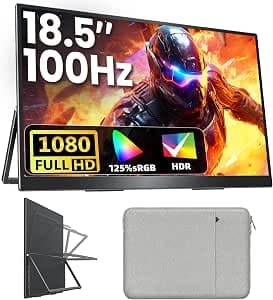
Upperizon Portable Monitor 18.5" FHD 125% sRGB 100Hz IPS HDR HDMI USB-C Travel Monitor for Laptop MacBook PC Surface PS5 Xbox, Large External Display with Kickstand & Speakers, VESA Compatible
Description
18.5 Inch Portable Monitor 100 Hz: Upperizon portable monitor adopts a 18.5 inch 1080p FHD IPS screen, featuring 125% sRGB (88% NTSC), 1200:1 contrast ratio, and 8-bit color depth with 16.7 M colors display, delivering vivid colors and accurate image reproduction. Along with such a high-quality screen, this laptop extended monitor with the upgraded 100 Hz refresh rate has a faster response time and smooth graphics, allowing you to get a head start on your gaming while providing a more comfortable and smooth experience; Ultra-Slim Aluminum Alloy Design, Premium and Portable: Built with a high-quality aluminum alloy body, this 3-sided frameless portable monitor offers premium texture, better heat dissipation, and long-term durability. At only 2.7 lb lightweight, it fits effortlessly into your backpack and can be carried anywhere without burden. Perfect for office use, travel, coffee shops, or on-the-go work setups. A sleeve case is included with the monitor, making it even more portable and easy to carry on the go; Portable Monitor for Laptop: The portable display has two USB-C ports and one HDMI port, so you can easily connect it to any major device you have, like Macbook, Surface, laptop, PC, Xbox, PS4/5 and more. Just ONE Single USB-C to USB-C cable to Plug & Play without any hassle. (NOTE: your device must have Thunderbolt 3/4/5 or Full-featured USB-C port). If you meet the issue of screen flickering, normally caused by insufficient power supply, then please use the original power adapter; Eye Care, Flicker-Free and Built-In Speakers: With the Blue Light filter, Anti-Glare Coating and Flicker-Free function, the portable gaming monitor is able to protect your eyes and improve your viewing experience. Built-in speakers offer an enhanced entertainment experience when viewing videos and playing games; Portable Laptop Monitor with VESA and Kickstand: The laptop screen extender monitor is VESA compatible, so you can easily attach it to a monitor arm or stand on the desk or wall. You can also use this external monitor for laptop vertically or horizontally, depending on your different needs. With the built-in adjustable kickstand, this portable second monitor gives you the flexibility and convenience to boost your productivity
Comparez les compromis
Produits similaires, côte à côte
Une sélection aléatoire de produits analysés de la même catégorie. Des produits différents ne sont pas nécessairement interchangeables.

ASUS ProArt Display 27” 1440P Professional Monitor (PA278CGV) - IPS, QHD (2560 x 1440), 144Hz, 95% DCI-P3, ΔE < 2, Calman Verified, USB-C PD 90W, FreeSync Premium, DisplayHDR 400, Height Adjustable
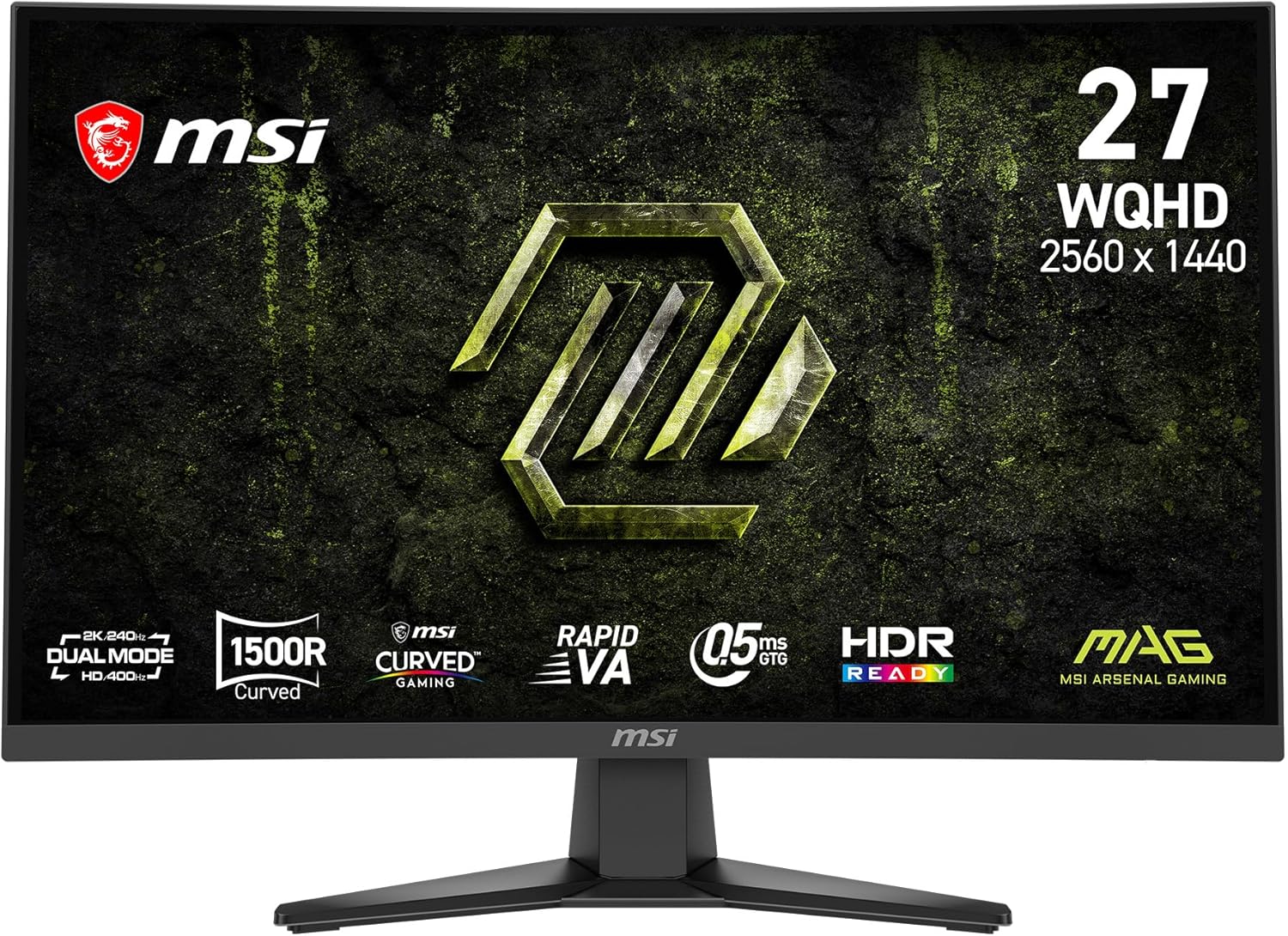
msi MAG 275CQDF X24 27-inch 2560 x 1440 (QHD) Gaming Monitor, AMD FreeSync Premium, Dual Mode with WQHD 240Hz and HD 400Hz, HDR Ready, HDMI, VESA, Tilt, 0.5ms, Black

ASUS TUF Gaming Series 5 24.5” 1080P Monitor (VG259QM5A) – Full HD, Fast-IPS, 240Hz, 0.3ms, G-SYNC Compatible, FreeSync Premium, 99% sRGB, DisplayWidget, Gaming AI, 3 yr Warranty
Une chose de moins à chercher
Avant d'acheter : questions rapides
क्या किकस्टैंड दैनिक उपयोग के लिए पर्याप्त मजबूत है, या क्या मुझे एक अलग माउंट खरीदने की आवश्यकता होगी?
किकस्टैंड एक स्थिर डेस्क पर हल्के समायोजन के लिए कार्यात्मक है, लेकिन निर्माण गुणवत्ता के संबंध में यह सबसे आम आलोचना है। कई रेडिट उपयोगकर्ता इसे "डगमगाने वाला" या "कमजोर" बताते हैं। लगातार यात्रा के लिए या यदि आप कई कोणों पर पूरी तरह से स्थिरता चाहते हैं, तो हम एक अलग वीईएसए माउंट (मॉनिटर 75x75mm वीईएसए संगत है) या अधिक स्थायी सेटअप के लिए एक पोर्टेबल मॉनिटर आर्म पर विचार करने की सलाह देते हैं।
क्या यह केवल एक USB-C केबल का उपयोग करके मेरे लैपटॉप, Nintendo Switch, या Steam Deck के साथ काम करेगा?
यह आपके डिवाइस के पावर आउटपुट पर निर्भर करता है। मॉनिटर को कई आधुनिक लैपटॉप (जैसे नए MacBooks) और Steam Deck से एक ही USB-C केबल के माध्यम से पूरी तरह से पावर दिया जा सकता है। हालांकि, हैंडहेल्ड मोड में Nintendo Switch या कम-पावर वाले USB-C पोर्ट वाले लैपटॉप के लिए, आपको शामिल HDMI केबल का उपयोग करना पड़ सकता है *और* USB-C पावर केबल को चार्जर या पावर बैंक से कनेक्ट करना पड़ सकता है। यह एक सामान्य भ्रम का बिंदु है, इसलिए अपने डिवाइस के विशिष्टताओं की जांच करना महत्वपूर्ण है।
अंतर्निहित स्पीकर कितने अच्छे हैं, और क्या मुझे बाहरी स्पीकर की आवश्यकता होगी?
पूरी ईमानदारी से कहूं तो, अंतर्निहित स्पीकर काफी बुनियादी हैं। सिस्टम ध्वनियों या बहुत शांत कमरे में वे काम चलाऊ हैं, लेकिन लगभग हर समीक्षा, जिसमें YouTube पर कई शामिल हैं, ध्यान दिलाती है कि वे "पतले" हैं और आवाज़ में कमी है। फिल्मों, संगीत या खेलों का आनंद लेने के लिए, आपको हेडफ़ोन, बाहरी स्पीकर या अपने लैपटॉप के ऑडियो का उपयोग करके बहुत बेहतर अनुभव होगा।
क्या HDR सुविधा वास्तव में उपयोगी है, या यह सिर्फ एक विपणन विशिष्टता है?
यह मॉनिटर HDR10 सिग्नल डिकोडिंग का समर्थन करता है, जिसका अर्थ है कि यह एक HDR सिग्नल स्वीकार कर सकता है। हालाँकि, टेक समीक्षकों द्वारा बताए गए अनुसार, इसमें प्रीमियम HDR डिस्प्ले में पाई जाने वाली उच्च पीक चमक और लोकल डिमिंग का अभाव है। इसका परिणाम SDR की तुलना में एक सूक्ष्म सुधार है, लेकिन वह परिवर्तनकारी "वाह" प्रभाव नहीं है जिसकी आप एक हाई-एंड TV से अपेक्षा कर सकते हैं। इसे खरीदने का प्राथमिक कारण मानने के बजाय एक अच्छी बोनस सुविधा के रूप में सोचें।
यह मॉनिटर किसके लिए सबसे उपयुक्त है, और किसे कहीं और देखना चाहिए?
यह मॉनिटर यात्रियों, छात्रों और हाइब्रिड कर्मचारियों के लिए शानदार मूल्य प्रदान करता है, जिन्हें मुख्य रूप से उत्पादकता, आकस्मिक मीडिया या कंसोल गेमिंग के लिए एक बड़े, रंग-सटीक पोर्टेबल डिस्प्ले की आवश्यकता है। यदि आकाश-मजबूत अंतर्निर्मित स्टैंड, प्रभावशाली स्पीकर या वास्तविक सिनेमाई HDR आपकी शीर्ष प्राथमिकताएं हैं, तो आप एक अधिक प्रीमियम (और महंगे) ब्रांड से अधिक खुश हो सकते हैं। हालांकि, इसके मुख्य उद्देश्य — एक उच्च-गुणवत्ता वाला, पोर्टेबल दूसरी स्क्रीन — के लिए इसे भारी प्रशंसा मिलती है।
D'un produit similaire mieux noté dans cette catégorie : KOORUI 24 Inch Gaming Monitor, 180Hz 1080P VA Display with 3000:1 Contrast
Does this monitor really run at 180Hz, and what do I need to enable it?
Yes — it's a native 180Hz panel, but you'll need to switch it on manually. Connect via the included HDMI cable (or a DisplayPort-capable setup), then set 180Hz in your GPU's display settings; it defaults to a lower refresh rate out of the box. Many Reddit and YouTube users note that enabling Adaptive Sync/FreeSync alongside it gives the smoothest experience, and it works with both AMD and NVIDIA cards.
How does the VA panel perform for gaming and everyday work?
The 3000:1 contrast gives noticeably deeper blacks than typical IPS budget monitors, which shines in dark game scenes and movies. For fast-paced competitive shooters, some TikTok and Reddit users mention mild ghosting/smearing in dark transitions — it's great for casual gaming, students, and office work, but color-critical creators or hardcore FPS players may prefer an IPS panel.
The stand looks basic — can I adjust the height or mount it?
Correct, the included stand only tilts (-5° to 20°) and doesn't offer height, swivel, or pivot adjustment, and a few users find the base slightly wobbly. The good news: it's VESA 100×100mm compatible, so a monitor arm or desk mount solves ergonomics entirely — a popular fix among dual-monitor and dorm-room setups.
What if I receive a unit with a dead pixel or backlight bleed?
Budget monitors can vary unit to unit, and some buyers report stuck pixels or corner bleed — but KOORUI backs it with a 3-year manufacturer warranty. If your unit arrives defective, contact the seller for a replacement or refund promptly; most users who did so report a smooth resolution, so inspect the screen within the return window.
Is it good value, and who is it best suited for?
At around $120, it's widely praised as one of the best budget 180Hz options — ideal for students, casual gamers, home-office users, and compact or dual-monitor setups. Just set expectations: no built-in speakers, a single HDMI plus VGA, and basic ergonomics. If you need height adjustment, color accuracy, or built-in audio, consider spending more on an IPS alternative.
Les réponses se limitent à la fiche du fabricant et aux avis que nous avons analysés. Les questions que ces sources ne permettent pas de traiter restent sans réponse ici.
Transparent par conception